

Spotify does not have a "clear all" button for your listening history or your Recently Played list.
However, you can still control your digital footprint. You can hide your current activity from friends, delete old searches locally, and stop specific playlists from ruining your personalized algorithms.
This guide breaks down the exact settings you need to fix your recommendations, manage your social privacy, and clean up your interface.
How Do I Clear My Spotify History?
You cannot wipe your full server-side listening history at once. Instead, manage specific data types based on your exact need:
- Clear searches: Tap the Search bar, scroll to the bottom of your recent queries, and tap "Clear recent searches."
- Hide activity: Navigate to Settings > Privacy & Social, then toggle on Private Session to hide your real-time listening from followers.
- Fix recommendations: Tap the three dots on any playlist and select "Exclude from your Taste Profile."
- Wipe everything: The only way to permanently erase all listening data is to delete your Spotify account permanently and delete your data.
Types of Spotify History Explained
Users often confuse local app data with cloud-based identity. Caching is not listening history, and your public activity is not your Taste Profile. Identifying your exact problem prevents you from hunting for UI buttons that no longer exist.
The 5 types of Spotify data you can control:
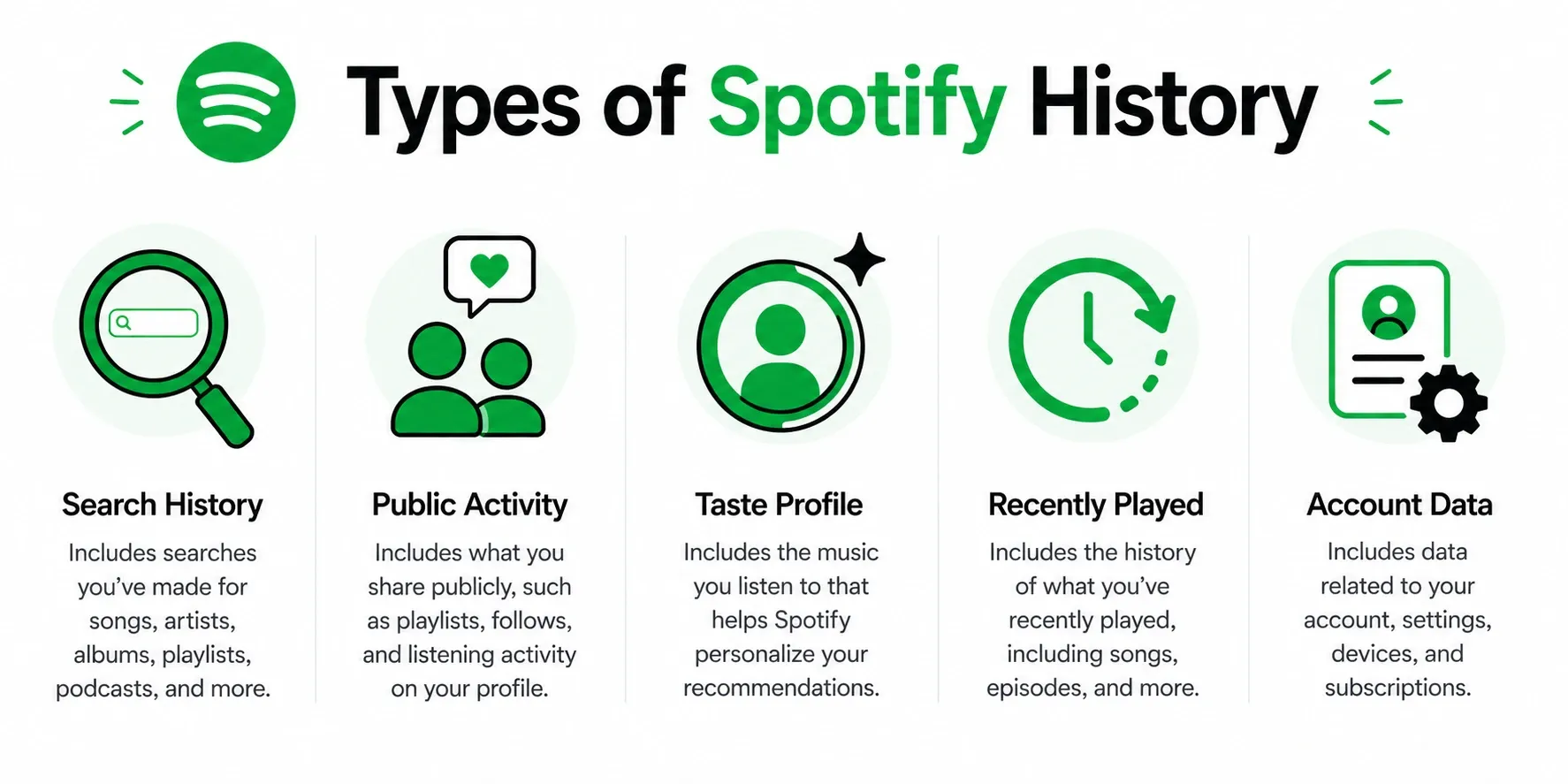
- Search History: The names of artists and podcasts you typed into the search bar. This is stored locally and is fully deletable.
- Public Activity: What your followers see you listening to in real-time. This is managed via social toggles.
- Taste Profile: The internal algorithm Spotify uses to build your Discover Weekly and Daylist. You can command Spotify to ignore specific playlists.
- Recently Played: The visual UI tiles on your home screen. You cannot manually delete these anymore; you can only overwrite them by playing new music.
- Account Data: The permanent log of every song you have ever played, stored on Spotify's cloud servers, as outlined in Understanding your data. You cannot erase this without deleting your entire account.
How to Clear Spotify History on Mobile and Desktop (Step-by-Step)
Pick the section that matches your goal. Menus differ slightly between the mobile app and the desktop client, so follow the exact path for your device.
1. How to Delete Spotify Search History
Search history is separate from listening history. Deleting the name of an artist you looked up will not fix your personalized playlists.
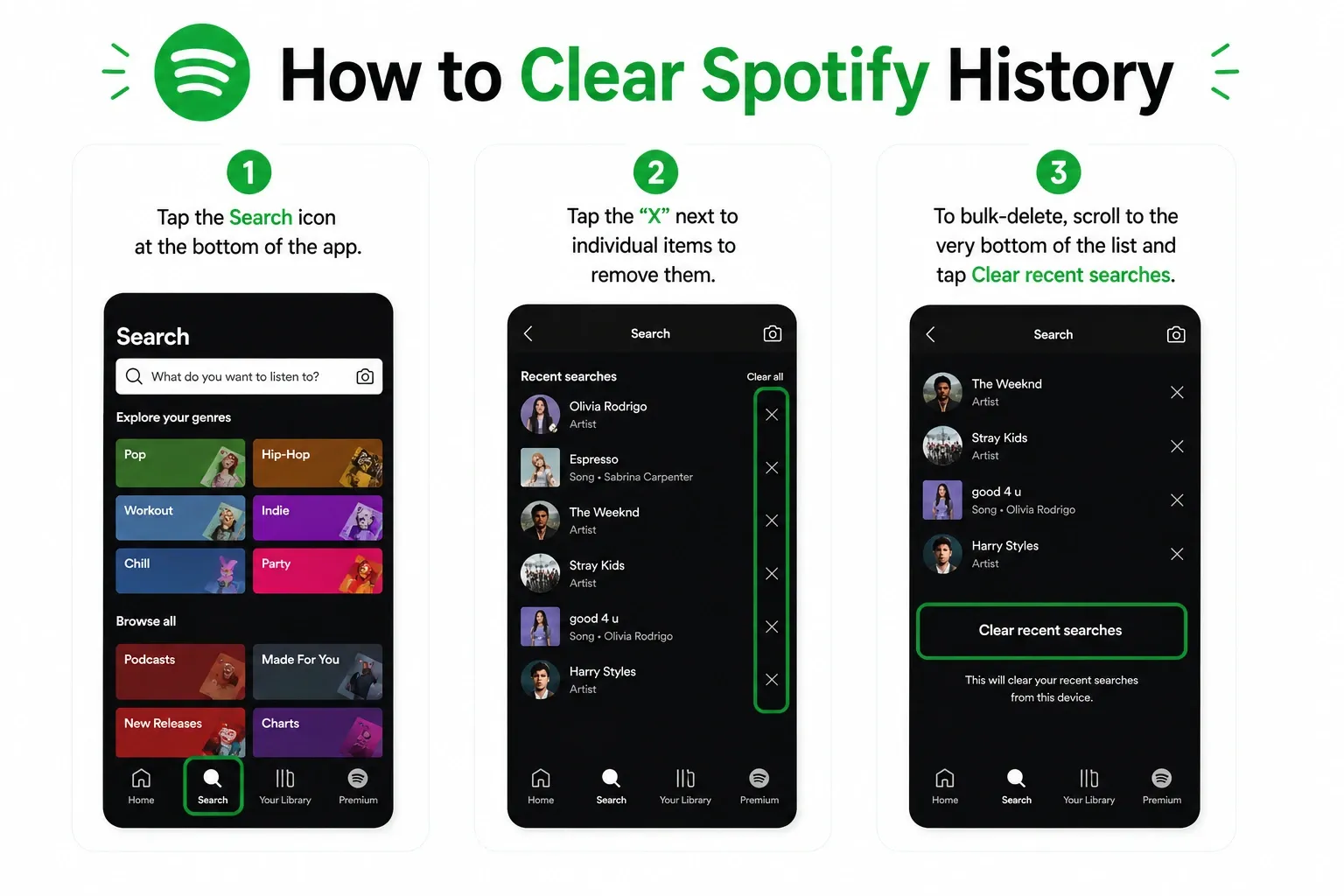
On iPhone and Android:
- Tap the Search icon at the bottom of the app.
- Tap the search input field at the top to reveal your recent queries.
- Tap the "X" next to individual items to remove them.
- To bulk-delete, scroll to the very bottom of the list and tap Clear recent searches.
On Desktop and Web Player:
- Click the Search bar in the left-hand navigation pane.
- Hover over a recent search query and click the "X" to delete it.
- Alternatively, click Clear recent searches at the top right of the list.
2. How to Exclude Songs from Recommendations
If your core issue is that background noise, kids' music, or sleep sounds have ruined your algorithmic playlists, this is the most critical fix.
Exclude a playlist from your Taste Profile:
This tells Spotify's server to ignore plays from that playlist when calculating your personalized mixes.
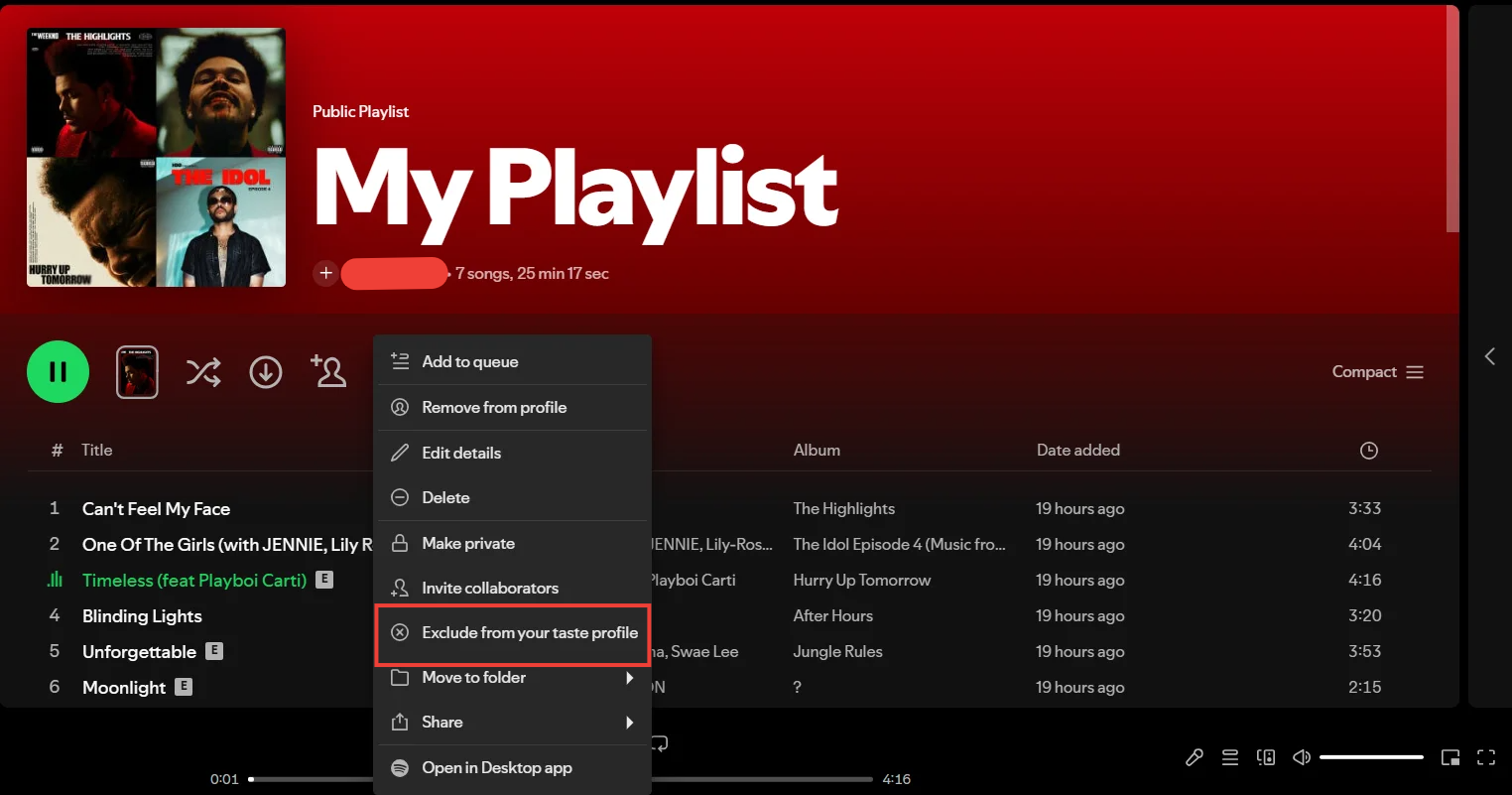
- Open the playlist you want to hide (e.g., a white noise playlist).
- Tap the three dots (options menu) near the top.
- Select Exclude from your Taste Profile.
Why this matters: Spotify's engineering team deployed this exact feature to solve user intent mismatch. By late 2023, over 20 million users had engaged with the Exclude from Your Taste Profile feature. Spotify noted a nearly 10% increase in overall listening among adopters because their personalized mixes finally felt accurate again.
3. How to Hide Social Listening Activity
Use a Private Session to keep your music choices hidden from friends, roommates, or coworkers who follow your profile.
On iPhone and Android:
- Tap your profile picture in the top left corner.
- Select Settings and privacy.
- Tap Privacy & Social.
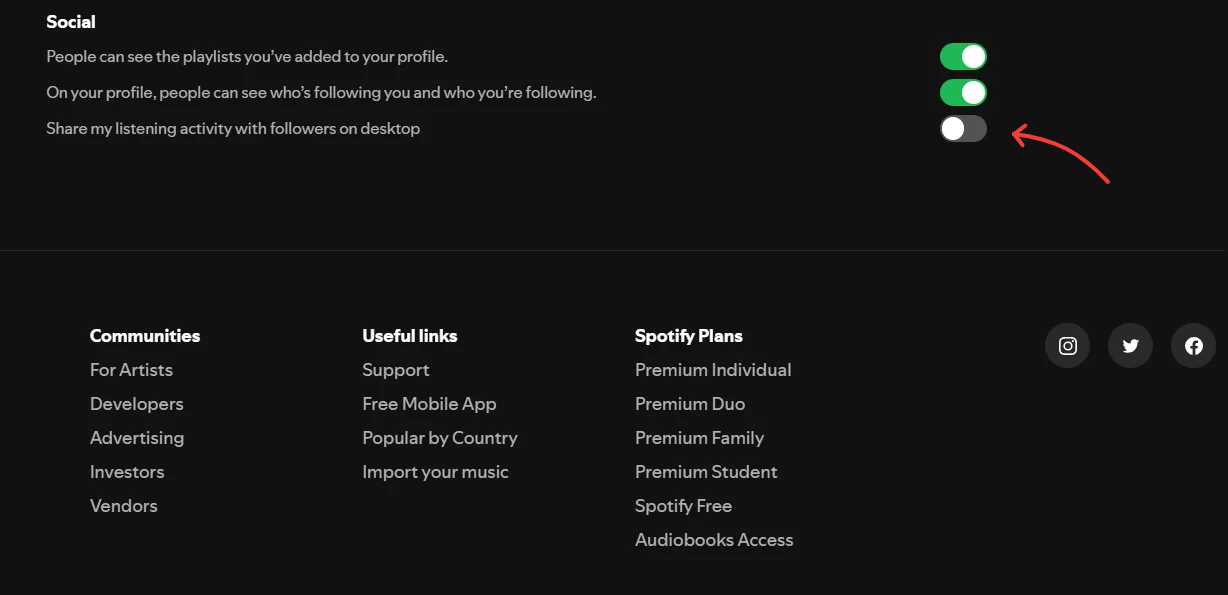
- Toggle Private Session on. (You can also permanently turn off Listening activity here to stop sharing your feed entirely).
On Desktop:
- Click your profile picture in the top right.
- Select Private session from the dropdown menu to activate it temporarily.
Spotify Private Session Limit: Why It Stops Working After 6 Hours
Standard privacy advice tells you to use a Private Session when listening to sleep sounds. This usually fails.
A Private Session automatically expires after about six hours of inactivity, or if the app restarts in the background. If you listen to an 8-hour rain loop, the session drops at hour six. The remaining two hours of rain sounds flood directly into your listening history, polluting your algorithm anyway.
The permanent fix: Put your sleep or ambient tracks into one dedicated playlist on Spotify. Exclude that entire playlist from your Taste Profile. You only have to do this once, and it permanently protects your algorithms without requiring a daily settings toggle.
Can You Clear Recently Played on Spotify? (Limitations Explained)
Spotify removed the manual ability to remove items from Recently Played. You cannot clear it retroactively.
The platform relies on your historical data to drive its core product: personalization. Current app controls prioritize social privacy and algorithmic management over literal data deletion.
What you can do to fix your home screen:
- Overwrite it: Play a few seconds of 10 to 15 different new playlists. This pushes the unwanted, embarrassing, or out-of-place items off your immediate home screen.
- Prevent it: Turn on a Private Session before playing a questionable track. This hides the session from followers and keeps it out of taste-based personalization, but it may still appear in your own Recently Played surfaces.
Why Your Spotify History Changes Automatically (Shared Devices Explained)
Your Spotify history often gets polluted without you even touching your phone. Shared environments are the biggest cause of mystery history pollution.
- Auto-connect: Your app automatically casts to a smart TV.
- Voice assistants: A roommate asks Alexa to play a song, and it defaults to your linked Spotify profile.
Always check your connected devices (the speaker icon) before hitting play. Disconnect manually from shared living room speakers immediately after use. If you share a home, upgrade to a Duo or Family plan to keep everyone's listening history strictly separated.
Tired of Spotify Ads? Improve Your Listening Experience
If you listen to Spotify via the web browser to bypass app restrictions, native interruptions and audio ads will inevitably break your focus.
Blockify is a dedicated browser extension built specifically to stop these web-based interruptions. Unlike traditional ad blockers that trigger Spotify's anti-adblock freeze loops, halting your music entirely, Blockify uses smart detection and safe muting to maintain seamless playback.
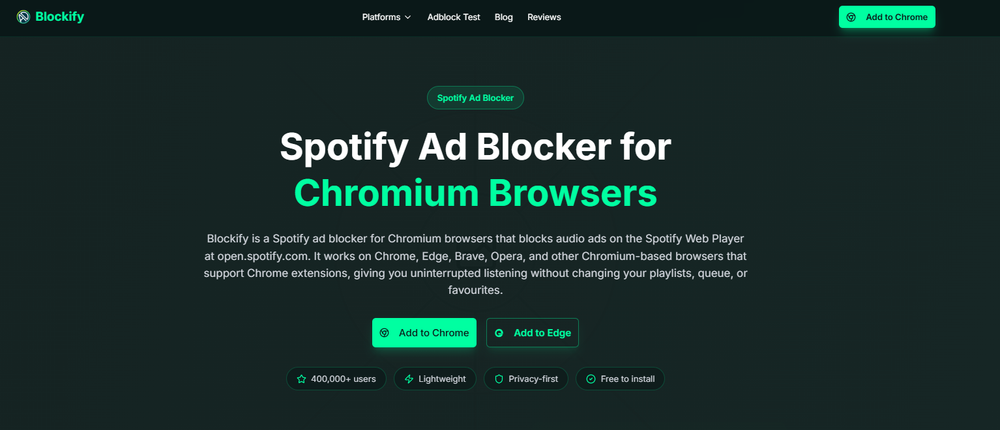
Trusted by over 360,000 users, it works immediately upon installation in Chrome, Edge, and Brave. It provides a clean, set-and-forget listening session, making it the perfect complementary tool once you have your privacy settings dialed in.
FAQ
Can You Delete Recently Played On Spotify?
No, you cannot manually delete or clear items from your Recently Played list. Spotify removed the native removal control. Your only option is to play new tracks to push old ones out of sight.
Does Spotify Allow You to Clear Listening History?
Not as a standard in-app action. You can clear your local search history, exclude tracks from your algorithmic Taste Profile, or delete your entire account, but you cannot wipe your server-side listening log via the settings menu.
How Do I Remove Songs from Spotify History?
You cannot surgically delete past listening records. The closest native fix is selecting "Exclude from your Taste Profile" on the song or playlist. This stops the track from influencing your personalized recommendations moving forward.
Does Clearing My Cache Delete Spotify History?
No. Clearing your app cache under settings only removes locally downloaded files to free up phone storage space. It has zero effect on your cloud-based listening history, recently played tiles, or algorithms.
How to Clear Spotify History On Mobile and Desktop?
To clear local searches, tap the search bar and hit the "X" next to recent items. To hide current social activity, toggle on Private Session. To fix algorithms, use the "Exclude from your Taste Profile" feature.




