

You spent hours curating the perfect mix, and now the follower count is climbing. The immediate next question is obvious: how to see who saved your spotify playlist?
Can you see who liked your Spotify playlist? No. Spotify strictly hides anonymous follower identities to protect user privacy. You cannot view a master list of the names or profiles of users who saved your playlist. However, you can natively check the aggregate total of your spotify playlist followers. For developer use, current Spotify API workflows only support current-user library checks with that user's consent, not arbitrary user lookups.
If you are frustrated by contradictory Reddit threads or fake third-party apps promising to reveal names, this guide cuts through the noise. We cover how to check spotify playlist followers, what the official API actually does, and the legitimate ways to track engagement.
Spotify Playlist Privacy: What Data You Can (and Can’t) Access
You can only see the total number of saves natively. Anything else requires the API or external analytics.
Everyday users frequently mix up Spotify's terminology, leading to confusion about what data is actually public. To track engagement accurately, you must separate profile actions from playlist actions.
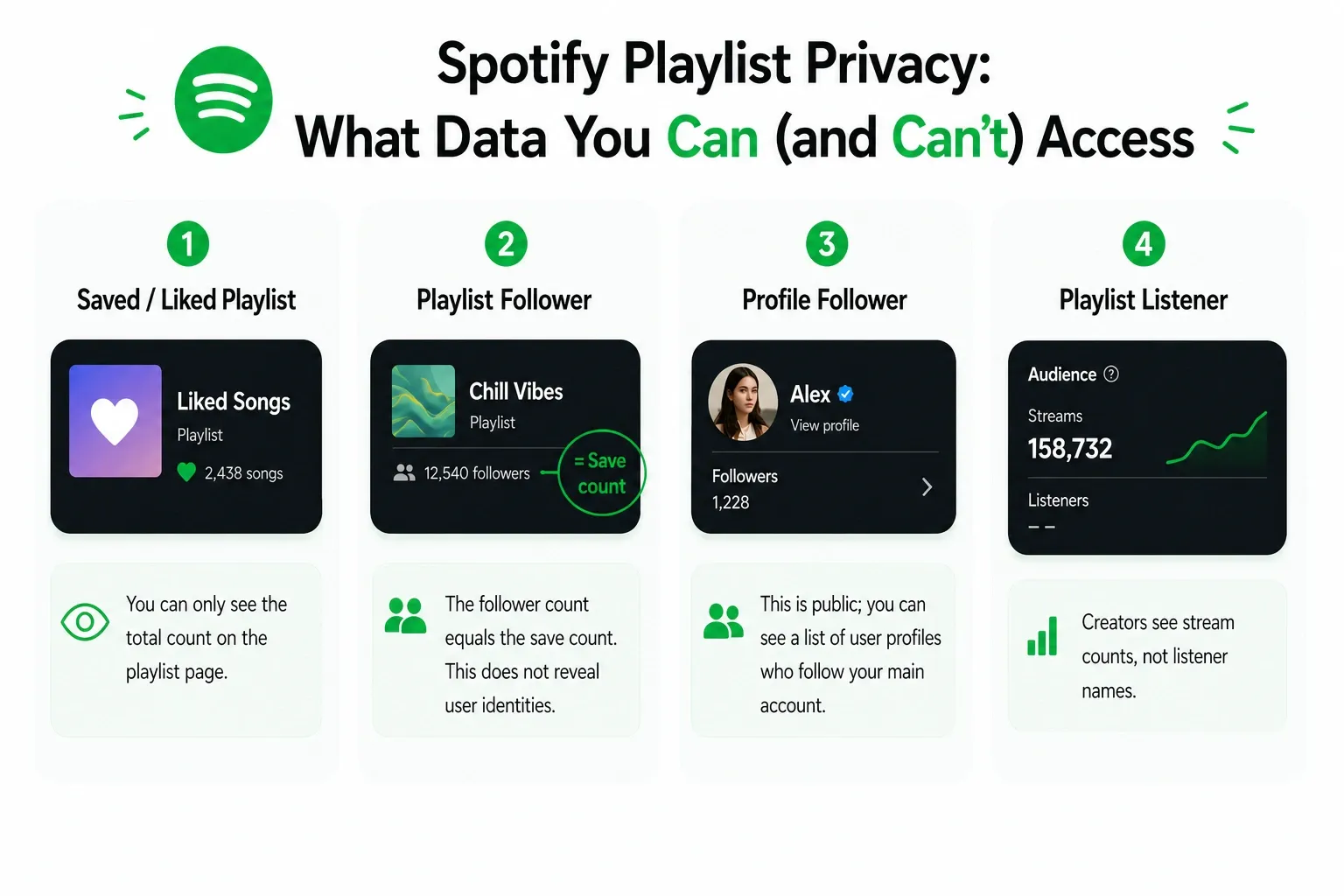
- Saved / Liked Playlist: Adding a playlist to Your Library. "Saved" and "Liked" are identical actions. You can only see the total count on the playlist page.
- Playlist Follower: Another term for saving the playlist. The follower count equals the save count. This does not reveal user identities.
- Profile Follower: A user who subscribes to your curator profile directly. This is public; you can see a list of user profiles who follow your main account. A profile follow does not equal a playlist save.
- Playlist Listener: Someone who streams audio from the mix. Spotify protects listener privacy entirely. Creators see stream counts, not listener names.
How to Check Spotify Playlist Followers (Mobile, Desktop, Web)
You can view total playlist followers across all devices directly under the playlist title. This reveals the total count, not the user identities.
Follow these direct steps to locate your follower count.
On Mobile (iOS & Android)
- Open the Spotify app and tap Your Library.
- Select your playlist.
- Look directly under the playlist title and description. The total save/follower count sits right next to the global duration.
On the Desktop App
- Open Spotify Desktop.
- Click your playlist in the left sidebar.
- Check below the playlist name and cover art. The follower count is visible right next to your profile username.
On the Web Player
- Navigate to open.spotify.com.
- Select your playlist from the library tab.
- The follower number displays in the header metadata alongside the total track count.
Spotify may cache data, so if a user saves your playlist, the count might not update instantly. Platform-specific layout updates also occasionally shift where this number lives. A temporarily missing count does not mean Spotify is hiding a secret named list elsewhere.
Why Spotify Doesn’t Show Who Saved Your Playlist
Spotify treats playlist saves as private library data, blocking third-party apps from scraping anonymous listener identities.
The rule is strict: Spotify treats saves as private library data, so it does not expose anonymous follower identities. The platform’s backend ecosystem simply does not expose a list endpoint for anonymous follower identities. Consumer UI limits prevent third-party apps from extracting data that Spotify refuses to package for delivery.
You might find users on forums claiming they received alerts naming specific people who liked their playlists. Some users claim to have seen named notification alerts during Spotify's Viewing Liked Playlists tests. Treat these instances as temporary edge-case tests, not standard platform behavior. Do not rely on outdated privacy assumptions.
Also read: How to Make a Playlist on Spotify
Can You Check if Someone Specific Saved Your Spotify Playlist?
You cannot extract a list of strangers, and current Spotify API checks only work for the authenticated user's own library.
If you want to know if a specific friend or curator saved your playlist, you have one manual option and one limited developer route.
Option 1: The Public Profile Method
Navigate to their public Spotify profile. Look under their "Public Playlists" section. This method is imperfect and highly dependent on their privacy settings. It only works if the user manually sets their saved playlists to public visibility.
Option 2: The Official Spotify Web API
Spotify's February 2026 Web API Dev Mode Changes - Migration Guide replaced the old GET /v1/playlists/{playlist_id}/followers/contains route with GET /v1/me/library/contains for current-user checks in development mode. This is still not for scraping anonymous listeners or verifying arbitrary third-party users.
What you need:
- The exact playlist URL you want to check.
- An authenticated user token from the person whose library you are checking.
- A basic developer setup (like Postman or cURL access).
When you query the current library-check flow, the response looks like this:
[ true ]
This confirms the current authenticated user saved the playlist.
This official verification method cannot generate a full list of everyone who followed your playlist. It does not turn Spotify into a social graph explorer.
How to Track Engagement on Your Spotify Playlist
Knowing names is a vanity metric. Real growth requires tracking save rates, stream-to-listener ratios, and overall reach.
Does Spotify show playlist listeners or followers? Spotify shows aggregate follower counts to everyone, and Spotify for Artists shows aggregate stream data to creators. Neither platform provides a named list of individual listeners.
Stop trying to unmask your listeners. Strong engagement signals matter infinitely more than knowing exactly who tapped the heart icon. Track these metrics instead:
- Follower count trajectory: Are you gaining net-new saves weekly? Consistent upward trends indicate algorithmic favor.
- Save rate: Industry heuristic models emphasize the ratio of listeners who save the playlist after hearing a featured track.
- Stream-to-listener ratio: High replays signal a highly engaging, sticky playlist. Low replays indicate poor track sequencing or suspicious bot engagement.
- External reach: Monitor how widely the playlist circulates outside the platform.
Keep a weekly tracking document. Record the date, total followers, track rotation, external shares, and notable stream spikes. Spotting which playlist edits trigger follower spikes is how you actually build an audience.
To identify listeners voluntarily, use your playlist description to funnel users to a Discord server or an Instagram page. Build a consent-based audience funnel rather than trying to hack a surveillance loop.
Spotify “Who Saved My Playlist” Apps: What’s Legit and What’s a Scam
Avoid third-party apps promising to reveal anonymous followers. Rely on native counts, professional analytics, and workflow tools.
Most consumer apps promising to show exactly who saved your playlist are scams. They cannot bypass Spotify’s API restrictions.
Red flags of a fake app:
- Promises a downloadable list of every anonymous follower.
- Asks for your Spotify login credentials without a transparent API authorization scope.
- Blurs basic public analytics with claims of identity spying.
What to Use Instead
- Native Spotify Counts: The safest baseline for tracking your growth.
- Professional Analytics Suites: Platforms like Viberate track aggregate metrics, playlist reach, and market performance without falsely promising identity reveals.
Tired of Spotify Ads Interrupting Your Playlist Workflow?
Are you looking for a smoother way to build and manage your Spotify playlists without constant interruptions? If you spend long sessions curating tracks, testing flow, or refining your mix on the web player, ads can quickly break your focus and slow you down.
Blockify is a modern browser-based Spotify Ad Blocker that safely mutes and removes audio and video ads dynamically inserted into streams. It handles the interruptions so you can focus entirely on seamless playlist curation.
FAQs
Can You See Who Saved Your Spotify Playlist?
No. Spotify hides anonymous follower identities to protect user privacy. You can only view the aggregate total follower count natively.
How Do You Check Spotify Playlist Followers?
Open your playlist on the mobile app, desktop app, or web player. The total follower count displays directly under the playlist title and cover art, adjacent to your username.
Why Can’t I See Who Liked My Spotify Playlist?
Spotify categorizes playlist saves as private library data. They do not expose a public consumer interface or API endpoint for extracting a list of anonymous followers.
Does Spotify Show Playlist Listeners or Followers?
Spotify shows aggregate playlist follower counts to all users. Creators using Spotify for Artists can see aggregate stream data. Neither provides names of individual listeners.
Can Developers Check If One Person Follows a Playlist?
Yes, but only with that person's authenticated access. In current development-mode apps, Spotify uses library checks to confirm whether the current logged-in user saved a playlist; it does not expose arbitrary third-party follower lookups.
How to Track Spotify Playlist Engagement?
Instead of seeking listener identities, track your net follower growth, save rates, and stream-to-listener ratios. Use a weekly tracking sheet to monitor how track additions impact your overall audience retention.




