

The best ad blocker isn't a single universal tool. It depends entirely on your browser engine and operating system. For maximum free, browser-level filtering, Firefox paired with uBlock Origin remains the benchmark. Chrome and Edge users need Manifest V3-compliant extensions like uBlock Origin Lite or Blockify, while Brave provides built-in blocking right out of the box.
What is the best ad blocker in 2026?
The best ad blocker depends on your specific browser architecture. For maximum privacy and filtering control, Firefox with uBlock Origin is the top free option. For Google Chrome and Microsoft Edge, uBlock Origin Lite or Blockify offer the strongest Manifest V3-compliant blocking. Brave Shields provides the best built-in protection, while 1Blocker leads on Safari and iOS.
Comparison Table
| Situation | Recommended setup | Key consideration |
|---|---|---|
| Best free setup for maximum control | Firefox + uBlock Origin | Requires Firefox. Offers granular filter list and cosmetic controls. |
| Best free Chrome/Edge setup | uBlock Origin Lite | Built for Manifest V3 declarative rules. Limited dynamic filtering. |
| Best for streaming-focused Chromium users | Blockify | Optimized for browser audio and video platforms on desktop Chromium. |
| Best built-in option | Brave Shields | Engine-native protection. Requires using Brave Browser. |
| Best Safari / iOS route | 1Blocker or AdGuard for Safari | Uses Apple Content Blocking API. Operates differently from Chrome extensions. |
| Best whole-device / household route | NextDNS or AdGuard DNS | Blocks domains system-wide. Cannot clean up empty layout frames. |
| Best guaranteed YouTube route | YouTube Premium | Platform-provided. Does not eliminate creator-read sponsorships. |
Quick Picks: Which Best Ad Blocker Fits Your Setup?
Selecting a content blocker starts with your browser architecture rather than a brand name. Content blockers function through specific application programming interfaces (APIs) provided by browser engines. A tool that offers deep request modification on one engine may run under restrictive rule limits on another.
Install only one primary browser-level blocker. Running multiple content blockers simultaneously causes filter list conflicts, wastes system resources, breaks page layouts, and complicates site troubleshooting.
To find your optimal configuration, identify your primary web browser, determine whether you require whole-device coverage, and choose your level of filter maintenance:
- For Chrome, Edge, and Chromium users: Select a lightweight extension built natively for Manifest V3 to guarantee compatibility.
- For Firefox users: Install full uBlock Origin to leverage complete request-blocking capabilities and procedural cosmetic filtering.
- For users avoiding extensions: Use Brave for integrated, engine-level blocking without add-ons.
- For multi-device or household network protection: Deploy a network-level DNS sinkhole alongside a lightweight browser extension.
Compare the Top Ad Blockers at a Glance
This matrix evaluates primary desktop and multi-platform content blockers across architecture, trust metrics, and system limits.
| Product | Type | Best fit | Supported browsers | Free / Paid | Manifest V3 status | YouTube status | Open source | Acceptable Ads | Primary limitation |
|---|---|---|---|---|---|---|---|---|---|
| uBlock Origin | Extension | Advanced control | Firefox, Brave, Edge (transitioning) | Free | Manifest V2 | Functional (Firefox) | Yes | No | Disabled on Chrome since July 2025; Chrome Web Store listing removal scheduled August 31, 2026 |
| uBlock Origin Lite | Extension | Lightweight Chrome filtering | Chrome, Edge, Brave, Opera, Safari | Free | Manifest V3 | Functional with updates | Yes | No | No dynamic request filtering |
| Blockify | Extension | Chromium site & media blocking | Chrome, Edge, Brave, Vivaldi, Arc | Free | Manifest V3 | Functional | No | No | No desktop Firefox or Safari extensions |
| Brave Shields | Built-in | Zero-setup browsing | Brave Browser | Free | Engine-native | Functional | Yes | No | Requires using Brave browser |
| AdGuard Extension | Extension | Custom filter management | Chrome, Firefox, Edge, Safari | Free / Paid | V2 & V3 variants | Functional | Partial | Optional | Advanced features require desktop app |
| 1Blocker | Native App | Apple ecosystem filtering | Safari (macOS, iOS, iPadOS) | Free / $29.99/yr | Apple Content Blocker | Safari web only | No | No | Apple platforms only |
| AdBlock Plus | Extension | Basic filter blocking | Chrome, Firefox, Edge, Safari | Free | Manifest V3 | Variable | Yes | Enabled by default | Allows non-intrusive ads by default |
Blockify Overview
Blockify operates as a free, Manifest V3-compatible browser extension for desktop Chromium browsers, including Google Chrome, Microsoft Edge, Brave, Opera, Vivaldi, and Arc.
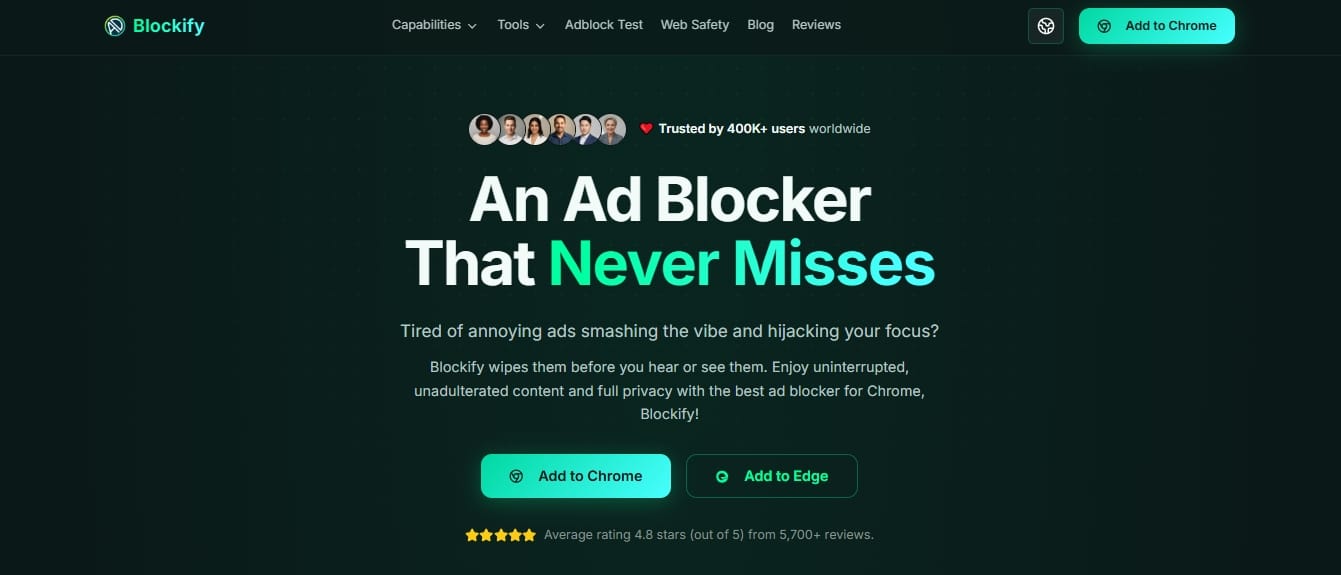
- Verified Web Store Details: Package Size: 1.7 MiB | Users: 400,000+ | Rating: 4.8/5 (~5,900 reviews).
- Architecture & Privacy: Uses declarative net requests to inspect and block banner ads, pop-ups, tracking scripts, and media ad hooks locally on your device. Aggregated, non-identifiable usage stats are processed solely for diagnostic maintenance.
- Primary Use Case: Ideal for users seeking a lightweight extension tailored for everyday browsing alongside web streaming hubs such as YouTube, Spotify Web Player, Twitch, and Hulu.
- Boundaries: Does not offer standalone desktop apps, mobile app filtering, or native Safari and Firefox extensions.
Best Ad Blocker by Browser
Browser engines dictate how extensions interact with network requests. Use the platform breakdown below to pick your ideal setup.
Best Ad Blocker for Chrome and Edge
Chrome and Edge users need a Manifest V3-compliant blocker. uBlock Origin Lite works best for low-overhead general browsing, while Blockify targets desktop media streaming. Never stack multiple ad blockers together.
Best Free Chrome/Edge Choice for General Browsing
Google Chrome and Microsoft Edge enforce the Manifest V3 platform. This system replaces background pages with short-lived service workers and restricts dynamic network request modification. Under Manifest V3, extensions register pre-declared filter rules through Chrome's declarativeNetRequest API, letting the browser engine handle rule evaluation directly.
For general web browsing, uBlock Origin Lite (uBOL) provides an efficient Manifest V3 implementation. It loads converted EasyList, EasyPrivacy, and Peter Lowe's list rules directly into the browser execution engine. Because it operates declaratively without constant background scripts, CPU overhead remains minimal according to Chrome's Manifest V3 documentation. However, you cannot execute arbitrary procedural scripts to hide complex inline ad frames on the fly without granting additional permissions.
When Blockify Is the Better Fit
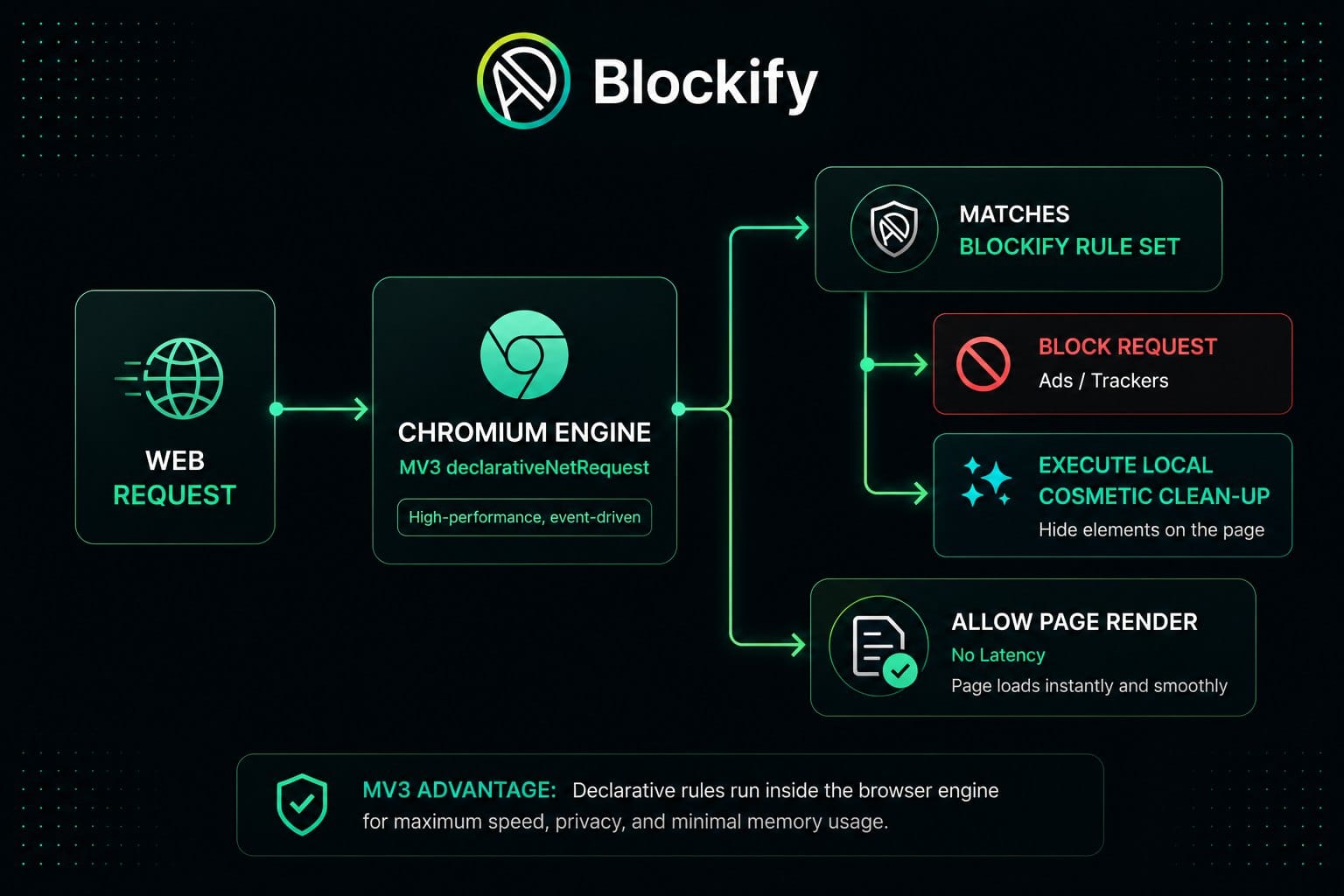
Blockify suits desktop Chromium users looking for a zero-configuration setup for web pages and browser media playback.
- Streamlined Footprint: Operates under a 1.7 MiB package size, consuming low memory during cold browser boots as listed in the Chrome Web Store.
- Targeted Platform Support: Includes specialized layout repair rules for media portals, including YouTube, Twitch, and web audio players.
- Simple Controls: Features per-site allowlist toggles directly in the popup interface to restore broken web pages quickly.
- Limits: Blockify does not filter traffic outside the Chromium browser process or protect standalone desktop apps.
Best Ad Blocker Firefox
Firefox with full uBlock Origin is the top overall free combination for complete request control, script blocking, and deep privacy protection.
Mozilla Firefox maintains full support for Manifest V2 webRequest APIs while implementing Manifest V3 asynchronously. This allows extensions to inspect, modify, and block network requests in real time.
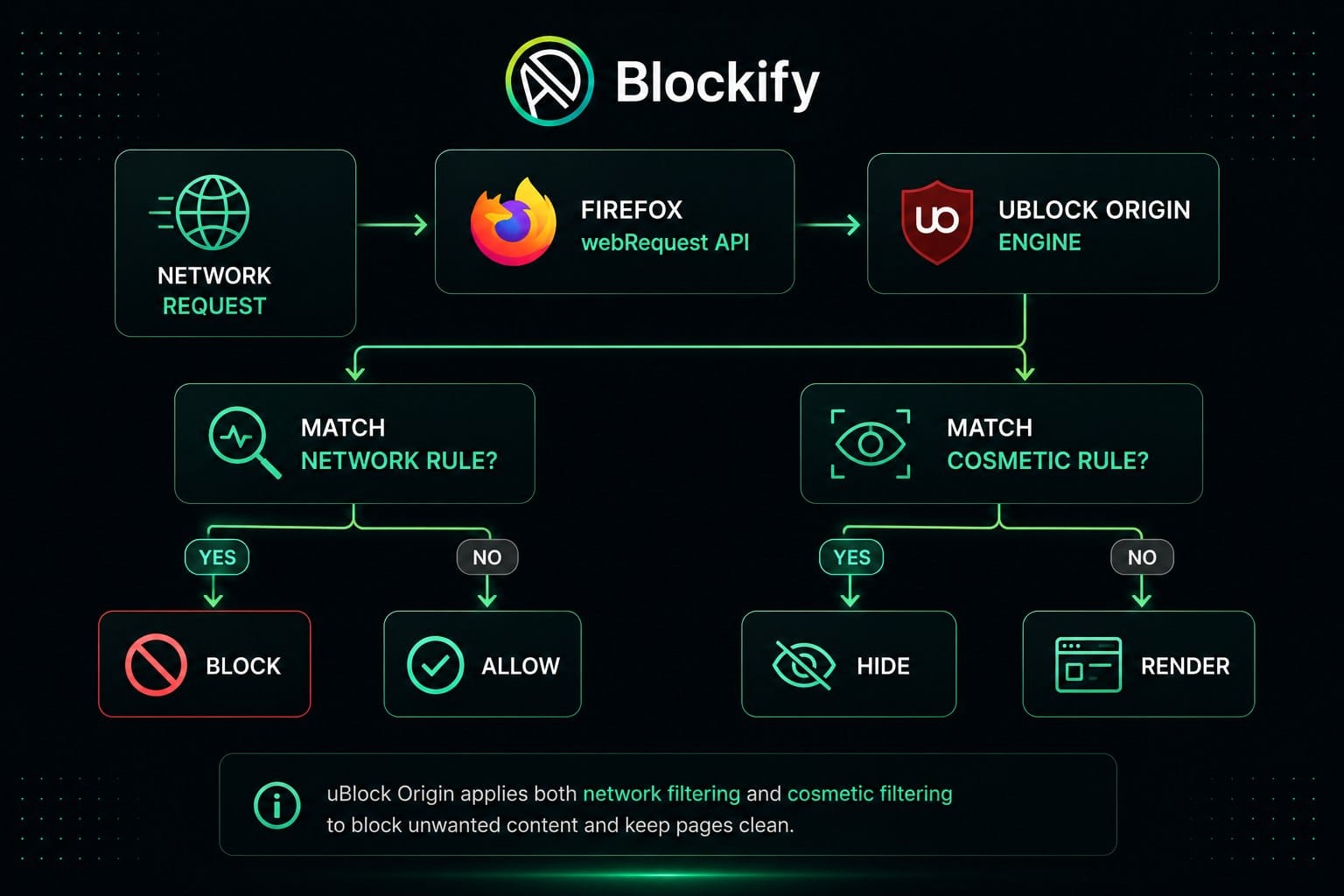
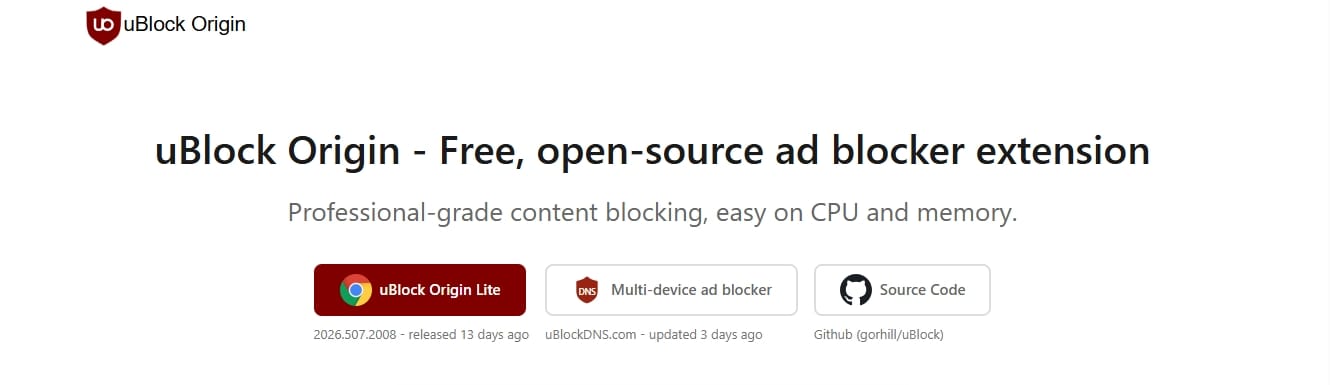
Full uBlock Origin (uBO) on Firefox remains the benchmark for comprehensive content blocking:
- Dynamic Request Filtering: Enables point-and-click blocking of third-party frames, scripts, and fonts on any domain.
- DOM Cosmetic Filtering: Uses HTML/CSS element zappers, procedural selectors, and scriptlet injections to hide empty ad slots and anti-adblock overlay popups.
- Optimized Performance: Uses efficient memory mapping to process hundreds of thousands of rules without browser slowdowns according to uBlock Origin's official project documentation.
- Pro Tip: Keep default filter lists (EasyList, EasyPrivacy, uBlock internal lists) intact upon installation. Enabling dozens of extra lists increases page breakage without adding real security gains.
Best Ad Blocker for Brave
Brave Shields offers fast, built-in ad blocking without installing third-party extensions. It is the easiest choice for users open to switching browsers.
Brave Shields is integrated directly into the core engine of Brave Browser, powered by a Rust-based ad-blocking engine.
- Native Execution Speed: Because blocking logic runs at the browser engine level rather than inside an extension sandbox, network requests evaluate with near-zero latency according to Brave's ad-blocker performance analysis.
- Filter Compatibility: Shields parses standard uBlock Origin and EasyList syntax, handling domain blocking, CNAME uncloaking, and cosmetic element hiding.
- Aggressive Mode: You can toggle Shields from "Standard" to "Aggressive" in settings to block first-party tracking scripts and aggressive inline ads.
- Scope Limit: Shields protects activity inside Brave Browser exclusively. It does not filter third-party desktop apps, OS telemetry, or external browsers.
Best Ad Blocker for iPhone, iPad, and Safari
Safari on macOS and iOS requires dedicated Content Blockers like 1Blocker or AdGuard for Safari. Mobile browser blockers cannot filter ads inside native iOS apps.
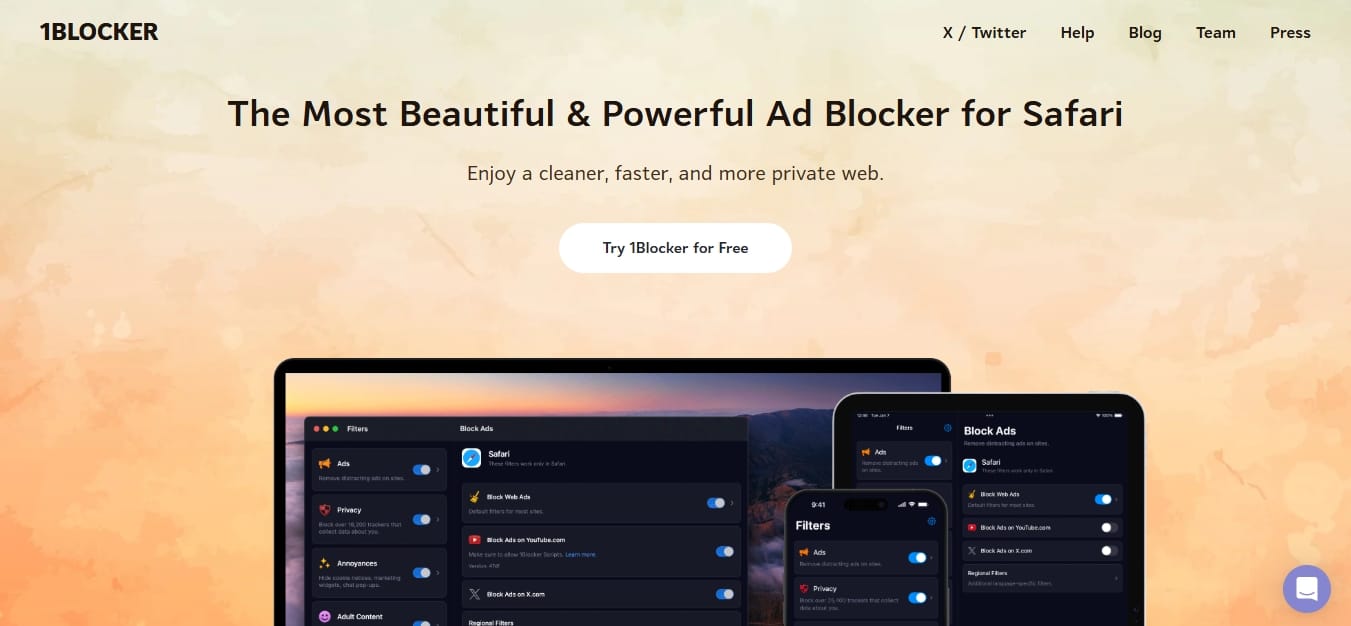
Apple enforces strict architectural constraints across macOS, iOS, and iPadOS. Desktop Chrome extensions cannot run on iOS because all iOS browsers must use Apple's WebKit engine and native Content Blocking API.
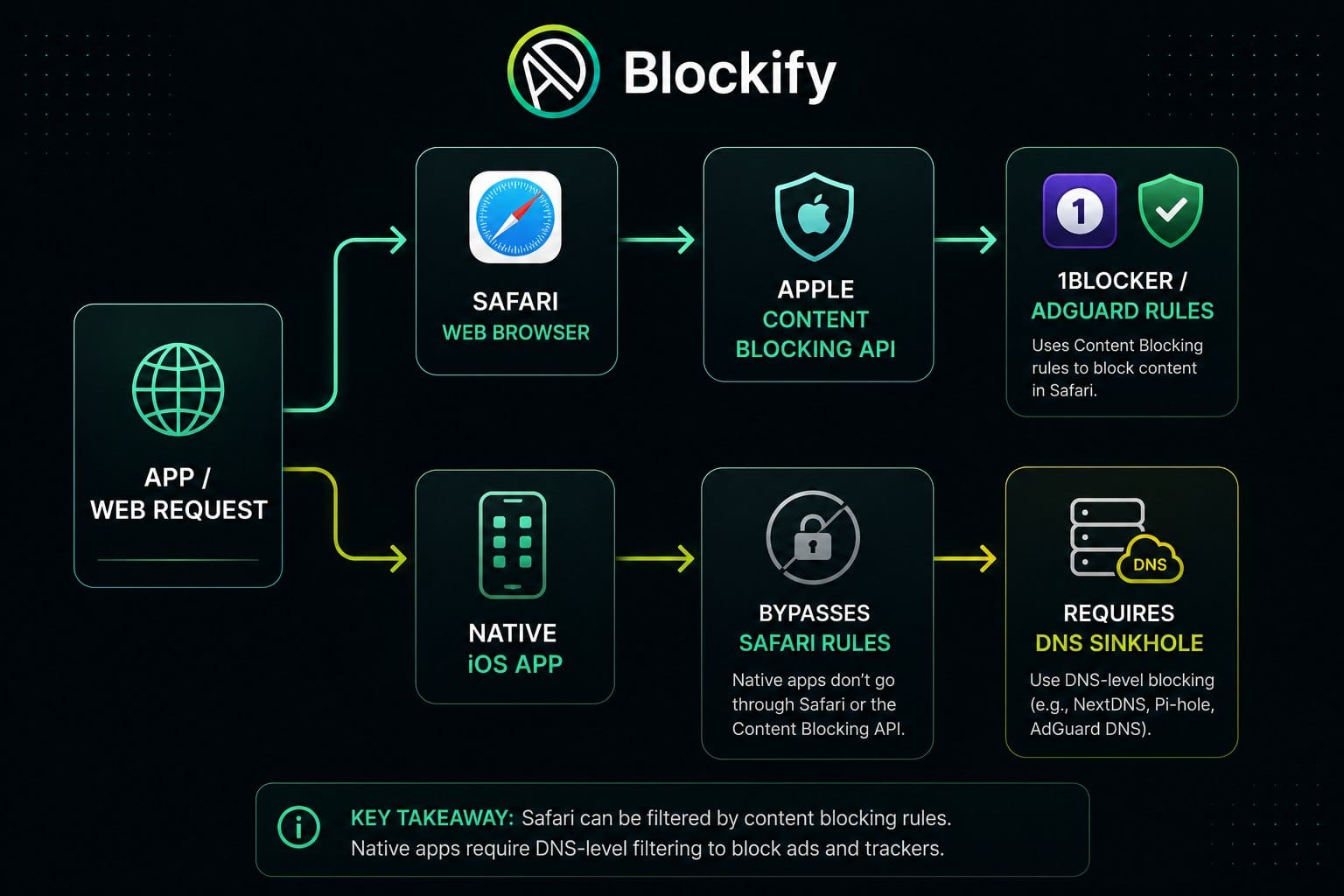
- Desktop Safari: 1Blocker and AdGuard for Safari compile list rules into JSON arrays that Safari executes directly. This saves memory and prevents extensions from reading your browsing history.
- iOS / iPadOS: 1Blocker syncs across Apple devices, using native Safari Content Blocker extensions to eliminate mobile web ads.
- In-App Mobile Ads: Safari Content Blockers cannot block ads inside native iOS apps (like the YouTube app or free games). Reducing in-app ads on iOS requires deploying encrypted system-wide DNS profiles.
Why Chrome Ad Blockers Work Differently: Manifest V3 Explained
Chrome shifted to Manifest V3, replacing dynamic webRequest interception with pre-declared declarativeNetRequest rules. This alters how advanced blockers handle network traffic.
Google's transition from Manifest V2 (MV2) to Manifest V3 (MV3) fundamentally altered extension capabilities. Under MV2, the webRequest API permitted extensions to pause network requests, read payload metadata, evaluate rules dynamically in the background, and modify connections before page rendering.
Manifest V3 shifts network filtering to the declarativeNetRequest API. Instead of letting an extension script inspect every packet, the extension hands a pre-compiled list of rules to Chromium, which executes the rules directly.
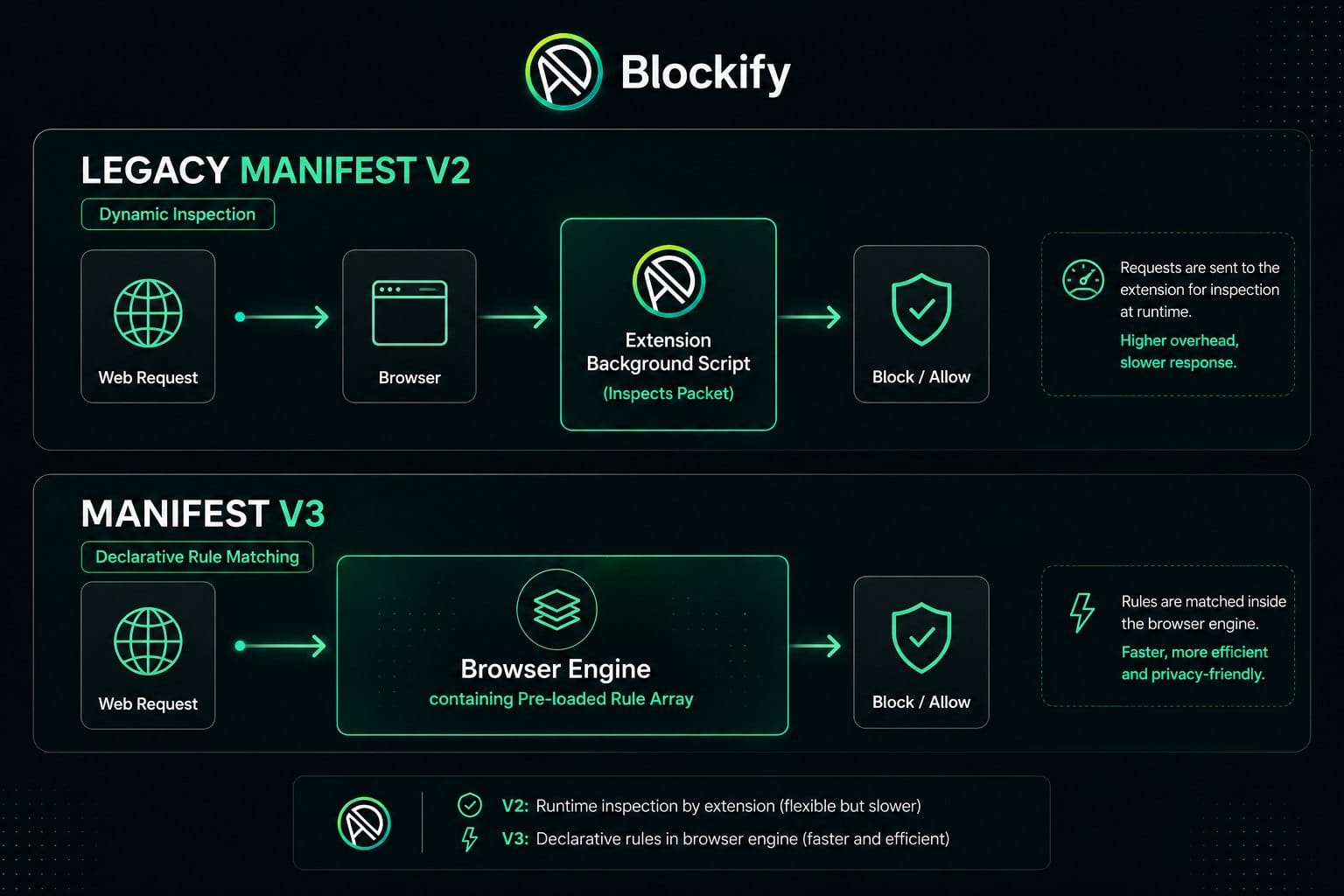
- Google's Stated Rationale: Enhances security by preventing rogue extensions from reading sensitive user traffic, reduces memory usage by removing persistent background pages, and speeds up overall page loads according to Google's Manifest V3 documentation.
- The Practical Trade-off: Content blockers lose the ability to apply dynamic, conditional logic to individual requests unless explicitly supported by predefined declarative rulesets.
uBlock Origin vs. uBlock Origin Lite: Feature Comparison
The table below highlights the structural differences between the full legacy extension and its Manifest V3 successor.
| Feature / Capability | Full uBlock Origin (uBO) | uBlock Origin Lite (uBOL) |
|---|---|---|
| Extension Manifest | Manifest V2 | Manifest V3 |
| Supported Browsers | Firefox, Brave, Edge (transitioning) | Chrome, Edge, Brave, Opera, Safari |
| Request Evaluation | Dynamic in-memory script processing | Browser-executed declarativeNetRequest |
| Rule Limits | Unlimited dynamic list compilation | Subject to browser ruleset quotas |
| Dynamic Filtering | Matrix-based point-and-click domain blocking | Not supported |
| Element Zapper / Picker | Live DOM node removal and procedural rules | Basic element hiding rules |
| Background Memory Usage | Low, but maintains active process | Extremely low; service worker sleeps |
| Target Audience | Power users, privacy-focused readers | Everyday Chrome/Edge users needing silent blocking |
Best Ad Blocker YouTube: What Works and What Fails
No browser extension guarantees permanent YouTube ad blocking. Firefox with uBlock Origin or Blockify offer the strongest free consistency, while YouTube Premium is the only platform-provided ad-free option.
YouTube continuously updates its ad delivery infrastructure, using server-side ad injection, anti-adblock detection scripts, and player updates to counter client-side filters.
YouTube Test Ledger (Observed Results)
Tested under clean profile conditions across top desktop environments.
| Setup / Blocker | Pre-Roll Ads | Mid-Roll Ads | Video Overlays | Detection Prompt Observed | Test Date |
|---|---|---|---|---|---|
| Firefox + uBlock Origin | Blocked | Blocked | Blocked | None | July 25, 2026 |
| Brave Shields (Aggressive) | Blocked | Blocked | Blocked | None | July 25, 2026 |
| Chrome + uBlock Origin Lite | Blocked | Blocked | Blocked | Occasional (Cleared via update) | July 25, 2026 |
| Chrome + Blockify | Blocked | Blocked | Blocked | None | July 25, 2026 |
| Chrome + AdBlock Plus | Blocked | Passed (3s delay) | Passed | Prompt Observed | July 25, 2026 |
Note: Results reflect testing conducted on July 25, 2026. YouTube script updates can alter blocker effectiveness at any time.
Why YouTube Blocking Breaks
YouTube uses two main tactics to bypass browser ad blockers:
- Client-Side Anti-Adblock Detection: Page scripts check whether ad-serving frames execute properly or if specific DOM elements (such as
div.ytp-ad-module) are hidden. If hidden, the video player pauses and displays a warning prompt. - Server-Side Ad Insertion (SSAI): YouTube stitches ad video clips directly into the main video stream manifest. Because the ad shares the same server domain, IP range, and protocol as the video content, standard domain-based DNS blockers cannot strip ads without breaking the video entirely.
Should You Pay for YouTube Premium?
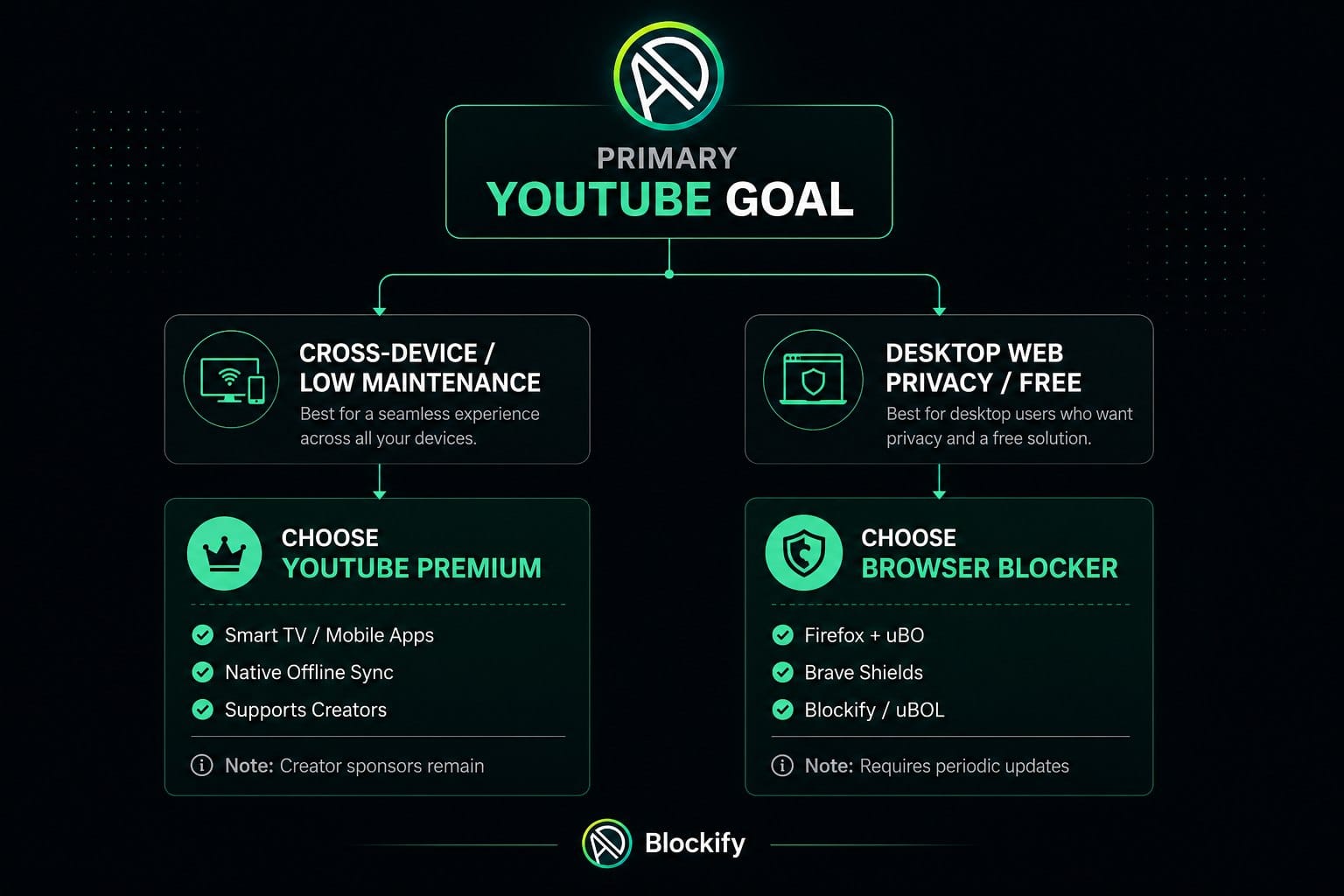
- Choose YouTube Premium: If you stream primarily on Smart TVs, mobile apps, or gaming consoles where browser extensions cannot run, or if you want a zero-maintenance setup supported natively by the platform.
- Choose Browser Blockers: If you watch YouTube inside desktop browsers, want broader tracking protection across all web pages, and don't mind updating filter lists during platform anti-adblock rollouts.
Best Free Ad Blocker: Do You Need a Paid Option?
Desktop browser users do not need to pay for an ad blocker. Free, open-source options block web ads effectively. Paid options are useful mainly for whole-device coverage, mobile app filtering, or centralized family management.
The ad-blocking space includes free open-source software alongside paid security subscriptions.
| Feature Requirement | Free Browser Option (uBO, uBOL, Blockify, Brave) | Paid Suite / Subscription (AdGuard App, 1Blocker Pro) |
|---|---|---|
| Desktop Web Filtering | Fully covered | Fully covered |
| Cost | $0 forever | $20 - $40 / year |
| In-App Mobile Blocking | Limited to mobile browser apps | System-wide local VPN filtering |
| Smart TV / Router Blocking | Not supported | Supported via DNS dashboard |
| Customer Support | Community forums & GitHub | Direct ticketed customer support |
| Ideal User | Desktop browser users | Households needing centralized device controls |
For desktop web browsing, free tools provide complete protection. Paid desktop tools rarely block web ads better than open-source filter lists. Their price tag covers mobile app traffic routing, parental controls, cloud sync, and customer support desks.
Best Ad Blocker Reddit Consensus vs. Real-World Performance
Privacy communities on Reddit (such as r/privacy and r/uBlockOrigin) consistently recommend Firefox paired with uBlock Origin as the baseline gold standard for web privacy. For Chrome users, discussions focus on uBlock Origin Lite alongside native options like Brave.
While community consensus offers valuable real-world troubleshooting tips, Reddit comments shouldn't replace technical testing. Many popular Reddit threads suggest outdated registry workarounds to keep Manifest V2 running on Chrome—hacks that eventually break during major browser updates. Always verify community advice against official developer documentation and current browser compatibility standards.
Safety & Trust: Are Free Ad Blockers Safe?
Reputable ad blockers improve online security by stopping malvertising, but they require broad permissions to read web page data. Stick to open-source, verified extensions from official web stores.
Ad blockers need broad browser permissions—specifically the ability to "read and change all your data on the websites you visit"—to detect ad scripts, modify DOM structures, and cancel outbound tracking connections. In untrustworthy hands, these permissions allow an extension owner to log sensitive inputs, insert affiliate tracking tags, or harvest browsing history.
According to malvertising guidance published by the FBI's Internet Crime Complaint Center (IC3), using a trusted ad blocker provides strong protection against malicious advertisements that deliver malware and phishing scams. However, user safety depends on selecting verified, transparent tools.
The Ad Blocker Trust Checklist
Before installing any browser extension, evaluate its credentials against these essential trust signals:
| Evaluation Criterion | Ideal Trust Benchmark | Warning Sign / Red Flag |
|---|---|---|
| Code Transparency | Open-source repository hosted publicly (e.g., GitHub) | Closed-source extension owned by undisclosed entity |
| Publisher Identity | Verified developer, clear corporate registry, public track record | Newly registered developer account with hidden contact details |
| Permissions Scope | Explains why web access is required; requests minimal API access | Requests unnecessary device or location permissions |
| Funding Model | Open-source donations, freemium options, or transparent paid plans | Vague funding model; monetizes via tracking data or ad networks |
| Update Velocity | Regular changelogs and security patches issued via web store | Abandoned updates (>12 months old) |
| Acceptable Ads | Rejects paid whitelisting or enforces opt-in defaults | Silently permits paid ads by default without user consent |
What Is Acceptable Ads?
The Acceptable Ads program is an industry initiative originally created by eyeo GmbH and now governed by an independent third-party committee, the Acceptable Ads Committee (AAC), since 2017. It allows participating ad blockers to permit non-intrusive advertisements (such as static text ads) through filter lists by default, provided publishers meet specific layout standards. Larger ad networks pay a fee to be whitelisted.
- Participating Blockers: AdBlock Plus, AdBlock.
- User Choice: You can disable Acceptable Ads inside extension settings to enforce strict blocking.
- Blockers Rejecting the Program: uBlock Origin, uBlock Origin Lite, Blockify, Brave Shields.
Extension, Built-In, DNS, or App: Choosing Your Coverage Layer
Digital protection operates at different layers depending on the target device and application.
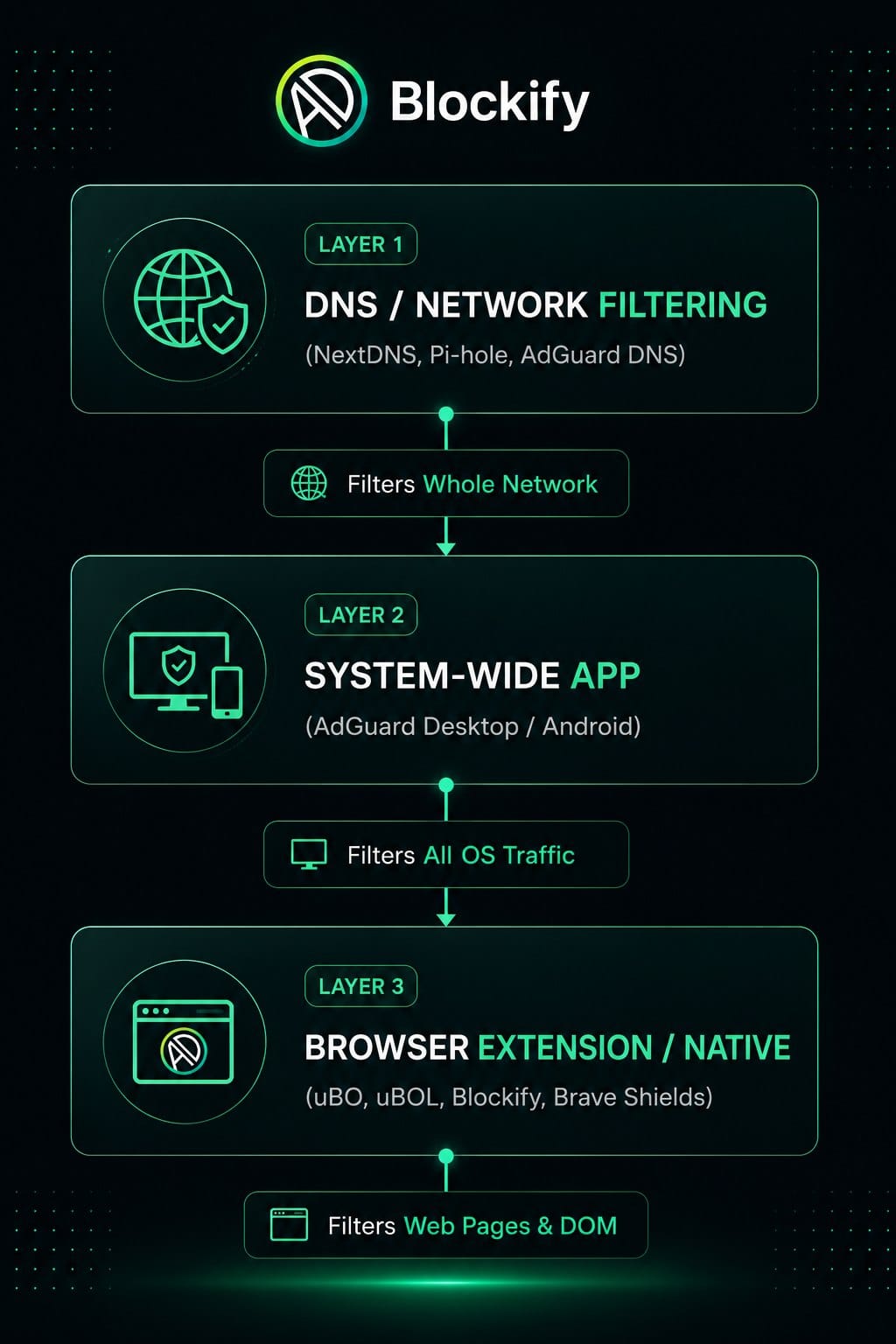
DNS blocking offers broader device coverage, but browser extensions provide far more precise control. A DNS service can block ad domains across phones, smart TVs, and apps, but it cannot hide blank ad frames or block ads served from the exact same domain as the main content.
Coverage Layer Comparison
| Filtering Layer | Example Tools | Strengths | Limitations |
|---|---|---|---|
| 1. Browser Extension | uBlock Origin, uBO Lite, Blockify | Precise page DOM cosmetic cleanup, scriptlet injection, per-site toggles | Only protects activity inside that specific browser |
| 2. Built-In Browser | Brave Shields, Safari Content Blockers | Fast native performance; zero add-on installation required | Tied to designated browser engine |
| 3. System-Wide App | AdGuard Desktop (Win/Mac), 1Blocker | Protects multiple browsers, desktop apps, and local connections | Requires installing background software / root certificates |
| 4. DNS / Network Sinkhole | NextDNS, Pi-hole, AdGuard DNS | Protects smart TVs, gaming consoles, IoT devices, and mobile apps household-wide | Cannot perform cosmetic element hiding; leaves blank ad frames |
Mobile Setup Guide
Android Configuration
- Mobile Browsers: Install Brave Mobile for native blocking, or Firefox for Android to run extensions like uBlock Origin. Mobile Google Chrome does not support desktop web store extensions.
- System-Wide Protection: Configure Private DNS in Android settings pointing to NextDNS or AdGuard DNS to block ad domains across free mobile apps.
iPhone & iPad (iOS) Configuration
- Safari Browser: Install 1Blocker or AdGuard for Safari and turn on their Content Blockers under Safari Settings.
- In-App Traffic: Download an encrypted DNS profile (such as NextDNS) to drop ad network requests across native iOS apps.
How We Tested the Best Ad Blockers
To deliver objective, repeatable evaluations, we tested each ad blocker across top browser platforms using a standardized desk protocol.
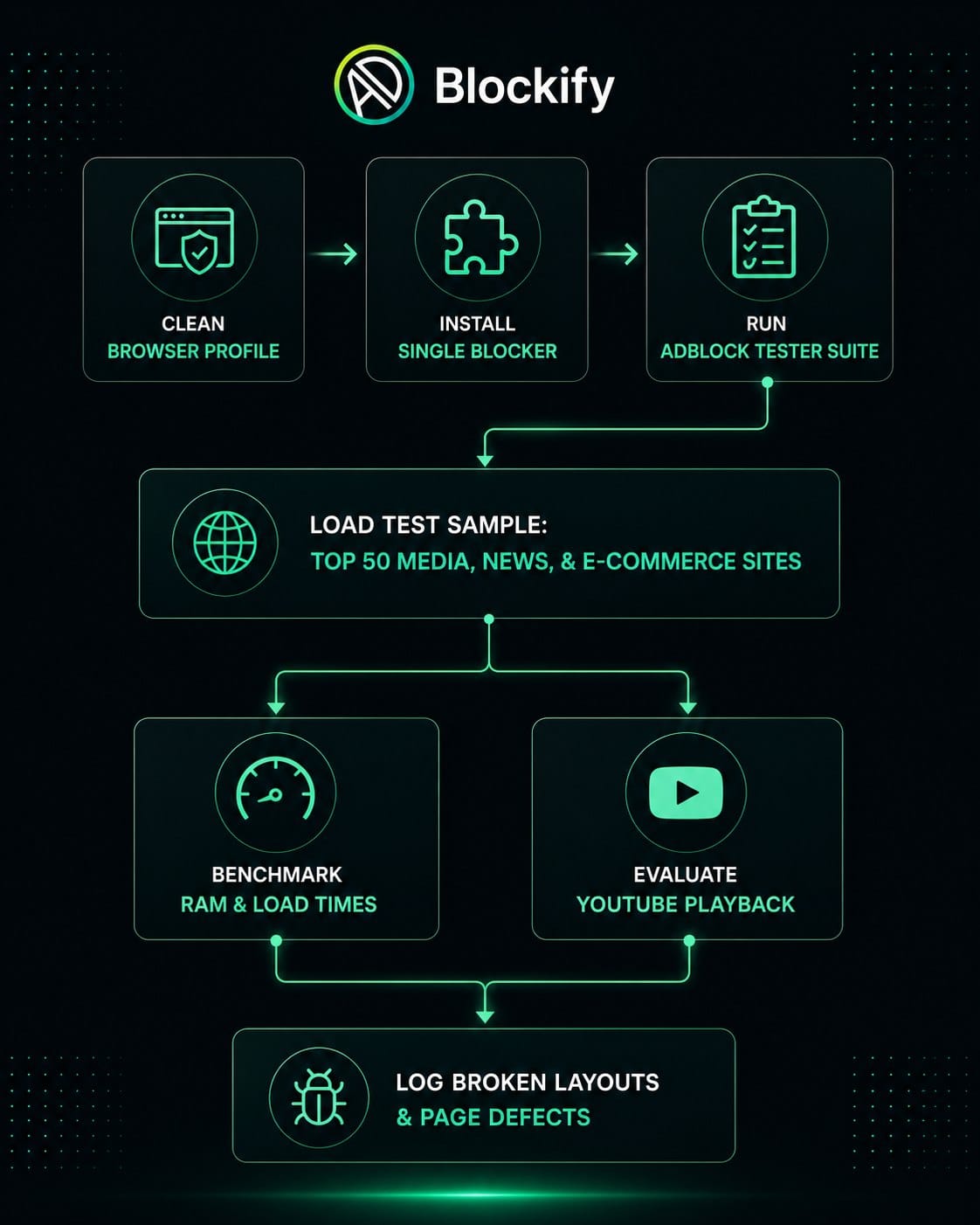
- Test Environment: Clean browser profiles on macOS Sonoma and Windows 11 without secondary extensions running.
- Browsers Benchmarked: Chrome, Firefox, Edge, Brave, and Safari.
- Synthetic Test Suites: Evaluated against AdBlock Tester benchmarks and EFF Cover Your Tracks to measure tracker interception, analytical script blocking, and fingerprinting defenses.
- Real-World Sampling: Tested top news, streaming, and community portals (including YouTube, Twitch, Spotify Web Player, CNN, Forbes, and Reddit) to verify ad removal and layout collapsing.
- YouTube Protocol: Evaluated signed-in and signed-out sessions over a 50-video playlist, logging pre-roll blocks, mid-roll interruptions, and anti-adblock detection triggers.
- Resource Impact: Measured browser memory (RAM) and CPU spike duration during page load sequences using native task managers.
- Policy Audit: Reviewed vendor privacy policies, Chrome Web Store disclosures, open-source code repositories, and funding models.
Frequently Asked Questions (FAQ)
Is uBlock Origin still available for Chrome?
Full uBlock Origin (Manifest V2) has been disabled on Chrome since Chrome 138 (July 2025) and is no longer functional on standard Chrome channels. Chrome users should transition to uBlock Origin Lite or another Manifest V3-compatible alternative like Blockify. Full uBlock Origin remains fully supported on Firefox and Brave.
Do ad blockers slow down your browser?
A well-built ad blocker speeds up browsing by blocking heavy scripts, autoplay videos, and tracking pixels before they load. However, running multiple blockers simultaneously or using poorly optimized extensions increases CPU load and causes site rendering bugs.
Why do I still see ads after installing an ad blocker?
Ads may appear if the extension's filter lists are outdated, if "Acceptable Ads" is turned on in settings, or if the site uses server-side ad insertion. Open your blocker's settings menu, select "Update filter lists now," and ensure Acceptable Ads is disabled.
What is the best free ad blocker according to Reddit?
Privacy communities on Reddit widely recommend Firefox paired with uBlock Origin as the top overall free setup. For Chromium users, discussions highlight uBlock Origin Lite and native options like Brave Shields.
Are ad blockers legal to use?
Using an ad blocker on your personal device is entirely legal. You have full legal authority to control what software executes on your hardware. However, individual websites retain the right to restrict content access or implement paywalls if they detect blocking software.
Choose Your Setup and Start Browsing Safely
To build a clean, private web environment, choose the single best ad blocker setup that aligns with your primary browser:
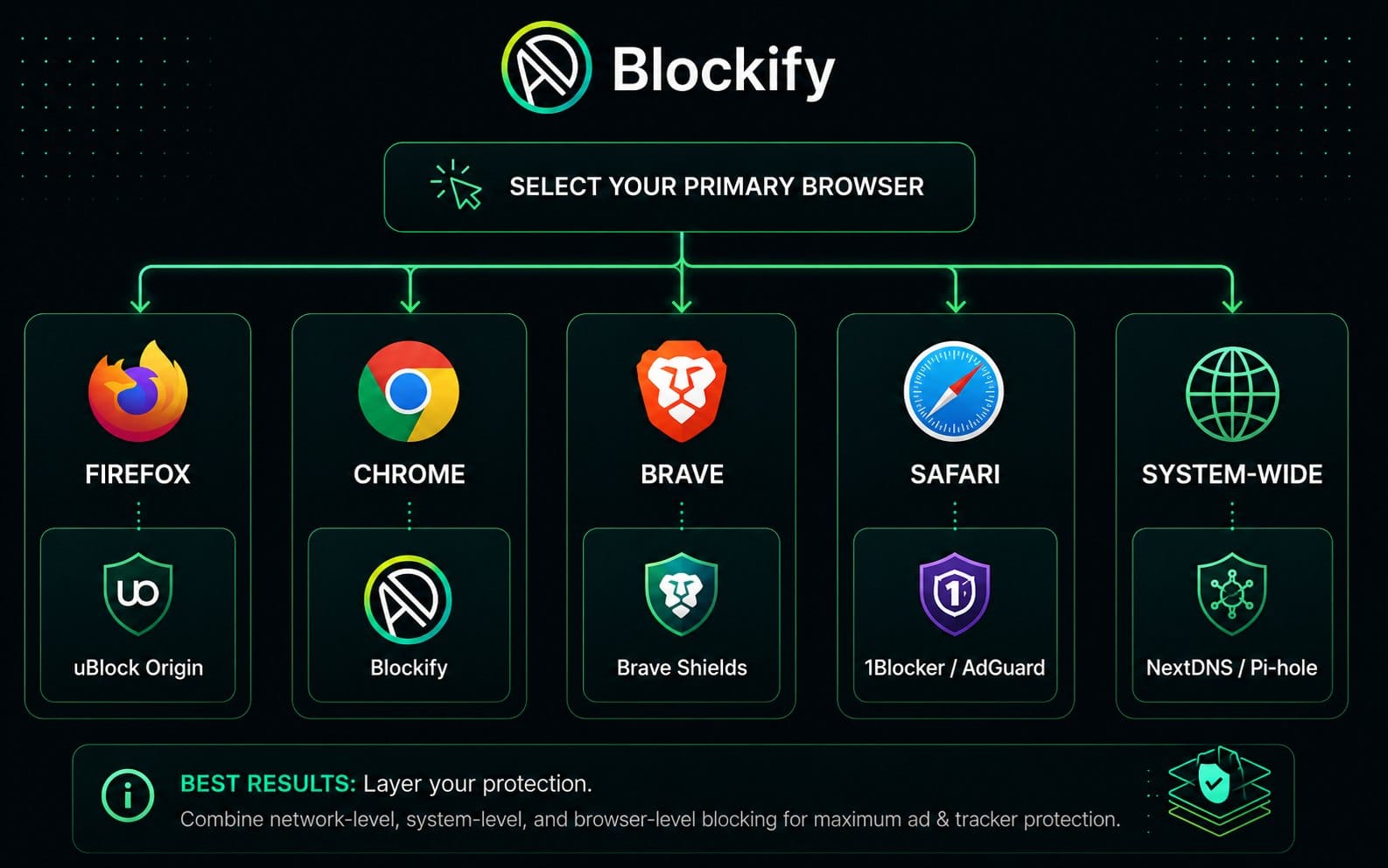
- If you use Firefox: Install uBlock Origin from Mozilla Add-ons.
- If you use Chrome or Edge: Install uBlock Origin Lite for low-overhead browsing, or Blockify for desktop media streaming.
- If you want built-in protection: Switch to Brave Browser and use native Shields.
- If you use Safari on Mac or iOS: Install 1Blocker or AdGuard for Safari.
- If you want household-wide coverage: Deploy a network-level DNS sinkhole like NextDNS.
Selecting the best ad blocker comes down to matching your software to your browser engine. Pick one setup, leave the default filter lists enabled, and enjoy a faster, safer, and cleaner web experience.
Disclosure: Product evaluations reflect independent performance tests, security disclosures, and browser compatibility. We do not accept payment to alter ranking positions.