
It is a free live social entertainment platform where creators broadcast video content in real-time. Viewers watch live streams while interacting directly with the broadcaster and other viewers in a highly active chat room. It functions like a massive, interactive live community center.
People often assume the Amazon-owned platform is exclusively for video games. The reality is quite different today. You are just as likely to see a cooking class, a live concert, or a massive creator-led sports event.
Games bring people in, but chat keeps them there. The live video is only half the product. Current data shows the "Just Chatting" category consistently leads the site in viewership, proving that conversational content dominates modern viewing habits.
What People Actually Do on Twitch Every Day
Beginners often ask what users actually do for hours. Viewers watch live streams and talk to each other in the chat.
Many users prefer to "lurk" and watch without typing anything. When you find a creator you like, you follow their channel to receive notifications when they go live. You can also subscribe financially to support them, clip funny moments, and watch past broadcasts.
The platform thrives on shared moments and inside jokes. When a creator accomplishes something difficult live, the chat reacts instantly.
You get the feeling of actually being in the room. This shared environment builds deep trust and familiarity. Recent civic research indicates Twitch viewers are more likely to trust influencers compared to users on traditional social platforms.
How Twitch Expanded Beyond Video Games
Gaming remains a massive pillar, but millions of users now watch casual conversations, music, art, and large-scale live creator events.
If you are wondering what is Twitch used for historically, gaming is the obvious answer. You will find thousands of channels dedicated to live gameplay, professional e-sports tournaments, and speedruns. Creators host walkthroughs and provide live commentary on gaming industry events.
Twitch is not only for gaming
The platform has expanded aggressively into everyday lifestyle content. Just Chatting is the leading category where creators sit and talk directly to their audience. You will easily find dedicated categories for IRL (in real life) mobile streaming, live music production, and creative arts.
VTubers and creator-led events are part of modern Twitch
VTubers are creators who use digital anime-inspired avatars mapped to their real-time movements instead of traditional webcams. They represent a massive part of modern streaming culture, generating over 1.1 billion hours watched in 2024.
They also maintained strong momentum through 2025 and 2026.
Massive live events also changed how people view the platform. In 2025, creator Ibai Llanos hosted the boxing event La Velada del Año V, shattering records with 9.3 million peak concurrent viewers. This proves the site handles global sports-scale broadcasts flawlessly.
Test the platform with one gaming stream and one non-gaming stream to understand the dynamic faster.
Twitch Basics Every Beginner Should Understand
The site organizes content by categories and tags. You can watch any stream for free without logging in, but you need an account to chat, follow, or save channels.
What you see when you open Twitch
When you load the homepage or the mobile app, you see a carousel of recommended live channels. Below that, categories and tags organize the current live content. Streamers use categories to label their broadcasts, and viewers use them to find exactly what they want to watch.
What happens when you click a stream
The video player takes up the main screen while the chat panel sits on the right. Below the video player, you will see the current viewer count, a purple Follow button, and a Subscribe button. The viewer count tracks everyone watching the live video, whether they are signed in or not.
Open one stream right now. Try to identify the chat, viewer count, follow button, subscribe button, and the clip icon.
Live streams, VODs, Clips, and Stream Rewind
Beginners often confuse the different video formats.
- Live stream: Happening right now in real-time.
- VOD: A saved past broadcast you can watch later. Retention windows last 60 days for Partners, Prime, and Turbo users, and 14 days for Affiliates.
- Clips: Short, shareable highlights pulled from live or past streams.
- Stream Rewind: A feature allowing Channel subscribers or Turbo users to pause and scrub backward through an active live broadcast.
Do you need an account to use Twitch?
You can start watching immediately without logging in or providing an email address. Creating a free account is highly recommended if you want to participate. An account makes chatting, following, subscribing, sending private whispers, and saving your preferences possible.
Chat, Emotes, and Shared Moments Explained
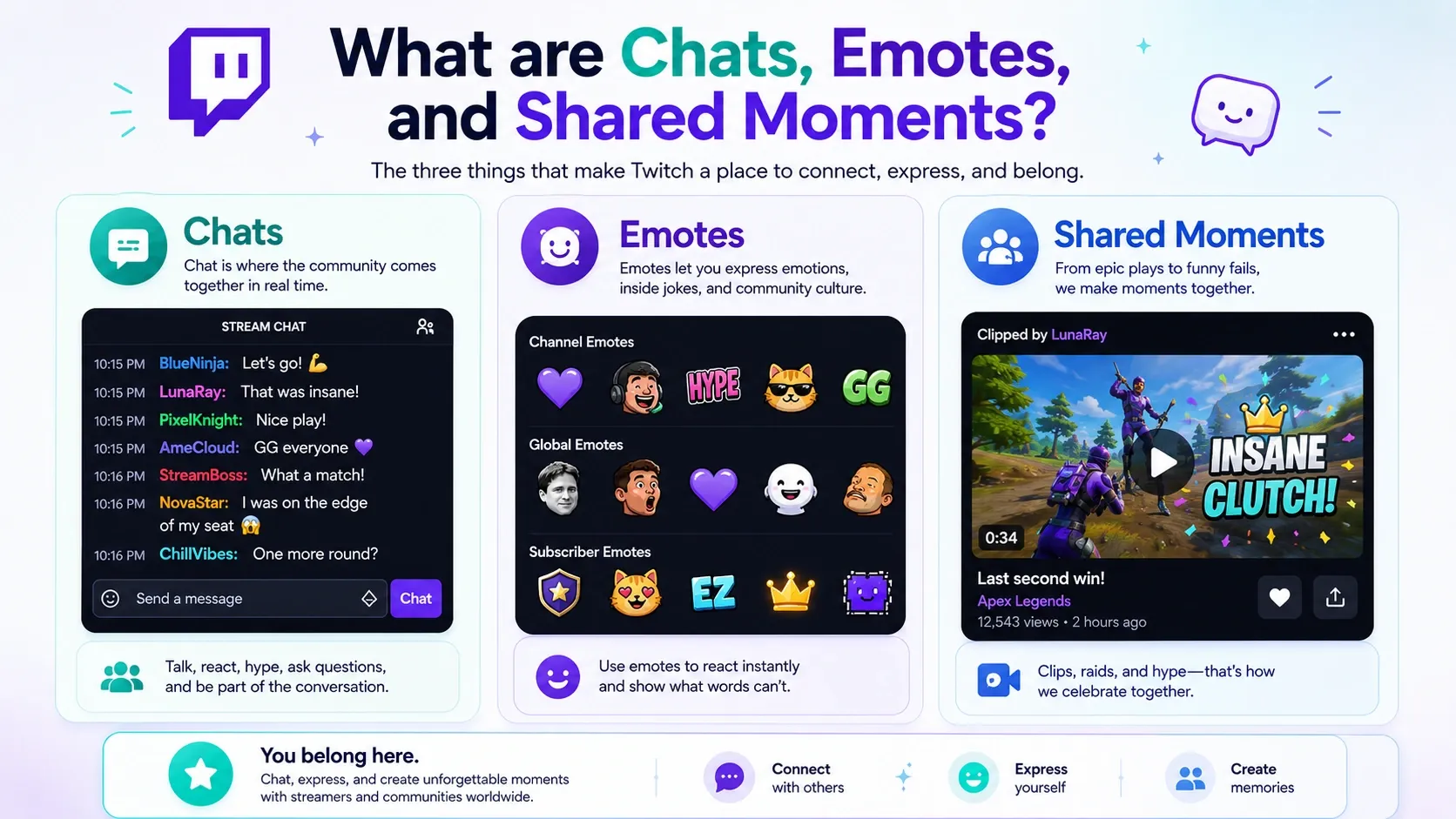
The chat room is just as important as the video. Viewers use specific emotes and interactive tools to shape the live experience.
Chat is not a side feature
How does Twitch work at its core? It is essentially a massive group chat with a live video playing in the background. On huge channels, the text moves so fast it becomes an unreadable blur of reactions. Smaller channels feature slower, intimate conversations where the creator responds to individual messages.
Channel moderators enforce specific rules, utilizing controls like follower-only or sub-only chat modes to maintain order.
Twitch emotes and slang beginners should know
Emotes are the visual language of the site. Viewers spam these tiny images during key moments to express collective emotion. Starter examples include Kappa for sarcasm, PogChamp for excitement, and KEKW for laughter.
Users also type "W" for a win, "L" for a loss, or "copium" when someone is in denial. Third-party emote extensions like BetterTTV and 7TV exist outside the native systems, unlocking thousands of extra emotes you will not see natively.
Interactive features that make Twitch feel different
Viewers interact directly with the broadcast. You earn Channel Points just by watching, which you can redeem to highlight a message or trigger on-screen alerts. You can also use points to vote on Predictions about what will happen next.
When audiences get excited, they trigger Hype Trains by donating or subscribing rapidly. At the end of a broadcast, creators often "Raid" another channel, automatically transferring all current viewers to a new creator to share the audience.
Privacy and safety basics
You control your safety on the platform. The site allows you to block whispers (private messages) from strangers easily. You can also apply personal chat filters to hide unwanted words. If you are new, lurk first. Watch the chat for a minute before typing to understand the room's vibe.
Watching is entirely free, but you will experience frequent video ads. You can bypass ads by subscribing to channels, paying for Turbo, or using a smart ad blocker.
What Free Twitch Viewing Really Includes
The platform is free to access. You never have to pay a single dollar to watch your favorite creators. The tradeoff for this free access is heavy advertising. Optional paid support unlocks special perks while giving creators a reliable income.
| Feature | Cost | What it unlocks | Who it’s best for | Ad impact |
| Follow | Free | Saves channel, sends alerts | Casual viewers | Full ads |
| Subscribe | Monthly fee | Emotes, badges, perks | Dedicated fans | Usually removes ads on that channel |
| Gifted Sub | Free for you | Same perks as a paid sub | Lucky viewers | Usually removes ads on that channel |
| Prime Gaming | Included with Amazon Prime | One channel sub token | Amazon Prime members | Removes ads on one selected channel |
| Twitch Turbo | $11.99/mo (U.S.) | Global ad-free viewing | Heavy platform users | Removes video ads platform-wide |
Why Twitch Ads Frustrate New Viewers
Pre-roll ads hit you the moment you open a new stream, causing friction when you are just looking for someone new to watch. Mid-roll ads interrupt the live content entirely. Unlike standard video sites, the stream does not pause for you while the ad plays. Ads matter more on live broadcasts because you actually miss real-time moments when they trigger.
Best Ways to Reduce Twitch Ads in 2026
If interruptions hurt your viewing experience, you have practical ways to fix the problem. You can subscribe to a specific channel if you only watch one person. You can use your Prime Gaming token. You can pay for Twitch Turbo to remove pre-rolls and mid-rolls website-wide.
If you want the simplest set-and-forget way to reduce interruptions, use a browser-level tool like Blockify. Blockify is a modern extension that safely removes stubborn video and audio interruptions. With over 360,000 users and a 4.8-star rating, Blockify uses a dual-layer blocking mechanism. It protects your attention seamlessly without requiring manual setup.
Check out How to Block Twitch Ads (2026) to explore this further.
How to Start Using Twitch Without Feeling Overwhelmed
Do not overthink your first visit. Pick a category you enjoy, open a few different streams, and observe the chat before participating.
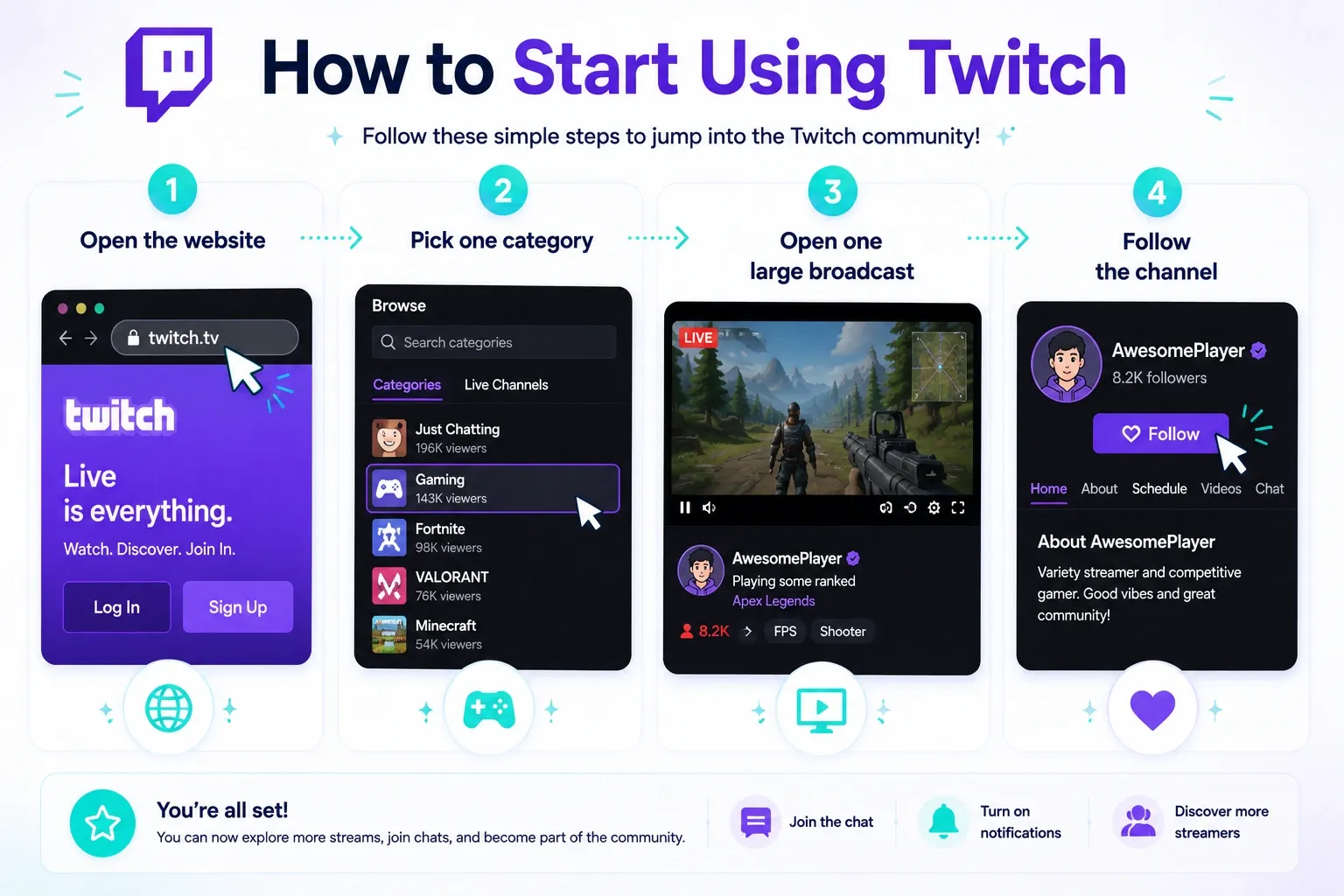
Start your journey with this simple quick-start checklist:
- Open the website or mobile app.
- Pick one category that matches your real-world interests.
- Open one large broadcast with thousands of viewers and one smaller stream.
- Watch the chat room for two minutes before typing anything.
- Follow at least one channel you would watch again.
The easiest way to find creators you’ll actually like
Discovery can feel overwhelming initially. Start with categories you already care about. Use the Clips tab on a category page to preview the funniest moments from the past week. Smaller communities are often much easier for beginners to join because the broadcaster will actually welcome you personally.
Desktop vs mobile for first-time use
Use a desktop browser for your first few sessions. Desktop layouts make understanding the video player, chat window, and interactive controls much easier. The mobile app is fine for passive watching, but the smaller screen makes reading fast-moving chat difficult.
Beginner mistakes to avoid
Do not spam the chat room with repeated messages trying to get attention. Avoid treating every live stream like a tight-knit friend group instantly. Wait a few days before spending money on a subscription.
Twitch vs YouTube Live vs Kick vs Discord
Twitch dominates chat culture. YouTube offers better video playback, Kick targets looser moderation, and Discord handles private friend groups.
Compare them from a viewer’s perspective
Feature |
Twitch |
YouTube Live |
Kick |
Discord |
Live chat culture |
Industry leader, massive emote ecosystem |
Basic text chat, slower engagement |
Very fast, looser moderation |
Totally private, invite-only |
Replay strength |
Average (VODs expire) |
Excellent (permanent 4K saves) |
Average |
None |
Community closeness |
High parasocial connection |
Medium |
High |
Extremely high (closed groups) |
Ad friction |
High (pre-rolls and mid-rolls) |
Medium (skippable options) |
Low |
None |
Best use case |
Shared cultural moments, interaction |
Clean viewing, paused rewinds |
Edgy content, specific creators |
Gaming with actual friends |
The platform remains culturally central, but the livestreaming market is highly fragmented today. Industry data shows Twitch viewers consumed more than 20 billion hours of live content in 2024, confirming its massive scale.
Many viewers now follow their favorite creators across multiple sites. Use this platform for live community participation. Keep YouTube or Discord nearby for permanent video saves or private group calls. Read our full comparison on Twitch vs YouTube Live for deeper insights.
Want to Stream too? Read this Before You Do
Broadcasting is technically easy to start but incredibly difficult to turn into a career. Treat it as a fun hobby first.
Watching is easy. Growing is hard.
The barrier to entry is almost zero. Hitting the "go live" button is simple, but building a consistent audience is an entirely different challenge. Adopting a hobby-first mindset is the healthiest default setting. Read our guide on how to start streaming on Twitch if you are truly curious.
The bare minimum to go live
You only need three things to start broadcasting: a stable internet connection, basic streaming software, and a tool to capture your video or gameplay. A basic microphone and a cheap webcam are entirely optional but highly recommended.
One ethical warning
Do not use fake engagement or bot services to inflate your numbers. The official platform rules state fake engagement services are not permitted and lead to strict enforcement actions.
Realistic expectations
Be realistic about your expectations. Growing on Twitch is hard, and turning it into full-time income is rare. Do a low-stakes test run before spending hundreds of dollars on fancy gear.
Final takeaway: is Twitch worth trying?
Yes. It remains the best place on the internet for live, shared community interaction around a massive variety of topics.
Who Twitch is best for
The platform is perfect for people who enjoy live interaction and shared cultural moments. It caters to fans who want something significantly more social than regular on-demand video.
Who may prefer another platform
You might prefer YouTube if you demand highly polished, permanent replays. People who dislike fast, chaotic chat culture or those who only want to talk privately with real-life friends will prefer Discord.
The simplest next step
Open the site right now. Spend 10 minutes in one gaming broadcast and 10 minutes in one non-gaming broadcast. Pay close attention to the chat room. That is the single fastest way to understand what is Twitch in reality. If ads keep interrupting that initial test, use Blockify's Twitch Ad Blocker so you can judge the platform itself, not the interruptions.
FAQs
Is Twitch only for gaming?
No. The "Just Chatting" category leads the platform. Millions of users watch live music, arts, sports, and creator-led events every day.
Can you watch Twitch for free?
Yes. You can watch any public broadcast entirely for free, though you will encounter pre-roll and mid-roll video advertisements unless you subscribe or use an ad blocker like Blockify.
Do you need an account to watch Twitch?
No. You can watch any video without logging in. You only need a free account if you want to use the chat room, follow channels, or subscribe.
Can you watch old Twitch streams?
Yes. Creators often save past broadcasts as VODs. These stay on their channel for 14 to 60 days depending on their partner or affiliate status.




