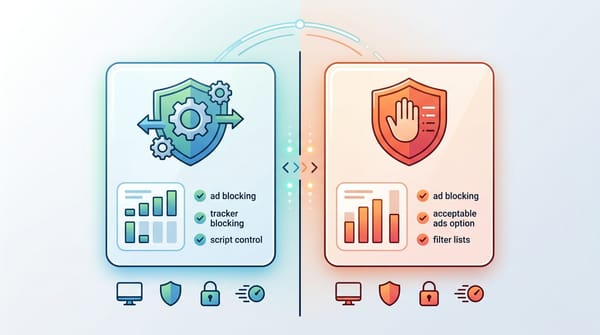
You are reading this AdGuard review because you want to know one thing: is AdGuard good enough to replace your current ad blocker in 2026? Yes. AdGuard remains one of the most powerful ad-blocking ecosystems available today.
However, your experience will depend entirely on which version you choose. The free browser extension provides excellent basic web cleanup. The premium system-level apps take it further, neutralizing ads and trackers across your entire operating system. I tested the AdGuard extension, desktop apps, and DNS across Chrome, Firefox, iOS, and Android to help you find the exact fit for your browsing habits.
What is AdGuard?
AdGuard is a comprehensive privacy ecosystem that eliminates intrusive ads, blocks web trackers, and bypasses anti-adblock walls. It speeds up page load times by up to 45% and protects your device from malicious scripts. AdGuard intercepts network requests and applies cosmetic filtering at the browser, system, or DNS level to stop ads before they render.
DATA: Testing Disclosure Box
- Last tested: March 2026
- Browsers tested: Chrome, Edge, Firefox, Safari
- Devices tested: Windows 11, macOS Sonoma, Android 14, iOS 17
- Products tested: AdGuard Browser Extension, AdGuard Premium App, AdGuard DNS
- Filters enabled: Base, Tracking Protection, Annoyances (Default configurations)
- HTTPS Filtering: Enabled for desktop testing
- Special scenarios: Retested against YouTube server-side ad insertion and strict anti-adblock walls
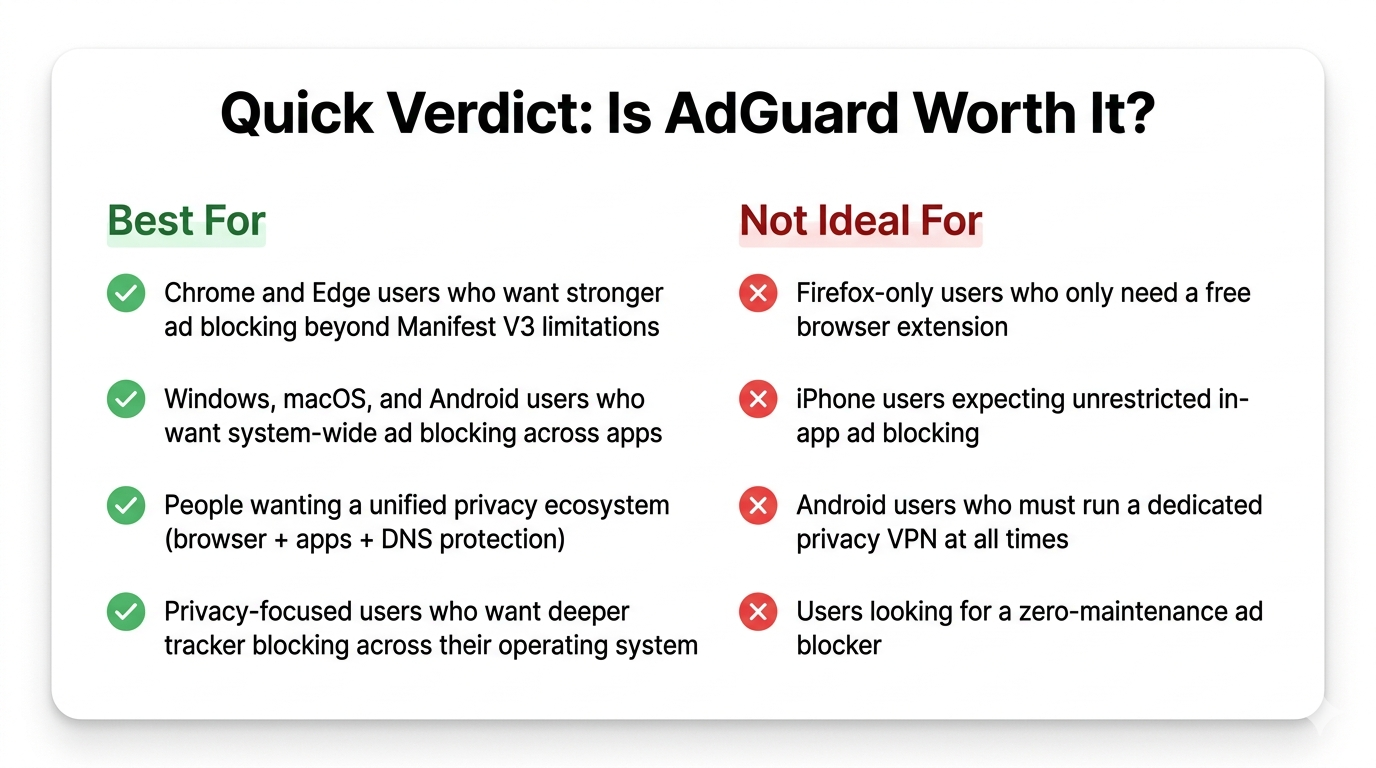
AdGuard’s value depends entirely on the product you select and the device you use. The free browser extension satisfies basic web browsing needs. The full premium apps matter most for system-wide blocking. Firefox-only readers likely do not need to pay for the premium version at all.
Quick Verdict
Treating AdGuard as just a standard ad blocker is a mistake. It operates as a complete privacy suite designed to clean up your digital footprint across browsers, standalone applications, and entire networks.
The value you get depends heavily on your chosen platform. The premium desktop apps provide deep, system-wide protection. Mobile environments like Android and iOS force AdGuard to operate within rigid Apple and Google constraints. You must choose the specific AdGuard product that matches your technical reality.
Best for:
- Chrome and Edge users wanting deeper blocking than Manifest V3 extensions currently allow.
- Windows, Mac, and Android users wanting app-level coverage beyond the web browser.
- Readers looking for a unified ecosystem across local apps, DNS, and network routing.
- Users heavily focused on privacy and tracking prevention across their entire operating system.
Not ideal for:
- Firefox-only users who just want a highly effective, free browser extension.
- iPhone users expecting universal, unrestricted in-app ad blocking.
- Android users who absolutely must run a separate, dedicated privacy VPN at all times.
- People looking for a zero-maintenance tool.
Free is enough if:
- You only care about blocking ads inside a single browser.
- You do not need to block ads inside desktop or mobile apps.
- You are willing to accept the limitations of Manifest V3 on Chromium browsers.
Premium is worth it if:
- You want system-wide HTTPS filtering.
- You need to block ads and trackers inside standalone software like Spotify or mobile games.
- You want one unified dashboard managing protection across multiple household devices.
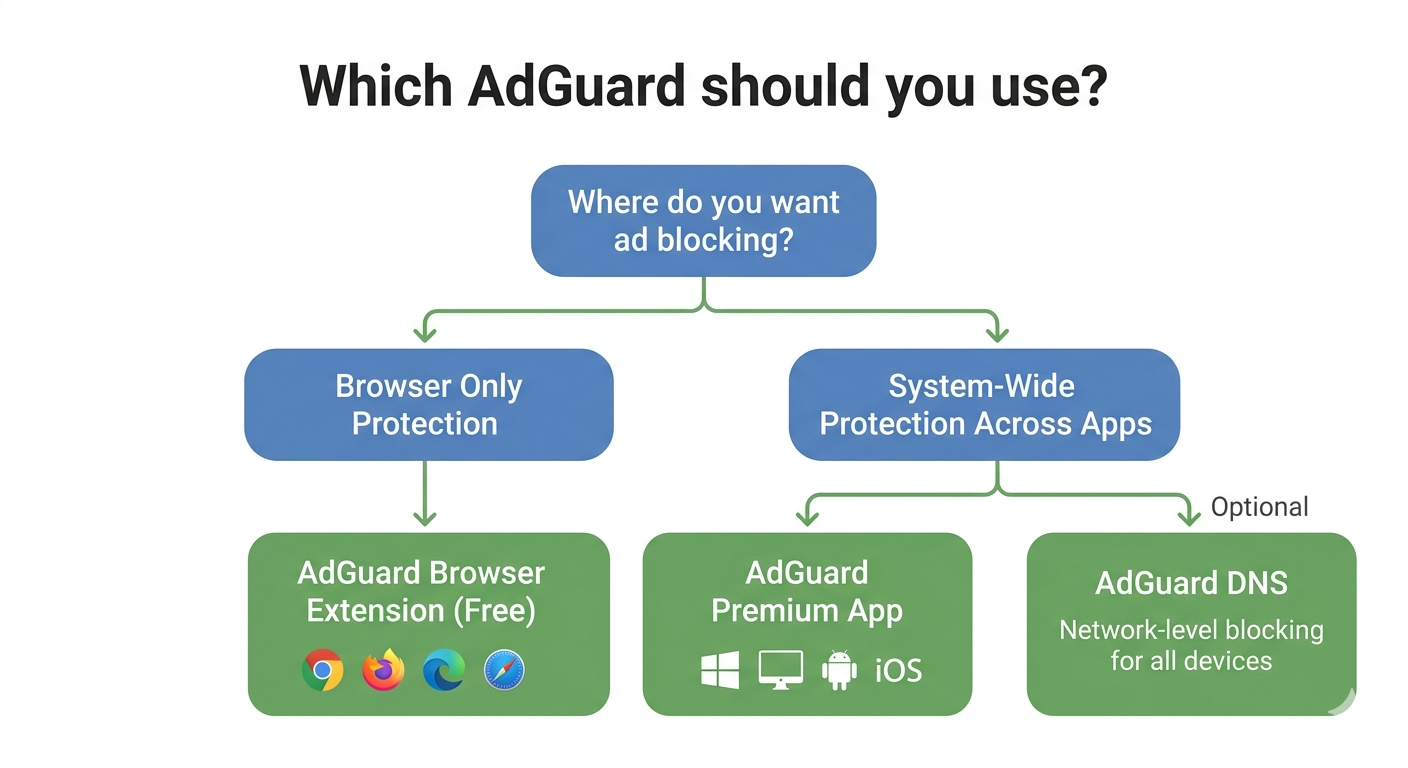
Which AdGuard Product Is Right for You?
The AdGuard browser extension is entirely distinct from AdGuard’s full desktop and mobile apps. Choosing the right architectural layer dictates your ad-blocking success.
AdGuard officially separates its offerings into a browser extension, desktop/mobile apps, a DNS service, and AdGuard Home. AdGuard’s own documentation states that users running the full desktop app do not need the standalone browser extension installed.
AdGuard Browser Extension Review
The AdGuard browser extension operates exclusively at the browser layer. It serves as a free starting point and is highly effective for basic cosmetic cleanup and tracker blocking. Its weakest point is reach. Protection ends the moment you close your browser.
Use the extension if:
- You strictly browse the web on a single primary browser.
- You do not need to block ads inside desktop software or mobile apps.
- You want to avoid configuring custom DNS or network-wide settings.
AdGuard App Review
The paid AdGuard app layer provides system-wide protection on Windows, Mac, Android, and iOS. This is where AdGuard’s most compelling premium value begins. It moves the filtering engine out of the browser and embeds it into the operating system.
Windows and Mac
On desktop, the AdGuard app excels at app-wide blocking. It operates at the network level and features powerful HTTPS filtering. It intercepts encrypted traffic before it ever reaches your browser or applications. This remains AdGuard’s absolute strongest use case.
Android and iOS
Mobile apps require a clear separation of expectations. On Android, AdGuard commands a broader mobile scope by operating as a local VPN to filter app traffic. On iOS, the experience is strictly Safari-led, relying heavily on Apple's native DNS and Content Blocker APIs.
AdGuard DNS
AdGuard DNS is a hosted filtering service that works across browsers and apps without installing any local software. It simply drops network requests to known ad and tracker domains. While it achieves broader coverage than an extension, it lacks cosmetic precision. It frequently leaves blank spaces where visual ads used to be because it cannot alter page code.
AdGuard Home
AdGuard Home is a self-hosted, whole-network sinkhole. It protects your entire Wi-Fi network. It is best reserved for advanced households looking to protect smart TVs, IoT devices, and guest phones without installing software on every endpoint.
| Product | Blocking Layer | Works Outside Browser? | Best For | Key Limitation |
|---|---|---|---|---|
| Extension | Browser only | No | Simple web browsing | Bound by browser engine limits |
| Premium App | System-wide | Yes | Deep OS-level protection | Requires HTTPS cert installation |
| DNS | Network-wide | Yes | Quick, multi-device cover | No cosmetic page cleanup |
| Home | Router/Network | Yes | Smart homes & IoT | Requires separate hardware |
AdGuard Performance
AdGuard delivers massive speed improvements on standard websites. It remains highly capable against streaming ads, though server-side ad insertion prevents absolute perfection.
In testing, AdGuard routinely delivers massive performance gains. According to AdGuard’s 2025 Web Performance Report, the software saves 30 to 40% of bandwidth and reduces page load times by 45% across major news websites. Raw page speed is only half the story. Streaming performance requires a completely different evaluation because platforms now aggressively alter their ad delivery methods.
Regular Websites
On traditional websites, AdGuard performance is exceptional. It easily neutralizes banners, popups, sticky ads, overlays, and background trackers. The tool effectively combines network-level domain blocking with precise cosmetic cleanup to ensure sites look native rather than broken or empty.
YouTube and Streaming Platforms
Performance on video platforms changes constantly with new backend backend updates. The system-level app generally proves more resilient than the browser extension. Results should always be framed as highly effective, rather than permanently guaranteed.
Server-Side Ad Insertion (SSAI)
Server-side ad insertion stitches the ad directly into the main video feed before it leaves the server. Ads become much harder to separate from the desired content. No ad blocker, including AdGuard, can promise absolute perfection against SSAI right now. AdGuard bypasses many anti-adblock warnings and handles a majority of YouTube ads, but it cannot defeat every SSAI implementation instantly.
Anti-Adblock Walls
Modern web browsing is plagued by anti-adblock walls, including warning popups, blurred articles, or completely disabled comment sections. Quietly bypassing these annoyances matters just as much as raw ad-block rates. AdGuard's "Annoyances" filter handles most of these obstacles elegantly.
| Site Type | Product Tested | Result | Caveat |
|---|---|---|---|
| News / Media | App & Extension | Excellent | Pages loaded 40%+ faster; visually clean. |
| YouTube | Premium App | Good | Occasional brief black screens before video starts. |
| Anti-Adblock Sites | Extension | Very Good | Annoyances filter must be manually enabled. |
Browser and Device Compatibility
Firefox, Chromium, Android, and iPhone represent entirely different AdGuard experiences.
Saying an ad blocker works identically on all devices is factually inaccurate. Chrome extensions now sit inside Manifest V3 limits. Firefox retains older, powerful APIs. Android requires a local VPN workaround. iOS remains a heavily restricted Safari-first environment.
Chrome and Edge
For Chromium browsers like Google Chrome and Microsoft Edge, the landscape has fundamentally shifted. Manifest V3 changed extension behavior, stripping away the real-time dynamic filtering capabilities ad blockers previously relied on. This limits users running the free AdGuard browser extension, though it barely impacts users running the full premium desktop app.
Firefox
Mozilla continues to support deeper, legacy extension capabilities alongside MV3. The AdGuard extension on Firefox remains incredibly powerful. Firefox-only readers should carefully compare AdGuard’s free extension with uBlock Origin before spending money on premium software.
Windows and Mac
Windows and macOS represent AdGuard’s strongest desktop case. The software delivers true app-wide blocking, covering both your browsers and standalone software. The system-wide HTTPS filtering catches encrypted ad requests before they render.
Android
AdGuard for Android offers incredible app-wide reach. It achieves deep system filtering without requiring you to root your device.
The Android VPN Conflict
One major limitation exists. Android normally does not allow two VPN-based apps to run simultaneously. AdGuard routes your traffic through a local VPN method to filter ads. If you rely on a dedicated privacy VPN like NordVPN or Mullvad constantly, this conflict forces a strict buying decision. You cannot easily run both at the same time.
iPhone and iPad
On iOS, AdGuard functions primarily as Safari-first protection. Apple tightly controls background app permissions.
What works well on iOS
AdGuard for iOS excels at removing Safari ads, blocking Safari trackers, and applying basic DNS protection across the device. The integration with Safari’s Content Blocker API is battery-efficient and fast.
What iOS users should not expect
You will not get universal in-app ad removal for platforms like the native YouTube or Spotify apps.
| Platform | Browser Ads | App Ads | YouTube | Another VPN Allowed? | Main Limitation |
|---|---|---|---|---|---|
| Chrome / Edge | Yes | No | Variable | Yes | MV3 constraints |
| Firefox | Yes | No | Variable | Yes | None |
| Windows / Mac | Yes | Yes | Yes (Browser) | Yes | Requires HTTPS trust |
| Android | Yes | Yes | No (In-App) | No | VPN slot occupied |
| iPhone / iPad | Yes | No | No (In-App) | No | Apple system limits |
AdGuard Features That Actually Matter
The features that matter most dictate how deeply AdGuard inspects your traffic and how much trust you place in the software.
AdGuard divides its filtering capabilities into specific categories. The settings that truly alter your experience are the ones you must understand before buying.
Filter Lists and Custom Filters
Filters serve as the rulebooks AdGuard uses to identify what to block. A curated set is enabled by default to balance performance with a clean web experience. You should not enable every single filter list. Doing so increases memory usage and raises the chance of breaking normal website functionality.
Stealth Mode
"Stealth Mode" translates directly into tangible privacy outcomes. It reduces tracking scripts, disables social media widgets, and cleans web pages. Pushing these privacy controls too far increases the chance of broken logins or missing shopping cart buttons.
HTTPS Filtering
HTTPS filtering is the core feature separating AdGuard Premium from basic browser extensions. To inspect encrypted web traffic, the AdGuard app installs a unique, local security certificate on your device. AdGuard uses HTTPS filtering to decrypt, inspect, and block ads hidden inside secure connections.
This feature guarantees strong ad coverage on encrypted traffic. The primary trade-off is certificate trust. You grant AdGuard permission to decrypt and inspect your secure traffic locally. You should not force-enable this for strict banking apps.
Features worth paying for:
- System-wide HTTPS filtering.
- Ad blocking inside standalone desktop and mobile applications.
- Parent-level network control over family devices.
Ease of Use, Setup, and Everyday Maintenance
AdGuard is highly usable, but the premium desktop and mobile apps require active maintenance and fine-tuning.
Usability includes how much maintenance AdGuard requires after installation. The browser extension works perfectly out of the box. The premium apps require deliberate configuration.
The First 10 Minutes After Install
- Confirm basic protection is enabled on the main dashboard.
- Update all filter lists manually to ensure you have the latest blocking rules.
- Enable specific extra filters like the Annoyances filter to kill cookie notices.
- Test your setup on one ad-heavy news site and one streaming video site.
- Learn the allowlist feature to quickly unblock a site if a page breaks.
Common Issues and Quick Fixes
When AdGuard conflicts with the modern web, you need tactical solutions.
Site breakage: If a checkout button disappears, use the immediate allowlist feature. Adding per-site exclusions is a normal part of running a strict ad blocker.
HTTPS errors: If a specific desktop application loses its connection, disable HTTPS filtering specifically for that app in the AdGuard settings menu.
Android VPN conflicts: If you use a corporate VPN, Android will force AdGuard to disconnect. Your only quick fix is to rely on AdGuard’s proxy mode.
[MEDIA: A first-10-minutes checklist graphic showing annotated screenshots of the allowlisting and filter settings menus.]
Free vs Paid: Is AdGuard Premium Worth It?
Test the free browser extension first. Upgrade to AdGuard Premium only if you require system-wide filtering or cross-device application control.
What You Get for Free
The free tier provides the AdGuard browser extension. It includes strong cosmetic filtering and tracker blocking. Free mobile scope on iOS handles Safari natively, which completely satisfies users who spend most of their time in the mobile browser.
What Paid Actually Adds
Purchasing an AdGuard Premium license unlocks system-wide filtering on Windows, Mac, and Android. It adds the ability to block ads inside desktop software, brings in advanced HTTPS controls, and allows you to sync your multi-device logic.
Who should pay:
- Users wanting persistent, app-level ad blocking on Windows, Mac, or Android.
- People requiring deeper control over their desktop network traffic.
- Users wanting one integrated ecosystem to protect all daily devices.
Who should start free:
- Strict browser-only users.
- Firefox-only web users.
- Readers currently comparing AdGuard directly against uBlock Origin.
Is AdGuard Safe and Trustworthy?
AdGuard operates transparently and runs filtering locally on your device. Trusting the deepest features requires accepting local HTTPS certificate installation.
AdGuard is a highly reputable company registered in Limassol, Cyprus. Its privacy policy explicitly states that filtering happens locally on your device and that they do not sell personal information.
Open-Source Footprint
AdGuard maintains massive transparency. Core components, including the browser extension and DNS tools, are open-source on GitHub. Public code proves the company allows independent security researchers to audit their software continuously.
HTTPS Filtering Trust Trade-off
From a security perspective, HTTPS filtering is a calculated choice. You actively choose to let AdGuard decrypt, inspect, and re-encrypt your web traffic to catch secure ads. This is a local process performed directly on your machine. It is technically safe, but it fundamentally requires you to trust AdGuard's root certificate.
AdGuard Pros and Cons
AdGuard’s biggest strength is system-wide scope. Its biggest weakness is platform limitation on mobile devices.
Biggest Pros
- System-wide reach: Blocks ads in desktop and mobile apps, not just browsers.
- Cosmetic filtering: Cleans up annoying blank spaces and anti-adblock walls smoothly.
- Unified ecosystem: One license manages Windows, Mac, iOS, and Android.
- Privacy controls: Stealth Mode neutralizes pervasive background trackers.
Biggest Cons
- Platform constraints: Android VPN limitations and iOS Safari rules handicap the mobile app experience.
- Setup density: Premium apps require active configuration and occasional troubleshooting.
- HTTPS requirement: Deep blocking requires trusting a local root certificate.
- Overkill for some: Paid tiers are completely unnecessary for users who only want a clean web browser.
AdGuard vs the Main Alternatives
Compare ad blockers by architecture first. A browser extension cannot do what a full system app or network router does.
AdGuard vs uBlock Origin
Firefox fully supports uBlock Origin's legacy capabilities. If you only want free browser blocking, uBlock Origin is incredibly light and equally powerful. Firefox users may not need paid AdGuard at all. Chrome users must compare the AdGuard extension against uBlock Origin Lite. Both are restricted by Google's MV3 rules, making the upgrade to AdGuard's system-level desktop app highly tempting.
AdGuard vs Brave Shields
Brave Shields are built natively into the Brave browser. It offers the lowest-friction alternative available. If you do not want to manage extensions or system apps at all, switching to the Brave browser is the fastest way to achieve a clean web experience.
AdGuard vs Blockify
Blockify is a dedicated browser-first alternative built specifically for streaming-heavy environments like Spotify and YouTube. Rather than relying entirely on static filter lists, it uses a dual-layer system to intercept audio and video ad calls before they load. With 360,000 users and a 4.8-star average from 5.3K ratings on the Chrome Web Store, it serves as an excellent, set-and-forget browser extension, though it lacks AdGuard's system-level reach.
When Not to Buy AdGuard
AdGuard is fantastic, but you should not spend your money if your daily setup fights the software.
- Skip paid AdGuard if you use Firefox only. A free extension on Firefox does almost everything a casual user needs.
- Skip Premium if you only want simple Chromium browser blocking. If you just want to read articles without banner ads, the free AdGuard extension covers the basics perfectly well.
- Skip it if you expect full iPhone in-app ad blocking. Apple strictly limits how ad blockers behave. AdGuard will clean up Safari brilliantly, but it will not strip ads out of the native iOS YouTube app.
- Skip it if another VPN is non-negotiable on Android. AdGuard requires Android's local VPN slot. If your corporate security policy requires running a strict VPN constantly, AdGuard Android will conflict directly with it.
Final Verdict
If you are reading this AdGuard ad blocker review to decide your next step, the conclusion is clear. AdGuard is exceptional in 2026, but only if you use it for the right reasons.
If you want deep, cross-device control that extends beyond the browser, AdGuard Premium is one of the best privacy investments you can make. If you just want a cleaner web browser, start with the free extension.
Best starting setup by scenario:
- Chrome user: Start with the free extension. Upgrade to the Windows/Mac app if MV3 limits frustrate you.
- Firefox user: Stick to the free browser extension.
- Windows/Mac user: AdGuard Premium desktop app for system-wide coverage.
- Android user: AdGuard Premium app, assuming you don't need a separate VPN.
- iPhone user: Free AdGuard extension for Safari.
FAQ
Is AdGuard good in 2026?
Yes. AdGuard remains one of the most powerful ad-blocking suites available. Its true value lies in its system-level desktop and mobile apps, which block ads across your entire operating system rather than just your browser.
Does AdGuard still work on YouTube?
AdGuard effectively blocks YouTube ads, but results vary based on platform updates. Because YouTube uses server-side ad insertion and aggressive anti-adblock scripts, performance is a continuous arms race.
Is AdGuard better than uBlock Origin?
AdGuard’s premium desktop app is far more comprehensive because it blocks ads system-wide. uBlock Origin is strictly a browser extension. For users who only want free browser-based blocking on Firefox, uBlock Origin remains equally powerful.
Does AdGuard slow down browsing?
No. AdGuard typically speeds up perceived page loads by up to 45%. By blocking heavy ad scripts and trackers from downloading, it saves significant bandwidth and renders pages faster.
Is AdGuard safe?
AdGuard is highly safe. It maintains a strict privacy policy and hosts its core code in public open-source repositories. Enabling its deepest features requires installing a local security certificate to inspect encrypted traffic locally.
What is the difference between AdGuard and the AdGuard browser extension?
The browser extension is a free, lightweight tool that only blocks ads inside your web browser. The full AdGuard app is premium software that filters ads system-wide, covering standalone applications and desktop software.
Is AdGuard free?
The AdGuard browser extension and basic mobile Safari protection are entirely free. To block ads in system apps on Windows, Mac, or Android, you must purchase an AdGuard Premium license.
Can I use AdGuard with another VPN on Android?
Generally, no. AdGuard for Android uses the device's single local VPN slot to filter system-wide traffic. It will conflict if you try to run a separate privacy VPN simultaneously.