
The headlines claim Google completely destroyed extension-based filtering. You probably noticed your favorite extension acting differently and started wondering about the future of a clean web.
Let me give you the exact truth right now.Does Chrome Manifest V3 kill ad blockers? No. It restricts their flexibility for real-time and advanced filtering, but basic page-ad and tracker blocking still works. Streaming-heavy and power-user scenarios are where the downgrade shows up most because the new framework limits the immediate adaptability modern web environments demand.
If you just want the practical answer, jump to the quick decision guide.
Does Manifest V3 Kill Ad Blockers?
The real change is a loss of adaptability, not a complete shutdown.
You can still block ads on Chrome. The architecture update shifted parameters rather than removing the entire function.
Basic ad and tracker blocking on standard websites remains highly effective. MV3-native blockers reduce page clutter for mainstream users. Under default browsing conditions, the underlying network interception gets the job done natively inside the browser.
Real-time adaptability suffered the biggest blow. Advanced custom filtering and the fast response times required to counter changing ad tactics face severe constraints. Cosmetic cleanup on some sites is also less reliable, leaving blank spaces where banners used to be.
Power users and streaming-heavy consumers feel the friction immediately. If you relied on old uBlock Origin behavior or cannot switch away from Chrome, you will face noticeable regressions.
What Chrome Manifest V3 Actually Changed for Ad Blockers
The update changed who runs the blocking logic and how flexible that logic can be.
This architectural shift rewrites the fundamental rules of how extensions interact with network requests.
How Manifest V3 Shifted Ad Blocking Control to Chrome
Manifest V2 relied on the webRequest API. This allowed extensions to pause, inspect, and modify network traffic in real time. Manifest V3 mandates the declarativeNetRequest API. This forces extensions to hand a predeclared list of rules to Chrome, leaving the browser to enforce them natively.
Why Google Introduced Manifest V3
Google cites security, performance, and predictability as the primary drivers. A constrained API limits the potential for malicious extensions to harvest user data. While that rationale holds legitimate security value, the implementation inherently shifts operational control back toward Chrome itself.
What “This Extension Is No Longer Supported” Means in Chrome
Chrome has phased out the old MV2 architecture. This warning message flags compatibility and support deprecation for specific legacy extensions. It does not indicate that all ad blocking is permanently disabled. You simply need updated MV3 versions, different blocker categories, or alternative browsers.
What Still Works and What Broke With Chrome Manifest V3
The declarative model preserves basic blocking but severely constrains advanced, real-time, and customized filtering.
Different features experienced completely different levels of degradation.
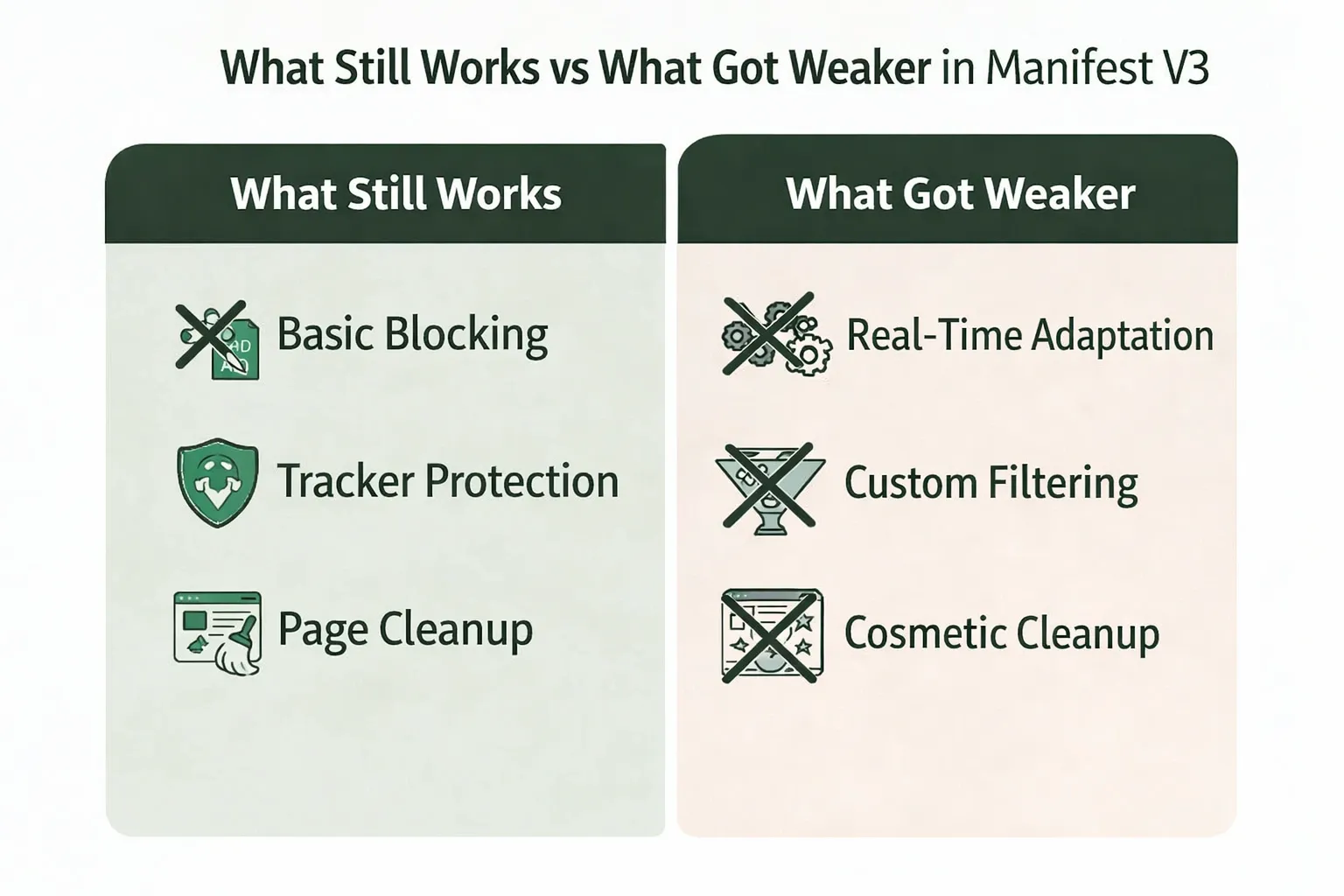
The default browsing experience on normal websites survived the transition intact. Many MV3 blockers handle common tracking requests effectively. For casual internet reading, the web remains relatively clean.
Cosmetic filtering visual downgrades
Cosmetic filtering hides the awkward visual artifacts left behind when a network request fails to load an ad. Under the new limits, you frequently see blank spaces, late-disappearing ad containers, or rougher page layouts. This visual downgrade makes blocking feel worse even when the network tracker is successfully stopped.
Dynamic filtering constraints
Advanced rules and on-the-fly decisions face strict structural limits. User-driven, fine-grained blocking cannot operate with the same instantaneous freedom. This specific constraint neutralized the power features legacy uBlock Origin users relied on most.
Slower filter updates
Blockers can feel critically behind when ad delivery tactics change overnight. The new framework limits how quickly an extension can pull and apply fresh filter rules without pushing a full extension update. This friction slows response times during active arms races.
Streaming and audio/video ads
Normal web ads load differently than dynamic audio and video insertion. Streaming platforms inject ads directly into the media feed, making them incredibly difficult to isolate. Rapid adaptation is harder under the new API, though it is not the singular reason streaming ads remain a complex technical challenge.
Why Chrome, Firefox, Developers, and Users Disagree on Manifest V3
Each group uses a different success metric, which is why the debate sounds highly contradictory.
The varying interpretations stem directly from competing priorities.
Google prioritizes predictable extension behavior
Google designed a safer extension model with a radically reduced abuse surface. The new framework delivers a more controlled performance profile. From an engineering and security perspective, the browser behaves exactly as intended.
Firefox keeps broader user control
Firefox adopted the MV3 standard while explicitly retaining the powerful webRequest API. Brave bypassed the extension debate entirely by relying on browser-native blocking paths built directly into the core software.
Developers had to specialize
Developers absorbed a massive rewrite burden with limited technical upside. The transition required significant resources just to restore basic functionality. This pressure forced a shift toward narrower scopes or specialized, layered products.
Users judge by page cleanliness
Technical nuance hits a wall when you encounter an unskippable video ad. Chrome-locked users and heavy streaming consumers judge success purely on output. You simply want your tools to work the way they did last year.
Security implications matter
Ad blocking serves a fundamental security function. The FBI officially recommends ad blockers to mitigate malicious advertising and digital fraud in search engine results. Stripping capability directly impacts user safety, not just convenience.
Best Ad Blocking Setup After Chrome Manifest V3
The best setup now depends less on ideology and more on what kind of ads actually bother you daily.
Match your tools to your exact daily pain points.
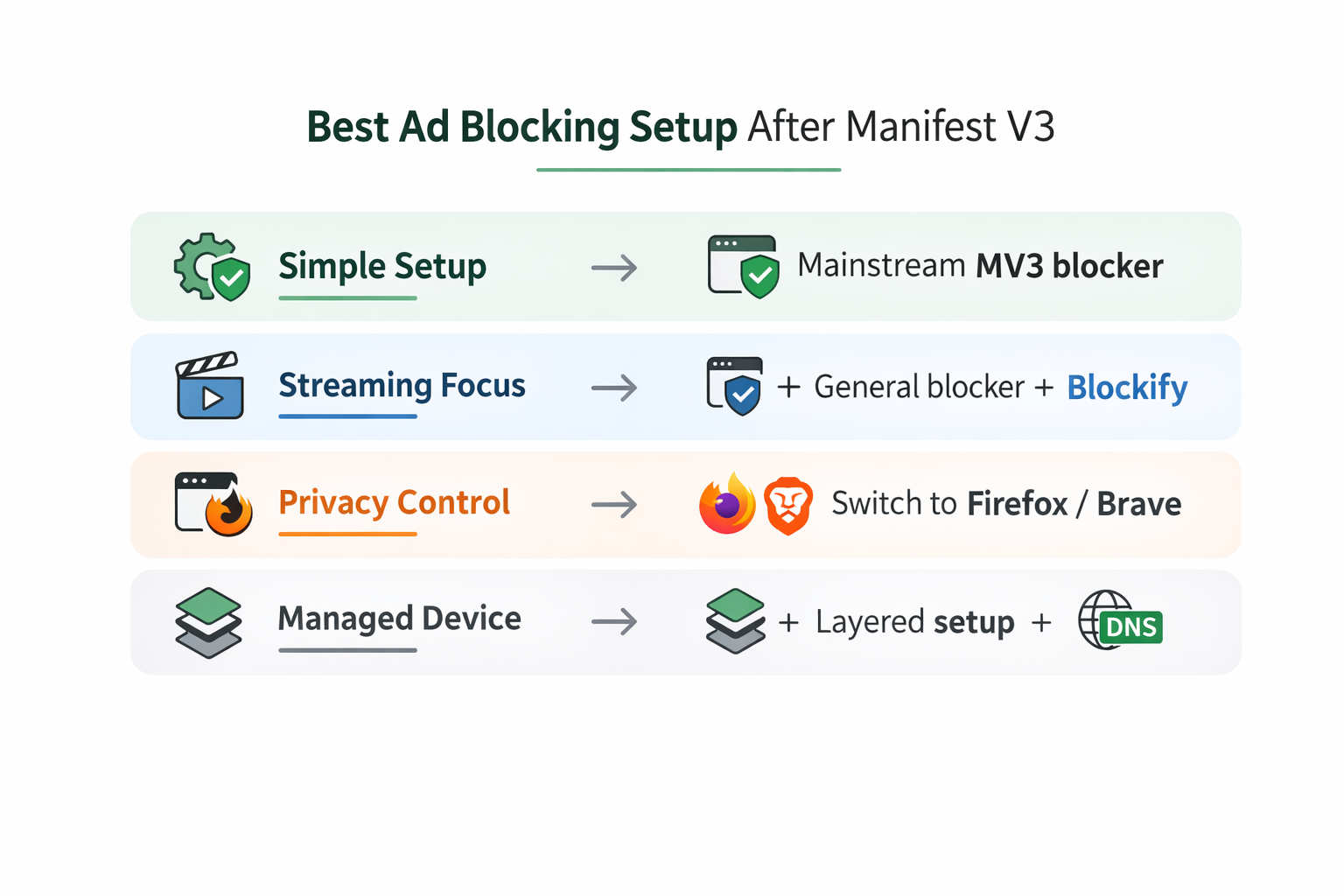
For a cleaner Chrome experience with minimal setup
Install a mainstream MV3-native blocker and leave it on default settings. Set realistic expectations regarding cosmetic cleanup. It works perfectly fine for typical reading and casual browsing.
If streaming ads annoy you more than page ads
Pair a lightweight general blocker with a streaming-focused tool. Blockify handles the dynamic media insertions that standard rule engines miss. This specific pairing targets both static text ads and aggressive audio/video interruptions.
If you care about advanced privacy controls
Chrome is now the tighter, less flexible environment for this specific requirement. Firefox remains the better fit if deep control and granular dynamic filtering matter most to you.
If you are locked into ChromeOS or a managed computer
Adopt a strict layered setup. Use one general blocker, one specialized layer only if absolutely necessary, and consider a system-level DNS filter for broader network coverage. Do not blindly pile on multiple overlapping extensions.
Key Mistakes to Avoid
- Stacking several general blockers that fight for the same rules.
- Expecting one basic extension to solve every server-side streaming case.
- Assuming paid options bypass Chrome's hardcoded architectural limits.
- Installing uBlock Origin Lite and never checking its manual mode settings.
What Happened to uBlock Origin After Manifest V3
The classic all-purpose power tool did not port cleanly, forcing the ecosystem to split into lighter, browser-native, layered, and specialized approaches.
Developers responded to the structural limits by segmenting their solutions.
Why classic uBlock Origin could not carry over
The legacy tool relied entirely on deep, real-time network inspection. That specific capability fundamentally clashes with the new constraints. The developer chose to build an entirely new tool rather than compromise the original engine's core philosophy.
What uBlock Origin Lite is
uBlock Origin Lite represents a different product built explicitly for the declarative rule model. It utilizes a strict permission-based structure. The default behavior feels conservative by design, requiring you to manually opt into higher, more intrusive blocking modes.
The confusion around uBlock Origin Lite modes
The extension offers Basic, Optimal, and Complete modes. Many users install it, stay on the default setting, see ads slip through, and immediately assume the tool is broken. The manual configuration requirement creates a sharp learning curve.
How other native blockers adapted
Rule-optimized blockers retooled their engines around the declarative limits. Privacy-focused and browser-native blockers shifted tactics entirely. Firefox and Brave provide alternative environments where standard extension bottlenecks do not apply.
Where Blockify fits in the modern landscape
Where general blockers focus on static page ads, Blockify tackles the streaming and audio-video focused use cases. It functions best alongside other tools, targeting the complex dynamic insertions on platforms like YouTube, Spotify, Twitch, and Hulu. Operating with a dual-layer blocking mechanism and a safe muting fallback, it delivers a set-and-forget experience. Trusted by 360,000+ users and holding a 4.8 rating from 5,300+ reviews, it fills the exact gap the API changes widened.
If streaming ads are your biggest pain point, compare a general rule blocker with a streaming-focused tool like Blockify.
The Future of Ad Blocking After Manifest V3
Chrome ad blocking will survive, but the future looks more layered, more specialized, and much less dependent on a single extension.
The ecosystem is stabilizing around a new baseline.
What will improve
Chrome will continue adjusting API limits based on developer feedback. MV3 blockers will keep optimizing their logic around the current constraints. Mainstream blocking quality will naturally improve as developers master the declarative framework.
What will not come back on Chrome
Full extension freedom is permanently gone. The era of live, custom, power-user control residing entirely inside a single Chrome extension will not return.
The layered and specialized future
We now need a general blocker for page ads and a streaming-focused tool for heavy audio/video consumption. Power users will continue migrating toward Firefox or system-level DNS solutions. The definitive adaptability ceiling forces everyone to diversify their defenses.
Bottom line
Does Chrome Manifest V3 kill ad blockers outright? No. It successfully reduced Chrome-side flexibility and eliminated the era where one extension could instantly do everything. Mainstream users can still secure a much cleaner web with default tools. Power users and streaming-heavy consumers simply need more tailored, multi-layered setups to achieve the same results.
Key Learnings:
- Basic blocking survived the transition.
- Advanced flexibility shrank significantly.
- The future is layered, not all-in-one.
If you browse normally, an MV3-native blocker is enough. If streaming ads are your main issue, compare it with a specialized option like Blockify. If deep control matters most, Firefox deserves a hard look.
FAQs
What Exactly Does Manifest V3 Disable in Ad Blockers?
It restricts real-time inspection and modification of network requests. Advanced dynamic filtering, fast custom rule updates, and specific cosmetic scriptlet behaviors are significantly more constrained than they were under the previous architecture.
How Does the Manifest V3 Update Change the Way Ad Blockers Work?
It shifts the responsibility of blocking from the extension to the browser. Instead of the extension intercepting and evaluating every network request dynamically, it must provide Chrome with a static list of declarative rules to enforce natively.
How Does Manifest V3 Affect Free Ad Blockers?
Free and paid blockers operate under the exact same technical rules. Price is not the deciding factor. The capability model shifted for every developer, forcing free tools to optimize their filter rules differently to stay effective.
What Does “This extension is no longer supported” Mean?
It means Chrome has officially phased out the older architecture that your specific extension relied on. You simply need to download the updated version of the tool or find a modern alternative.