The best ad blocker for YouTube in 2026 depends on the browser you use. Not all blockers work the same way anymore, especially after Chrome’s shift to Manifest V3, which limits how extensions can filter ads.
If your old setup stopped working, you’re not alone. YouTube continues to update its ad delivery and anti-adblock systems, and some tools are now more reliable than others depending on whether you’re on Chrome, Firefox, Safari, or iOS.
This guide breaks down the best ad blocker for YouTube by browser, so you can choose the setup that currently works best for blocking pre-roll and mid-roll ads.
Quick Answer: Best YouTube Ad Blockers by Browser
The best ad blocker for YouTube depends on your browser and device. No single tool works everywhere. Here's what to install:
- Firefox (best free option): uBlock Origin (full MV2 version); available on Firefox and Brave
- Chrome (most reliable): AdGuard system-level app, or Blockify as an MV3-compatible extension
- Chromium, willing to switch: Brave Browser with Shields set to Aggressive
- Safari on Mac: AdGuard for Mac (system-level filtering)
- iOS: YouTube Premium; the only consistently reliable ad-free route
| Browser / Platform | Best Pick | Cost | Setup Effort |
|---|---|---|---|
| Firefox | uBlock Origin (full) | Free | Low–Medium |
| Chrome | AdGuard (system) or Blockify | Free / Paid tiers | Low |
| Edge | uBlock Origin (full) or AdGuard | Free / Paid | Low |
| Brave (Chromium) | Built-in Shields (Aggressive) | Free | Low |
| Safari (Mac) | AdGuard for Mac | Paid | Low |
| iOS | YouTube Premium (or Premium Lite) | $7.99–$13.99/mo | None |
Note on Edge: Microsoft Edge currently continues to support Manifest V2 extensions, including the full version of uBlock Origin. However, because Edge is built on Chromium and tracks many upstream changes from Chrome, its long-term support for MV2 is not guaranteed. Monitor official Edge release notes for any updates to extension platform policies.
Why Blocking YouTube Ads Is Harder in 2026
Two forces work against traditional blockers:
Manifest V3
Manifest V3 changed how extensions block network requests in Chrome. Google began phasing out Manifest V2 extensions in the Chrome Web Store in 2024 and has disabled MV2 extensions in stable Chrome releases as part of its transition to MV3. As a result, the full-featured version of uBlock Origin is no longer supported in Chrome.
uBlock Origin Lite is available for Chrome under Manifest V3. However, because it operates within declarativeNetRequest limits, it does not support dynamic filtering or some advanced scriptlet capabilities that were available in the MV2 version.
Mozilla Firefox continues to support both Manifest V2 and Manifest V3 extension frameworks. This allows the full version of uBlock Origin to operate with its original filtering model on Firefox.
SSAI: The Ad You Can't Filter
Server-side ad insertion (SSAI) stitches ads directly into the video stream, making them harder to distinguish from content at the network level. Unlike traditional ads that load as separate requests, SSAI ads are delivered as part of the media stream, which can make them more difficult for browser-based blockers to filter.
Reports of YouTube testing server-side ad delivery began circulating in 2025. Implementation appears to vary by user, region, and experiment group.
How to spot it: an ad plays, your blocker reports few or no blocked requests, and standard ad indicators (such as visible ad segments in the timeline) may not behave as expected.
YouTube does not use a single ad delivery method for all videos or users. When ads are delivered server-side, blocking becomes less consistent across tools. Subscription options like YouTube Premium remain the most reliable way to remove ads entirely.
Best YouTube Ad Blocker for Firefox (Best Free Option)
Firefox + uBlock Origin is the best free ad blocker for YouTube in 2026. Firefox's continued MV2 support gives it full filtering power Chrome removed.
How to install uBlock Origin Lite for Firefox
- Download Firefox if needed.
- Install uBlock Origin → click "Add to Firefox."
- Visit youtube.com and confirm the uBO icon appears.
Default settings block YouTube ads out of the box.
Recommended Filters
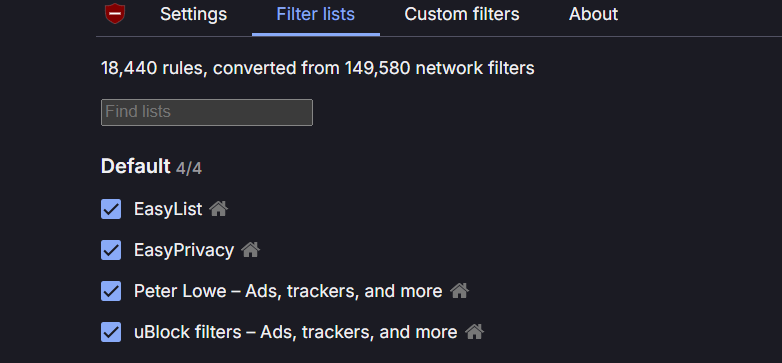
Open the uBO dashboard (click icon → gear icon) → Filter lists → confirm enabled: uBlock filters (all defaults), EasyList, EasyPrivacy, Peter Lowe's Ad and tracking server list.
YouTube ads still showing in this setup?
YouTube's anti-adblock system updates regularly. When ads return, don't uninstall:
- Try switching to “Complete Mode” in Settings
- Hard refresh YouTube: Ctrl+Shift+R (Mac: Cmd+Shift+R).
- If ads persist, disable all other ad blockers/privacy extensions; two blockers conflict and break filtering for both.
Best YouTube Ad Blocker for Chrome (and Edge) in 2026
Chrome is the hardest browser to block YouTube ads on. Google controls both browser and platform; MV3 caps extension capabilities while YouTube's detection keeps evolving.
Edge distinction: Edge currently supports full uBlock Origin, so Edge users can install it directly. However, Edge has been phasing out MV2, with plans to stop allowing them in the add-ons store.
Option A: AdGuard System-Level Blocking (Most Reliable on Chrome)
AdGuard's desktop app filters traffic at the OS level. Chrome's MV3 limits don't apply. System-wide filtering is also harder for detection scripts to identify.
Windows: Download AdGuard → Enable Ad Blocking → activate AdGuard Base filter, Annoyances filter, EasyList → test YouTube with multiple videos.
Mac (covers Safari too): Download AdGuard for Mac → grant macOS permissions → enable browser integration → activate filters → test across browsers.
Option B: Blockify (Best Chrome Extension)
For a browser extension handling YouTube alongside other streaming platforms: Download Blockify.
- Open Blockify settings after installing.
- Enable audio and video ad blocking (targets in-stream ads).
- Confirm fallback behavior (safe muting) is active; if an ad can't be fully blocked, Blockify mutes it.
Blockify covers YouTube, Spotify, Twitch, Hulu, and websites in one extension. If you use multiple streaming platforms, one tool beats juggling separate blockers.
Option C: Brave Shields on Aggressive (Easiest Browser Switch)
Brave uses the same filter lists as uBlock Origin, built into the browser engine instead of an extension, sidestepping MV3 limits.
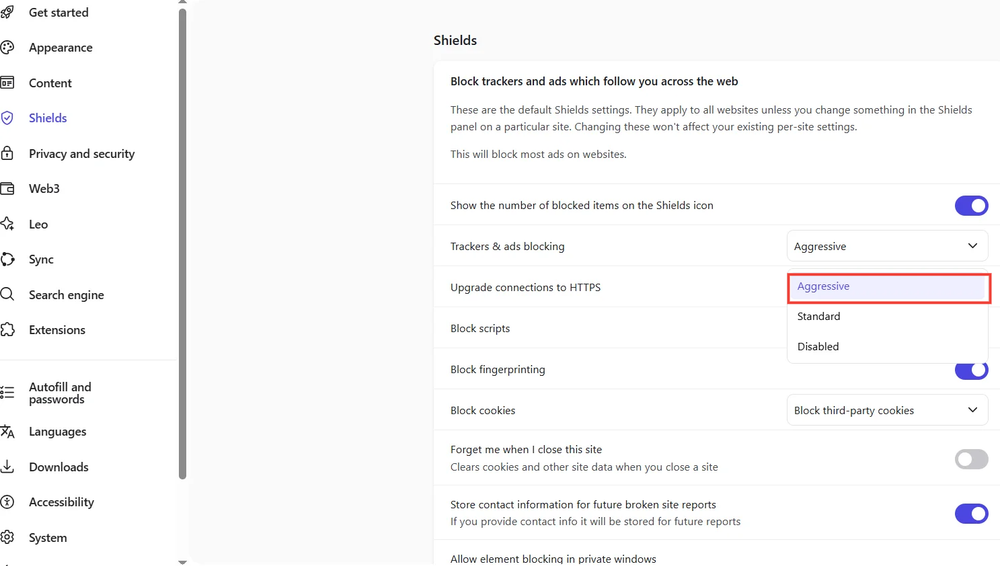
Important: The default is Standard. Set Shields to Aggressive for YouTube. Aggressive applies stronger protections at a slight risk of breaking some sites.
- Download Brave.
- Open YouTube → click the Shields icon (lion) → set Trackers & ads blocking to Aggressive.
- Disable other ad blocker extensions to prevent conflicts.
What Doesn't Work on Chrome (Dead Ends)
- uBlock Origin on Chrome: MV2 permanently disabled. MV3 prevents effective YouTube blocking even if re-enabled.
- Random "YouTube ad blocker" extensions: Often abandoned, repackaged adware, or unable to keep pace. Check publisher history and review recency.
- DNS-only solutions (Pi-hole, AdGuard DNS, NextDNS): YouTube serves ads and video content from the same domains; DNS blocking can't separate them without breaking playback. Pi-hole is a domain blocker with no effect on in-page scripts. Keep it for network-wide ads; use a browser-level tool for YouTube.
Also read: NextDNS alternatives
Best YouTube Ad Blocker for Safari (Mac)
Safari uses a declarative Content Blocker API, which limits certain dynamic filtering capabilities compared to browsers that support full request interception. As a result, some Safari-based YouTube blocking extensions may be less flexible when YouTube changes its ad delivery methods.
Recommended: AdGuard for Mac
The same AdGuard for Mac setup from the Chrome section covers Safari. This is generally the most consistent Safari-compatible solution because filtering happens outside the browser. Confirm Safari integration is enabled, then test pre-roll, mid-roll, and live streams.
Player Replacers (Trade-Offs)
Extensions that swap YouTube's player bypass ads through alternative playback but sacrifice features (comments, playlists, quality options) and break frequently after YouTube updates.
Best Ad Blocker for YouTube on iOS
Blocking ads inside the YouTube iOS app isn't reliably achievable with traditional blockers. Apple restricts all iOS browsers to WebKit, limiting content blocking. The YouTube app doesn't support extensions.
Most Reliable: YouTube Premium
YouTube Premium costs $13.99/month individual, $22.99/month family, or $7.99/month for students. Premium Lite ($7.99/month) provides ad-free videos without YouTube Music. One account covers phone, tablet, smart TV, and any logged-in browser.
Browser Route: Brave on iOS
Brave's native Shields, updated daily, remain the most reliable iOS browser for YouTube. Install Brave from the App Store, open youtube.com, and confirm Shields is enabled. Results vary, not the same reliability as Premium or desktop blocking.
Modified Clients (High Risk)
Modified YouTube clients violate YouTube's Terms of Service, require ongoing sideloading maintenance, and carry poor risk-to-reward ratios. Best split for most people: Premium (or Lite at $7.99/mo) on iOS, free blocker on desktop.
Head-to-Head: Firefox + uBO vs. Brave vs. AdGuard vs. Blockify vs. Premium
| Feature | Firefox + uBlock Origin | Brave (Aggressive) | AdGuard (System) | Blockify | YouTube Premium |
|---|---|---|---|---|---|
| Blocks YouTube video ads | Yes | Yes | Yes | Yes | Yes (native) |
| Handles anti-adblock walls | Yes (with updates) | Yes (usually) | Yes | Yes (dual-layer) | N/A |
| Works on | Firefox, Brave | Brave (all OS) | Chrome, Edge, Firefox, Safari | Chrome, Edge, Brave | All devices |
| Setup effort | Medium | Low | Medium | Low | None |
| Maintenance | Occasional filter updates | Rare | Rare | Rare | None |
| Cost | Free | Free | Free / Paid | Free | $7.99–$13.99/mo |
| Best for | Max control | Easy switch | Multi-browser desktop | Multi-platform streaming | Zero hassle |
Pick based on your constraint: the browser you must keep, and how much tweaking you'll tolerate.
Troubleshooting: When YouTube Ads Come Back
Don't uninstall. Two minutes fixes most issues.
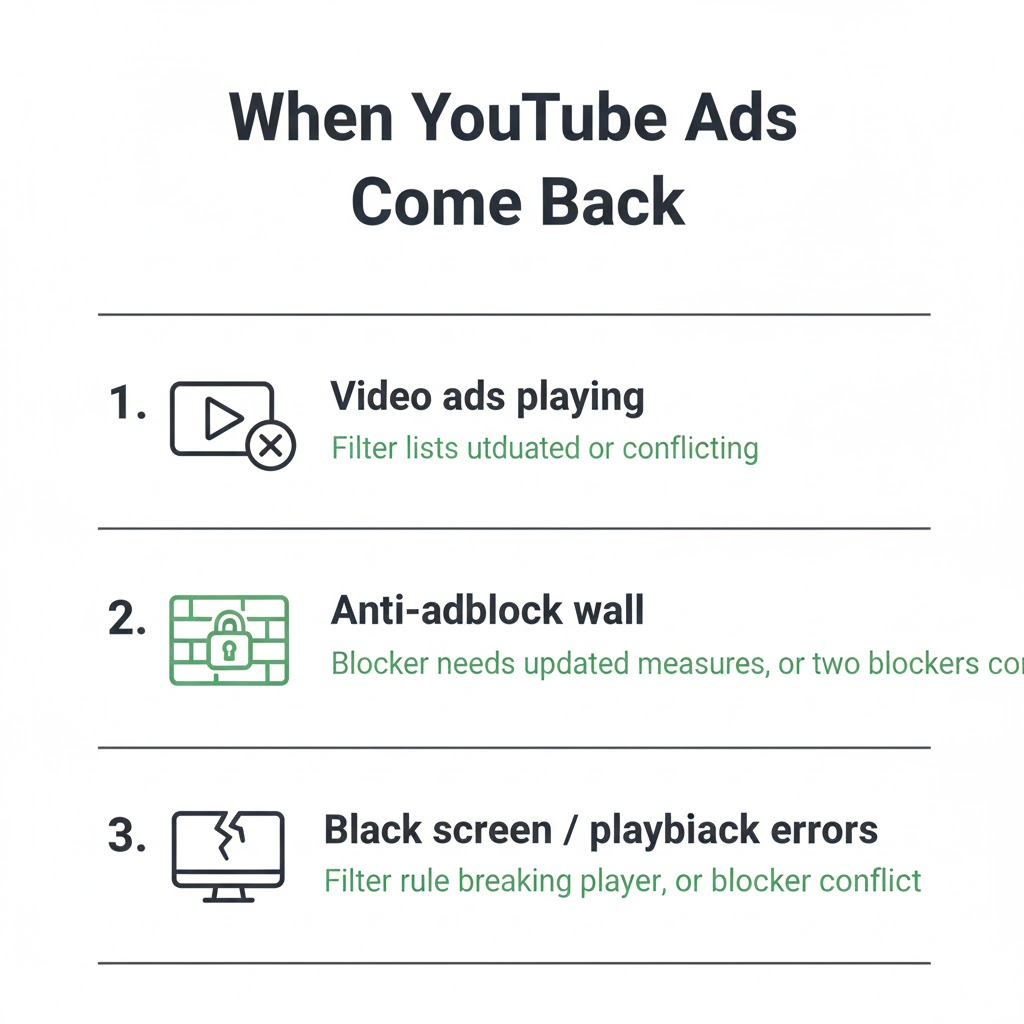
Identify the failure:
- Video ads playing → Filter lists outdated or conflicting
- Anti-adblock wall → Blocker needs updated countermeasures, or two blockers conflict
- Black screen / playback errors → Filter rule breaking player, or blocker conflict
- Lag / stuttering → See performance section below
The "One Blocker Rule": Running two ad blockers on YouTube almost always causes problems. Disable everything except your primary blocker, including privacy extensions that also block ads, and retest in a fresh window.
Update your blocker:
- uBlock Origin: Dashboard → Filter lists → "Purge all caches" → "Update now" → hard refresh (Ctrl+Shift+R)
- AdGuard: Check for filter updates → restart filtering
- Blockify: Check for extension updates → restart → retest
- Brave: Confirm Shields is still Aggressive (can reset after updates). Settings → Shields → Content filtering → "Update lists"
Fix YouTube Lag and High CPU with an Ad Blocker
YouTube's detection scripts and your blocker's counter-scripts create a feedback loop: detection triggers scripts, your blocker counters, which triggers more detection.
| Symptom | Likely Cause | Fix |
|---|---|---|
| Delay on play/pause | Detection overhead | Disable duplicate blockers; update lists |
| Dropped frames | Blocker + anti-adblock loop | Switch to Brave or Firefox |
| Overheating | Heavy cosmetic filtering | Reduce filter list count |
| Lag only logged in | Account-level detection | Test logged out |
If Chrome performs worse, try Brave or Firefox; often Chrome-specific due to MV3 interactions.
What Doesn't Work for YouTube Ads (Common Myths)
"Clear cookies and cache": YouTube's anti-adblock runs through scripts and account signals, not cached data. Update your blocker's filter lists and remove extension conflicts instead.
VPN to "no-ads countries": Inconsistent, temporary, and YouTube has cracked down on VPN-based regional workarounds throughout 2025–2026.
Pi-hole / DNS for YouTube video ads: Covered above; same-domain delivery makes DNS blocking ineffective for in-stream YouTube ads.
Is Blocking YouTube Ads Illegal?
Ad blocking is not illegal in most jurisdictions. It can violate YouTube's Terms of Service, and YouTube may restrict playback. YouTube has shown warning pop-ups and temporary restrictions but doesn’t usually ban accounts solely for ad blocking.
| Method | Account Risk | Stability |
|---|---|---|
| YouTube Premium | None | High |
| Firefox + uBlock Origin | Low | High |
| Brave (Aggressive) | Low | High |
| AdGuard (system-level) | Low | High |
| Blockify | Low | High |
| Modified clients / sideloaded apps | Medium–High | Low |
FAQ
Is there any ad block that works on YouTube in 2026?
Yes. uBlock Origin on Firefox, Brave (Aggressive Shields), AdGuard system-level, and Blockify all block YouTube video ads. Match the tool to your browser; Chrome-only extensions struggle most due to MV3 limits.
How do I block YouTube ads completely?
Use uBlock Origin on Firefox or Brave with Aggressive Shields (free). On Chrome, use AdGuard system-level or Blockify. SSAI can occasionally bypass any blocker; Premium is the only 100% guarantee across all devices.
What is the best YouTube ad blocker for Chrome?
AdGuard's system-level app (bypasses MV3 entirely) or Blockify (MV3-compatible extension). Full uBlock Origin no longer works on Chrome.
What is the best YouTube ad blocker for Firefox?
uBlock Origin, the full MV2 version. Mozilla supports both MV2 and MV3 concurrently, retaining full webRequest API functionality.
What is the best YouTube ad blocker for Safari?
AdGuard for Mac with Safari integration. Safari-only extensions and player replacers break more often after updates.
What is the best ad blocker for YouTube on iOS?
YouTube Premium or Premium Lite ($7.99/mo). iOS WebKit restrictions make browser blocking inconsistent. Brave on iOS works sometimes but varies.