Ads are slipping through because Google Chrome phased out legacy blockers under Manifest V3 (MV3), limiting how extensions filter network requests. If your current setup flickers, lags, or fails on YouTube, the fix isn’t one “magic” extension anymore.
In 2026, the most reliable approach is to separate streaming from general web browsing: use a streaming-focused tool like Blockify for audio and video ads, pair it with an MV3-compliant website cleaner such as uBlock Origin Lite or AdGuard for pop-ups and page ads, and enable a Secure DNS provider to block trackers at the network level. Combining streaming protection, page filtering, and DNS-level blocking keeps Chrome fast, stable, and consistently ad-free without breaking sites.
TL;DR: Best Free Ad Blocker For Chrome (2026 Quick Picks)
Pick your setup:
- Best overall: DNS-level blocker + MV3 extension + streaming-first blocker (Blockify) for audio/video ads.
- Best free ad blocker for Chrome browser: uBlock Origin Lite (in "Complete" mode) + free ad-filtering DNS.
- Best for streaming only: Blockify (built specifically for Twitch, Spotify, and YouTube).
Why Chrome Ad Blockers Break
Manifest V3 fundamentally shifted how Chrome handles extensions. Instead of intercepting network requests in real-time (Manifest V2), blockers must now ask Chrome to apply pre-defined rules.
What this means for you:
- Cosmetic delays (Flicker): Ads often load for a split second before the extension hides them.
- Loss of instant updates: Blockers cannot update their rule sets on the fly to fight ad-tech changes.
- Streaming failures: Platforms like YouTube and Twitch use Server-Side Ad Insertion (SSAI). Banner-ad blockers cannot reliably separate injected video ads from actual content anymore.
How To Block Ads On Chrome in 2026 (New Method)
The hybrid blocking stack is the modern standard. It splits the workload across different layers, catching ads at the network level, cleaning up the visual page, and intercepting dynamic media streams.
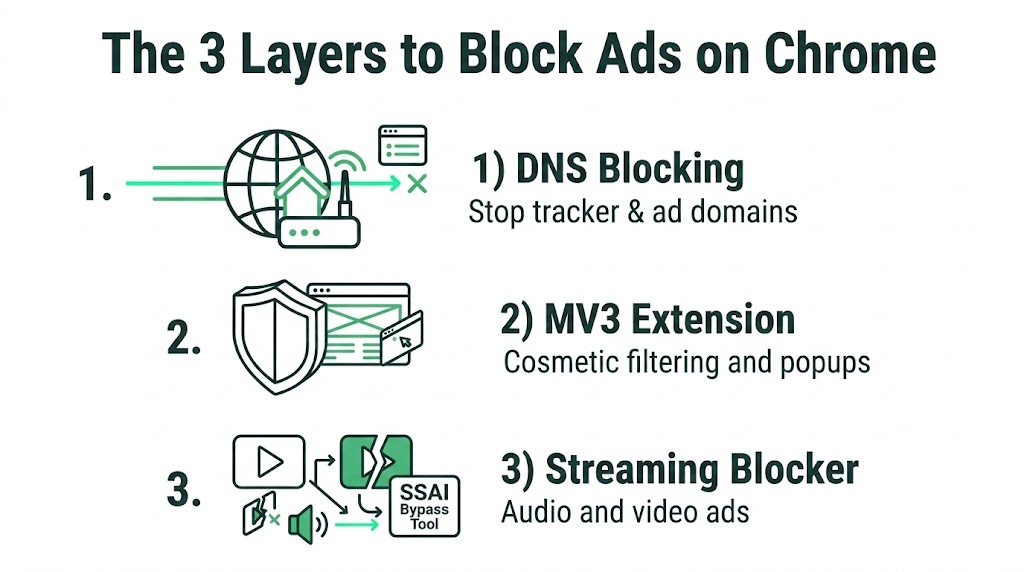
The 3 Layers:
- Layer 1 (DNS blocking): Stops tracker and ad domains before the webpage starts loading. This eliminates flicker.
- Layer 2 (MV3 extension): Cleans up the page structure. It handles cosmetic filters and popups that bypass the DNS.
- Layer 3 (Streaming blocker): Targets audio and video ad delivery (Hulu, Spotify, Twitch) using smart detection and safe muting.
Golden Rule: Run only one primary page-cleanup extension at a time. Blindly running three extensions that rewrite page elements causes severe lag and breaks websites.
Best Ad Block Extensions for Chrome: Blockify vs. uBlock Origin Lite vs. AdGuard MV3
Understand how the top solutions compare before installing them.
| Feature | Blockify | uBlock Origin Lite | AdGuard MV3 |
| Best For | Streaming-first, set-and-forget users. | Free, lightweight web browsing. | Power users wanting custom rules. |
| Top Strength | Audio/video ads, Twitch, Spotify. | Standard web ads, pop-ups, trackers. | Complex web layouts, specific elements. |
| Weakness | Deeply manual cosmetic element picking. | Advanced dynamic filtering (MV3 limits). | Increases browser overhead/friction. |
| Streaming | Exceptionally high (smart detection). | Moderate (vulnerable to YouTube updates). | Moderate (requires frequent list updates). |
| Friction | Low (works out of the box). | High (requires manual mode changes). | High (user scripts needed for max power). |
| Setup Time | < 2 minutes | ~5 minutes | 10+ minutes |
Blockify is the streaming-first choice. Designed specifically for dynamic audio and video ad patterns, it uses intelligent fallbacks and safe muting to protect your attention without triggering ad-block warnings.
uBlock Origin Lite remains the strict-MV3 baseline. Its effectiveness depends entirely on manually granting it broad permissions.
AdGuard MV3 offers control for tinkerers who use user scripts, but it introduces setup complexity.
Best Ad Blocker Setup For Chrome Browser in 2026
Match your stack to your browsing habits.
Option #1: Best Free Ad Blocker for Google Chrome (Web + Cleanup)
This stack maximizes free coverage for standard web browsing. uBlock Origin Lite is highly effective, but you must change its default settings.
Steps:
- Turn on Secure DNS. Go to Settings > Privacy and security > Security. Scroll to "Use secure DNS."
- Apply an ad-filtering resolver. Select "Custom" and paste a provider link (like Control D or NextDNS).
- Install uBlock Origin Lite. Open its dashboard. Switch the filtering mode from "Basic" to "Optimal" or "Complete." Warning: Basic mode leaves many ads visible.
Note: If dynamic streaming ads (YouTube, Twitch) are your main frustration, Option #1 will struggle. Move to Option #2.
Option #2: Best “Set-and-Forget” Stack (Browsing + Streaming)
This is the simplest path to reliable, ad-free browsing across heavy websites and dynamic streaming platforms. It uses smart detection to bypass server-side ad injection entirely.
Steps:
- Install Blockify from the official site and pin it.
- Leave defaults intact. Blockify's dual-layer mechanism works out of the box.
- Verify. Check one standard website, YouTube, and the Spotify web player.
Why it works on streaming: Traditional blockers rely on static lists. Blockify anticipates audio/video delivery patterns, detecting ads before they load and using intelligent fallbacks when platforms try to force ads through.
Option #3: Best Privacy-First Stack
Many free ad blockers quietly turned into data-extraction tools. This stack focuses on ownership transparency.
Check the publisher:
Before giving an extension the right to "read and change all your data," verify who owns it. For instance, Total Adblock is frequently recommended online, but System1 (a customer acquisition and ad-tech marketing company) owns it. Running a privacy tool built by an ad-tech network presents an inherent conflict of interest.
Steps:
- Configure a strict privacy DNS (like Quad9).
- Install a transparent, open-source MV3 extension (uBlock Origin Lite).
- Audit permissions. Never grant "Read and change on all sites" blindly. Set it to run "On click" or on specific websites.
Option #4: Best Power-User Stack (Maximum Control)
If you refuse to give up custom filtering rules and accept the risk of breaking sites, build this stack.

Steps:
- Install AdGuard MV3.
- Pair it with a customized NextDNS profile where you maintain personal block lists.
- Enable AdGuard's advanced permissions to apply custom user scripts.
- Maintain. Expect to manually whitelist sites when aggressive custom rules break page layouts.
Streaming Platforms: What Works on YouTube, Twitch, and Spotify on Chrome
Stop expecting banner-ad blockers to solve video ad problems.
| Platform | DNS Layer | MV3 Extension | Streaming-First Blocker (Blockify) |
| YouTube | Fails on mid-roll video ads. | Hit or miss (depends on YT script updates). | Highly Effective. Stays reliable via smart fallbacks. |
| Twitch | Fails completely (SSAI). | Breaks the video player entirely. | Highly Effective. Bypasses server-side injection. |
| Spotify | Minimal impact on audio. | Misses audio triggers. | Highly Effective. Employs safe muting on audio ads. |
Note: To run the best ad blocker for Chrome browser effectively, you have to manage permissions.
Chrome warns you that an extension can "Read and change your data on all websites." A blocker must see the webpage code to remove the ads. If you deny this permission, uBlock Origin Lite and others perform weakly.
Permission Checklist:
- Grant broad access only to trusted tools.
- Understand the trade-off: Less permission equals more visible ads.
- Avoid Developer Mode. Tools requiring external user scripts increase your attack surface. Keep it simple unless you possess deep technical knowledge.
- Re-check extensions quarterly. Extensions get sold. Ensure a trusted tool hasn't quietly changed hands.
Troubleshooting & Maintenance
Your stack is only as good as its last update. Touch it only when you notice ads again.
- Run an ad block test.
- Load a heavy news site to check for empty white boxes.
- Test a streaming platform you use daily.
Fast Fixes:
- Ads showing? Manually update your extension in Chrome and reload.
- Still showing? Check your MV3 extension mode. If it reverted to "Basic," it lacks permission to block deeply embedded scripts.
- Site broken? Temporarily allowlist the specific site.
FAQs
What’s currently the best ad blocker for Chrome?
The best approach is a hybrid blocking stack. Combine secure DNS filtering with a modern MV3 extension and a dedicated streaming tool like Blockify. Single legacy extensions no longer work effectively under Manifest V3.
Is uBlock Origin dead on Chrome?
The original uBlock Origin (Manifest V2) is disabled on modern Chrome builds. The developer created uBlock Origin Lite, which complies with MV3 rules. It works well but requires manual permission adjustments.
Do ad blockers still work on YouTube in 2026?
Standard list-based blockers struggle with YouTube’s server-side ad updates. To block YouTube ads reliably, you need a streaming-first tool that detects ad delivery patterns and utilizes intelligent fallbacks.
Can Chrome ad blockers block Twitch ads?
Most classic extensions fail on Twitch because it uses Server-Side Ad Insertion (SSAI). You need a dedicated, streaming-first solution with smart detection to handle Twitch without breaking the video player.
Do I need both a DNS blocker and an extension?
Only for maximum coverage. DNS stops ad domains before Chrome requests them, saving bandwidth. The extension cleans up the empty spaces and pop-ups left behind.