
You are deciding between two of the most popular ad blockers on the market. In the AdGuard vs AdBlock Plus debate, the right choice depends entirely on your privacy needs and browser setup. AdGuard delivers superior out-of-the-box ad blocking and system-wide protection. AdBlock Plus is a lighter, reliable extension that intentionally allows non-intrusive ads by default. This guide evaluates their real-world performance, privacy features, and Manifest V3 constraints to help you choose the exact tool for your daily browsing.
Already know your browser? Jump straight to the Chrome or Firefox verdict.
Quick Answer: AdGuard or AdBlock Plus?
AdGuard is better for users seeking aggressive ad blocking, strict tracker protection, and system-wide coverage via desktop apps. AdBlock Plus is ideal for casual users who prefer a lightweight browser extension and want to support publishers by allowing acceptable ads. AdGuard blocks more ads by default, while AdBlock Plus requires manual configuration for maximum protection.
Your true winner changes depending on how you plan to use the software.
- Best default blocking: AdGuard
- Best if you already use ABP: AdBlock Plus (with tweaked settings)
- Best for Chrome max-blocking: AdGuard desktop app
- Best for privacy: AdGuard
- Best for whole-home use: AdGuard Home
If you already use one of them, do not switch yet. Check the 2-minute setup section first.
How I Compared Them
I tested both tools across three distinct states to reflect actual user experiences. I evaluated the default installation, a properly configured browser extension, and beyond-browser system protection.
This testing framework reveals how the tools actually perform under real constraints rather than just comparing marketing pages.
The 5 Scoring Criteria
I evaluated ad blocking effectiveness and deep privacy tracker blocking. I also measured performance resource use, anti-adblock YouTube resilience, and overall setup friction.
Methodology and MV3 Limitations
I measured actual ads blocked, visible page leftovers, RAM consumption, CPU spikes, and blocked network requests. I tracked site breakage and anti-adblock prompts across various media platforms including news sites, video streaming services, and social media.
Performance efficiency and blocking effectiveness require a delicate balance. A lightweight extension provides zero value if it misses aggressive pop-ups.
Recent 2025 academic testing found no statistically significant reduction in basic blocking effectiveness for Manifest V3 blockers using the DeclarativeNetRequest API. Real-world experience still depends heavily on browser constraints and evolving ad delivery methods.
Which Blocks More by Default?
AdGuard delivers superior ad blocking immediately after installation. AdBlock Plus enables Acceptable Ads by default, meaning it intentionally allows certain advertisements through. However, AdGuard disables its strongest tracking protection filter out of the box, requiring a manual settings tweak for optimal privacy.
AdGuard Default Install
The out-of-box blocking posture for AdGuard is highly aggressive against basic banners and pop-ups. Its privacy upside is very real, but the core Tracking Protection filter remains off by default in the browser extension. Many users never realize this advanced filter requires manual activation.
AdBlock Plus Default Install
Acceptable Ads is enabled by default immediately upon installing AdBlock Plus. Default AdBlock Plus is designed to allow lighter, non-intrusive ads through unless the user actively opts out.
Default-Install Verdict
AdGuard is stronger for readers who want rigorous blocking right after installation. AdBlock Plus is completely usable, but its default settings are significantly less aggressive.
Using ABP already? The next section shows the single setting that changes the comparison.
Which Blocks More After 2 Minutes of Setup?
A quick settings adjustment drastically changes the adblock plus vs adguard comparison. Disabling Acceptable Ads in AdBlock Plus and enabling Tracking Protection in AdGuard levels the playing field. AdGuard still maintains a slight edge in tracker blocking, but both extensions become highly effective browser-level tools.
How to Configure AdBlock Plus Correctly
You need to click the ABP icon and open the settings menu. Navigate to the Acceptable Ads tab and uncheck the primary box. Official documentation confirms users can disable Acceptable Ads at any time.
Letting acceptable ads through globally is very different from selectively allowlisting specific sites you choose to support. Disabling the global setting helps you make an intentional choice rather than accepting a corporate default.
How to Configure AdGuard Correctly
Open the AdGuard settings menu and navigate to Filters. Click on Privacy and enable the Tracking Protection filter. AdGuard highly recommends this exact configuration path for enhanced privacy.
AdGuard includes optional privacy features like Stealth Mode for advanced users. The AdGuard browser extension has strict browser-specific limits, meaning its tracking protection features differ noticeably between Chromium-based and non-Chromium browsers.
Configured-Extension Verdict
The gap narrows considerably once you compare AdBlock Plus with Acceptable Ads turned off against AdGuard with Tracking Protection turned on. AdGuard still usually comes out ahead if you care deeply about strict privacy depth.
Make these changes before you uninstall either tool.
AdGuard vs AdBlock Plus Performance
Effective blocking and lightweight operation are completely different metrics. My tests tracked RAM consumption, CPU spikes, page-load changes, and visible site breakage. AdGuard generally uses slightly fewer resources when fully optimized, but poorly configured filters in either tool will quickly drag down browser performance.
Benchmark Results
I compared both tools in their default and properly configured states separately. True performance testing requires measuring RAM after a full page load and CPU spikes during the initial render.
- RAM Consumption: AdGuard operates slightly leaner on heavy pages when using basic filters.
- CPU Spikes: Both extensions trigger brief CPU usage during initial page rendering.
- Site Breakage: Aggressive filtering increases the risk of broken checkouts and hidden video players.
Site Breakage and Allowlisting
Real-world friction includes broken checkouts, infinite login loops, and stuck cookie banners. If a site breaks, allowlist the specific domain first. Disable annoyance or cosmetic filtering on that page and retest before turning off your blocker globally.
AdGuard vs AdBlock Plus Privacy
AdGuard offers a significantly higher privacy ceiling than AdBlock Plus. AdBlock Plus relies on a business model built around acceptable advertisements, which inherently limits strict tracker blocking. AdGuard provides comprehensive fingerprinting and URL cleanup features provided you manually activate them in the settings menu.
Privacy Defaults vs Privacy Potential
The biggest trade-off for AdBlock Plus is its Acceptable Ads program. The biggest trade-off for AdGuard is that its best extension privacy filter remains disabled for most users. You must configure it to realize the actual privacy benefits.
Both tools successfully intercept basic trackers and unwanted cookies at the browser level. AdGuard offers broader tracking protection, but browser-extension limits still restrict its full potential. This is especially true on Chromium-based browsers where deep URL cleanup is heavily constrained.
Trust Model and Incentives
AdBlock Plus frames Acceptable Ads as a necessary middle ground that financially supports free internet content. Critics point out an inherent conflict of interest between blocking ads and operating a paid allowlisting service for large publishers. You must separate official company explanations from independent editorial interpretation.
AdGuard vs AdBlock Plus on Chrome
The transition to Manifest V3 restricts what any Chrome browser extension can accomplish. AdGuard overcomes these limitations by offering dedicated desktop applications that operate outside the browser. If you require maximum blocking against server-side ads on Chrome, a system-level application outperforms a simple extension.
Manifest V3 Constraints
Manifest V3 radically changed the Chrome extension environment by replacing the WebRequest API with the DeclarativeNetRequest API. The best available evidence does not show a statistically significant drop in basic blocking effectiveness across tested MV3 extensions. However, MV3 does negatively affect cosmetic page cleanup and the speed of adaptation against new threats.
When a Chrome Extension Is Enough
A simple browser extension is entirely sufficient for browsing mostly standard websites with moderate privacy needs. A perfectly tuned AdBlock Plus or AdGuard extension easily satisfies many everyday users who do not need whole-device coverage.
When AdGuard’s App Becomes the Better Answer
The architectural gap between the two tools is massive. The AdGuard browser extension only protects the browser, whereas the AdGuard desktop app protects the entire device. Extension-only tools are structurally limited when platforms merge ads directly into the content stream via server-side insertion. Desktop applications have significantly more technical room to respond.
If you use Chrome and video ads are your main pain point, read the architecture section before deciding.
AdBlock Plus vs AdGuard Firefox
Firefox does not suffer from Chromium browser restrictions, giving extensions far more power. The adblock plus vs adguard firefox comparison narrows significantly because both tools perform exceptionally well here. AdGuard still offers deeper privacy tools, but AdBlock Plus functions perfectly if you remain browser-only.
The AdGuard extension tracking-protection feature set differs between Chromium-based and non-Chromium browsers. Firefox fundamentally raises the ceiling of what any extension can actively intercept and clean.
The performance gap narrows substantially if you want a browser-only tool and take the time to tune your settings. AdGuard usually retains the edge if you demand stronger privacy tooling and more operational headroom. AdBlock Plus still makes an excellent case if you intentionally prefer a lighter philosophy that allows supportive ads.
Key Features That Change the Verdict
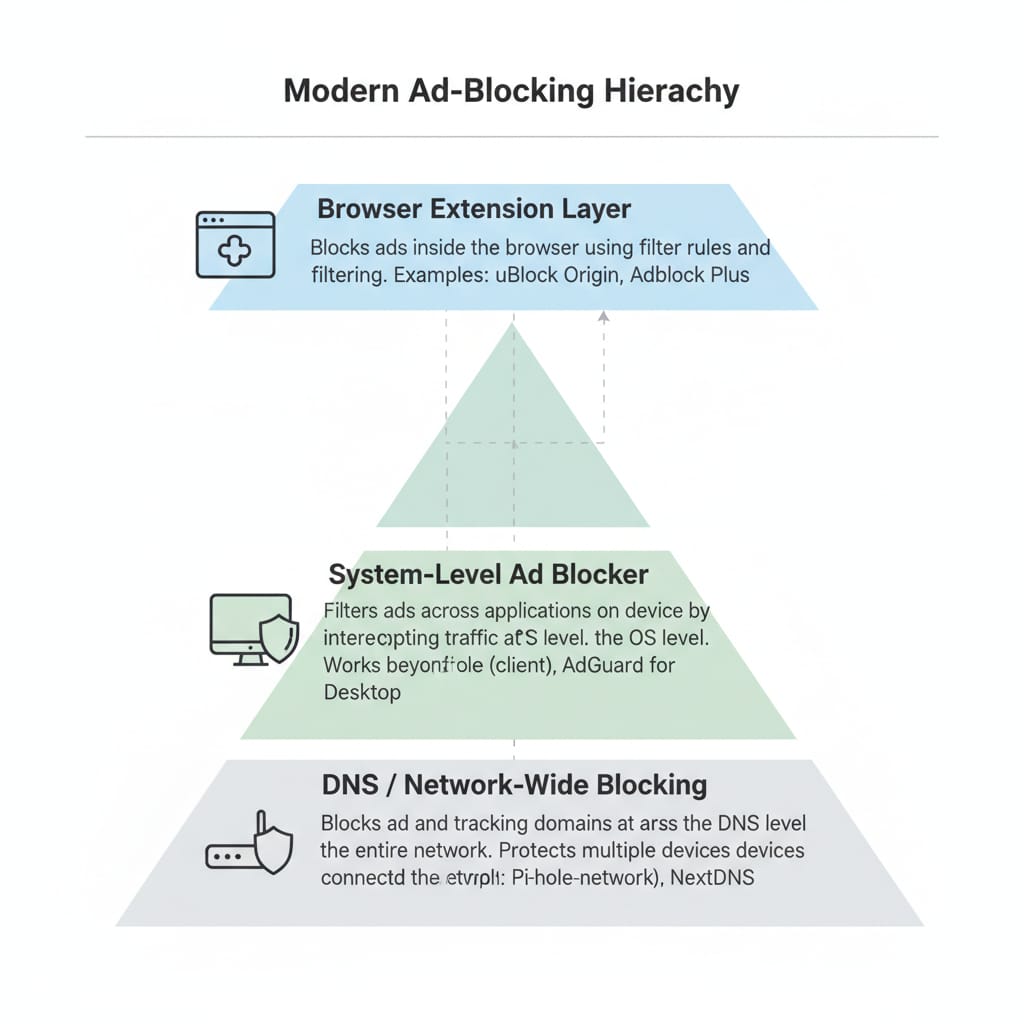
Most feature lists contain irrelevant marketing points. The only features that truly dictate a winner are browser-only capabilities versus system-level architecture. AdGuard Home provides network-wide DNS blocking for all connected devices, fundamentally changing the value proposition for multi-device households compared to standard extensions.
Browser-Only Blocking
Both tools function reliably as browser-focused applications. They easily handle basic page ads, tracking scripts, manual allowlisting, and annoyance blocking. This level of functionality is basic table stakes for modern internet browsing.
Whole-Device Blocking
AdGuard features a product line that extends far beyond a simple web browser. Its premium desktop applications protect the entire operating system, filtering traffic across all installed applications.
Network-Wide Blocking
AdGuard Home is a free and open-source platform that works as a network-wide DNS server. Once properly set up, it covers all home devices without requiring client software installations on every individual phone or television.
Mobile and Android Caveats
The full AdGuard Android app is not available on Google Play and requires manual downloading from the official AdGuard site. Official AdBlock Plus documentation states Android support is limited primarily to their dedicated browser and Samsung Internet. Consistently blocking video ads on native iOS and Android applications is practically impossible for simple extensions due to technical system limitations.
Pricing and Value
Both companies offer completely free browser extensions that handle basic web traffic perfectly. Adblock Plus Premium adds minor annoyance blocking but zero extra ad blocking power. AdGuard offers paid licenses that unlock system-wide protection, making its premium tier highly valuable for complex setups.
Free vs Paid
You must separate free extension value from paid premium value and paid ecosystem value. I checked the official pricing options in March 2026 to ensure accuracy.
Is Adblock Plus Premium Worth It?
Official documentation confirms that Adblock Plus Premium is entirely optional. It provides extra nuisance blocking for pop-ups and newsletters, but it does not provide better core ad blocking inside your browser.
When AdGuard’s Paid Plans Are Worth It
The real reason to purchase AdGuard is for comprehensive device-level protection. It offers broader platform coverage and seamless multi-device use for families. Official AdGuard licensing allows users to purchase yearly or lifetime terms across distinct Personal and Family tiers.
Modern Alternatives to Traditional Ad Blockers
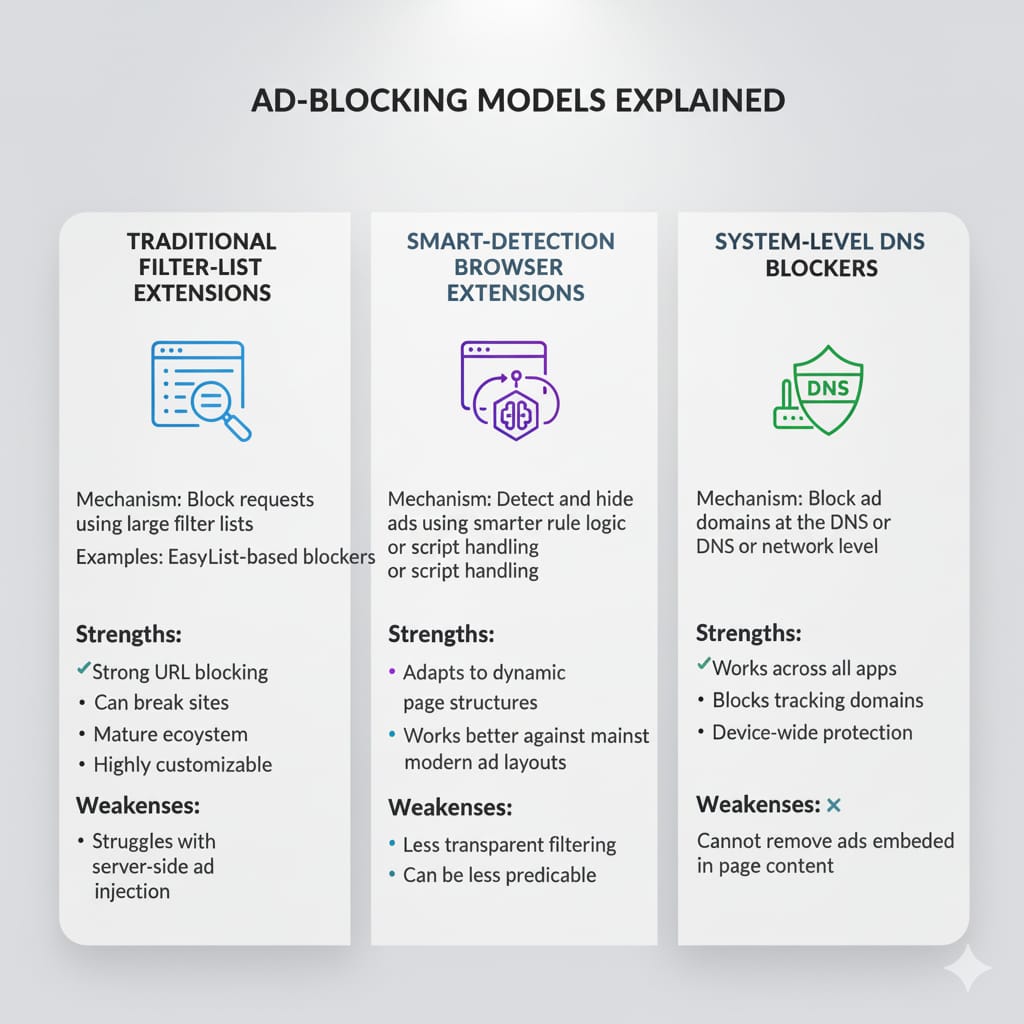
Traditional blockers struggle with modern advertisements embedded directly into video and audio streams. Server-side ad insertion on streaming platforms requires entirely different detection methods. Modern streaming-focused blockers use intelligent detection rather than static filter lists to bypass these advanced delivery systems.
Classic blockers heavily rely on static filter rules designed specifically for standard webpage banners. Modern advertising increasingly appears inside dynamic video and audio streams. Server-side insertion seamlessly merges the ad with the content, making interception exceptionally difficult for traditional extension-only tools.
Where Blockify Fits in the Modern Stack
Blockify operates as an example of a modern browser-level blocker built expressly for streaming-heavy environments. Blockify targets audio and video ads on popular media platforms using smart pre-load filtering and dual-layer protection.
It is an incredibly capable browser-level tool, but it is not a complete replacement for device-level or DNS-wide network protection. It serves as a specialized addition to your blocking setup.
Final Verdict by User Type
Choose the tool that matches your exact technical requirements and hardware setup. AdGuard or AdBlock Plus depends entirely on your specific goals.
Best for a Free Browser Extension
I highly recommend the AdGuard extension for out-of-the-box power. You get immediate results with minimal required setup.
Best for Privacy-Focused Users
AdGuard wins the privacy battle effortlessly. You must enable the Tracking Protection filter in the settings menu to utilize its full potential.
Best for Chrome Users Who Want Maximum Blocking
AdGuard takes the Chrome category easily. Its dedicated desktop application bypasses all Manifest V3 browser constraints entirely.
Best for Multi-Device or Home-Network Users
AdGuard Home fundamentally changes the value equation here. It covers every connected home device once configured at the network level.
Best If You Intentionally Want to Allow Some Ads
AdBlock Plus remains a deeply valid choice for this philosophy. Its Acceptable Ads model allows you to casually support content creators while blocking malicious pop-ups.
FAQ
Is AdGuard better than AdBlock Plus?
AdGuard generally outperforms AdBlock Plus for users seeking strict privacy and system-level protection. It offers a higher protection ceiling through desktop applications and DNS filtering. AdBlock Plus is simpler but intentionally allows acceptable advertisements through by default, making it weaker out of the box.
Is AdBlock Plus still good in 2026?
Yes. AdBlock Plus remains a highly effective browser extension for basic web surfing. Once you manually disable the Acceptable Ads feature, it blocks the vast majority of intrusive banners and pop-ups. It is reliable, lightweight, and perfectly adequate for users with straightforward browsing habits.
Which is better for Chrome?
AdGuard is the better option for Chrome users requiring maximum protection. Manifest V3 limits the capabilities of all standard Chrome extensions. AdGuard bypasses these browser restrictions entirely by offering dedicated desktop applications, ensuring deep protection against aggressive tracking and server-side inserted advertisements.
Which is better for Firefox?
Both extensions perform brilliantly on Firefox because the browser lacks Chromium limitations. AdGuard provides slightly more advanced tracking protection and URL cleanup capabilities. AdBlock Plus remains an incredibly strong contender on Firefox if you only need a straightforward, browser-level blocking experience.
Which uses fewer system resources?
Both tools are remarkably lightweight when using default configurations. AdGuard typically records slightly lower RAM consumption during heavy page loads in baseline benchmark testing. Performance drops drastically on either tool if you enable too many custom filter lists simultaneously.
Does Acceptable Ads really matter?
Yes. Acceptable Ads fundamentally changes how your browser handles traffic. It is enabled by default in AdBlock Plus, meaning the extension intentionally allows specific publishers to serve non-intrusive advertisements. You must manually opt out in the settings if you want a strictly ad-free experience.
Can either block mobile app video ads?
Neither extension can consistently block video advertisements on native iOS or Android mobile applications. Technical restrictions prevent browser extensions from modifying external app traffic. AdGuard provides a separate Android application that attempts system-wide blocking, but it requires side-loading and a paid subscription.
Do I need the AdGuard app or just the extension?
Most casual users only need the free browser extension for everyday reading and shopping. You need the dedicated AdGuard desktop application if you want to block trackers across all installed software, bypass browser extension limitations, or combat complex server-side video advertisements.
Is Adblock Plus Premium worth paying for?
Adblock Plus Premium is generally not worth the investment for most users. Official documentation states that Premium does not provide better core ad blocking inside the browser. It simply adds minor cosmetic features and blocks newsletter pop-ups, which many free tools already handle.