
Your ad blocker stopped working on Chrome. You need a reliable replacement fast. If you are weighing uBlock Origin vs uBlock Origin Lite, the choice comes down to how much control you want to retain under Google’s new Manifest V3 rules.
What is the difference between uBlock Origin and uBlock Origin Lite?
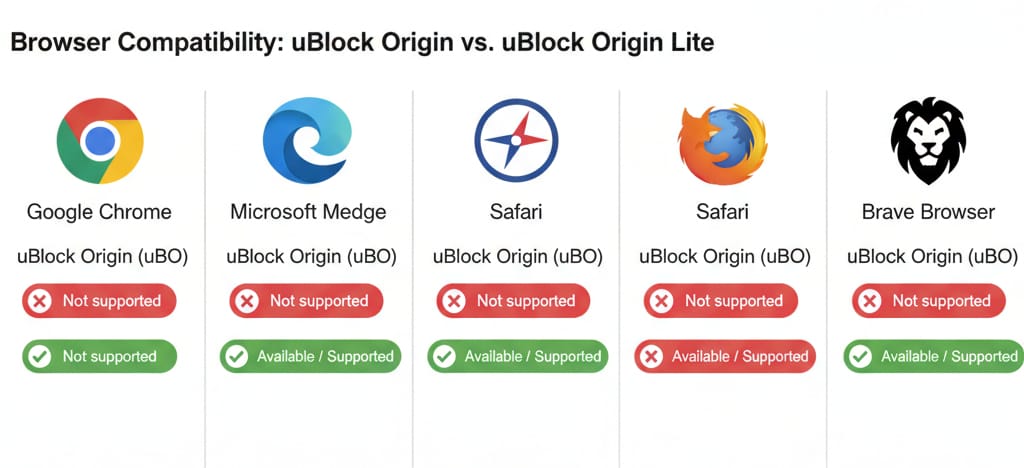
The main difference between uBlock Origin and Lite is their filtering method. Full uBlock Origin actively intercepts and modifies web requests on the fly, offering flawless visual cleanup and dynamic element control. uBlock Origin Lite relies on a declarative model (Manifest V3), meaning it hands a static list of rules to the browser. Lite effectively blocks standard ads with zero background CPU overhead but cannot perform advanced dynamic filtering or deep cosmetic cleanup.
60-Second Decision Tree: What Should You Do Now?
Stop scrolling through forum debates. Pick the path matching your actual browsing habits.
- If you are staying on Chrome and just want fewer ads:
Install uBlock Origin Lite. Most users who simply want to read news and browse without pop-ups will find Lite perfectly capable once configured correctly. (Jump to the mode setup section below). - If you used custom rules or dynamic filtering:
Switch to Firefox or Brave with full uBlock Origin. If you regularly zapped specific page elements, wrote custom block rules, or battled aggressive anti-adblock scripts, the capability gap in Lite will frustrate you. - If you are locked into ChromeOS or a work computer:
Use uBOL + an optional DNS layer. If your school or employer manages your device, you cannot switch browsers. Install Lite, set it to Optimal or Complete mode, and add a DNS-level blocker like NextDNS for network-wide coverage. - If your biggest pain is streaming video ads:
Look into modern alternatives built specifically for dynamic media. If your main goal is blocking ads inside video and audio streams, traditional static filter lists often struggle.
The Technical Capability Gap: uBlock Origin Lite vs uBlock Origin
To understand the uBlock Origin Lite Manifest V3 shift, look at how browser rules changed.
Under the older Manifest V2 (MV2), full uBlock Origin used the WebRequest API to sit actively between the web page and your browser, inspecting and modifying data live. Chrome’s platform update removed these background capabilities.
Under Manifest V3 (MV3), the browser itself executes the blocking based on a static list of declarative rules provided by the extension, using the DeclarativeNetRequest (DNR) API.
Do not fall for the outdated myth that Chrome limits blockers to 30,000 rules. The official Chrome extension documentation explains that Chrome has a 300,000-rule shared pool plus a 30,000-rule guaranteed allowance per extension, meaning a single installed content-filtering extension can reach 330,000 static DNR rules. Rule count is not the bottleneck; the actual loss is dynamic behavior.
Raw Ad Blocking Parity
When evaluating uBlock Origin vs Lite ad blocking, separate network request blocking from page cleanup.
Lite kills tracking and standard ad requests effectively. A January 2026 PoPETs peer-reviewed study tested MV2 vs MV3 blockers across 924 websites, finding no statistically significant reduction in raw ad-blocking or anti-tracking effectiveness in typical scenarios. The network requests still get intercepted natively.
The Visual Cosmetic Downgrade
You will notice the downgrade visually. Because uBOL cannot aggressively inject cosmetic filters on the fly, blocked ads often leave behind blank spaces, awkward gaps, or broken formatting. The ad does not load, but the placeholder remains.
Agility and Anti-Adblock Resilience
Power users rely on agility.
When a website deploys new anti-adblock technology, full uBO can pull filter-list updates without waiting for a full store release.
uBOL relies much more on packaged static rules that update when the extension is installed or upgraded, so fixes for fast-changing sites are less agile.
The true capability gap lives in visual aesthetics and troubleshooting agility, not raw network blocking.
uBlock Origin vs uBlock Origin Lite Performance
When comparing uBlock Origin vs uBlock Origin Lite performance, the strict MV3 rules actually give Lite a specific advantage.
uBOL relies entirely on native browser matching. There is no active filtering process running in the background while you browse. This means zero ongoing CPU/memory overhead from the extension itself while content blocking is ongoing.
If you dislike granting extensions the right to read and change all your data on all websites, Lite’s basic declarative design operates without needing broad host permissions. It lowers the trust barrier significantly. You trade active control for lower overhead and stronger privacy isolation.
uBlock Origin Lite Modes Explained: Basic vs Optimal vs Complete
Users often complain that Lite misses obvious ads. Usually, they just have it in the wrong filtering mode.
- Basic: The lightest, lowest-permission mode. It blocks network requests based on standard lists without requiring read/write permissions for specific websites. Visual gaps remain, and complex ads slip through.
- Optimal: The recommended baseline. Optimal provides a slightly stronger ruleset while balancing permissions. It suits users who want a set-it-and-forget-it experience.
- Complete: Required for generic cosmetic filtering. Complete requests broader permissions to read and modify data on all websites. It cleans up the blank spaces and placeholders but increases the chance of accidental site breakage.
How to set up uBlock Origin Lite properly on Chrome:
- Pin the extension: Install it from the Chrome Web Store and open the dashboard.
- Select your mode: Start with Optimal. If a site is cluttered with blank ad boxes, slide to Complete.
- Enable regional lists: Open the options page (cogs icon) and toggle on specific regional ad networks if you live outside the US.
- Per-site adjustments: If Complete mode breaks a checkout button, step down one mode for that specific site rather than globally downgrading your protection.
Modern Alternatives if uBlock Origin Lite is Not Enough
If your search for a uBlock Origin Chrome replacement stems entirely from frustration with streaming video and audio ads, traditional filter-list extensions might not solve your problem.
Video platforms update their ad-delivery scripts constantly. Filter lists require manual updates to fight server-side ad injection. If you want zero manual tuning for dynamic media, look for purpose-built tools.
Blockify is an independent browser-level ad blocker engineered specifically to target audio and video ads. It works seamlessly on Chromium-based browsers and ships weekly updates to combat fast-changing ad delivery methods on YouTube, Spotify, Twitch, and Hulu.
Blockify does not replicate Raymond Hill's granular dynamic filtering for general web browsing. Instead, it offers a low-friction approach focused strictly on keeping media streams ad-free.
Final Verdict: Which Ad Blocker Wins?
Stop treating them as identical products. When finalizing your stance on uBlock Origin vs uBlock Origin Lite, your choice depends entirely on your browser and technical comfort.
- Choose full uBO if you want total control. If you rely on dynamic filtering, zap elements manually, and refuse to tolerate blank cosmetic placeholders, switch to Firefox or Brave.
- Choose uBOL if you are staying on Chrome. If you want a lightweight extension that kills tracking and pop-ups without crushing your CPU, Lite is highly effective. Just use Complete mode for visual cleanup.
- Choose a modern alternative if streaming is your pain point. If you want ad-free Twitch, Spotify, or YouTube without tweaking filter lists, use specialized tools like Blockify.
FAQ
Is uBlock Origin Lite a good replacement for uBlock Origin on Chrome?
For casual users, yes. It efficiently blocks standard network requests and tracking scripts natively. For power users, no. It lacks dynamic filtering, instantaneous list updates, and aggressive on-the-fly cosmetic cleanup.
Does uBlock Origin Lite still block YouTube ads?
Yes, but with caveats. Because Lite relies on packaged static rules that update when the extension is installed or upgraded, it adapts to YouTube's rapid anti-adblock script changes slower than full uBO on Firefox.
Can I still use full uBlock Origin on Firefox or Brave?
Yes. Firefox continues to support both Manifest V2 and V3, and Brave has committed to continue supporting some Manifest V2 extensions, including uBlock Origin. Installing full uBlock Origin on either browser retains its classic capabilities.
Is Lite faster, or just less capable?
Both. It is faster because it uses a declarative model with zero active background CPU processing. However, it is less capable because that same declarative model prevents the extension from actively modifying web requests on the fly.
What is the best uBlock Origin Chrome replacement?
If you want general web protection, uBlock Origin Lite is the most direct successor. If you need deeper network coverage, layer AdGuard DNS underneath it. If your specific issue is video and audio ads, use a specialized tool like Blockify.