A good uBlock Origin Lite alternative does three things well: block ads and trackers reliably, stay lightweight, and give you enough control to bypass anti-block walls when needed.
Since changes in Chromium-based browsers like Google Chrome and Microsoft Edge have restricted how some blockers operate, MV3 tools like uBlock don’t always offer the same filtering depth users expect.
The best uBlock Origin Lite alternative depends on your browser, streaming habits, and how much control you need.
This guide covers honest comparisons, install steps, migration help, and streaming-specific fixes.
The Best uBlock Origin Lite Alternatives
For most Chrome users, AdGuard's MV3 extension is the smoothest transition. For streaming-heavy use, Blockify targets audio and video ads specifically. For maximum control with no MV3 limits, Firefox + uBlock Origin remains unmatched.
| Best For | Option | Why | Trade-off |
|---|---|---|---|
| Closest to old uBO on Chrome/Edge | AdGuard MV3 | Element picker, cosmetic cleanup, active MV3 development | Heavier on CPU/battery |
| Streaming-focused + General ad-blocking | Blockify | Dual-layer blocking targeting audio/video ads; low-maintenance | No dynamic rule tuning |
| Maximum control, zero MV3 limits | Firefox + uBlock Origin | Full uBO power, dynamic filtering, real-time filter updates | Requires switching browsers |
| Chromium without extension limits | Brave Browser (Shields) | Ad blocking built into the browser engine | Browser switch required |
| Low-permission, system-wide ad and tracker blocking | Browser + DNS blocker | Blocks known ad and tracking domains before they reach your browser | Cannot block first-party or server-side ads; lacks cosmetic page cleanup |
| Minimal permissions, low overhead | uBlock Origin Lite (uBOL) | Lowest permission surface, lightest resource use | Slower fix cycle; weak on streaming |
Why uBlock Origin Lite May Not Be Working for You Anymore
uBlock Origin Lite is intentionally lighter and more restricted. It’s not meant to fully replace classic uBlock Origin.
The Lite version was built specifically to comply with Google’s Manifest V3 framework, which limits how filtering works. This completely affects your ad-blocking experience:
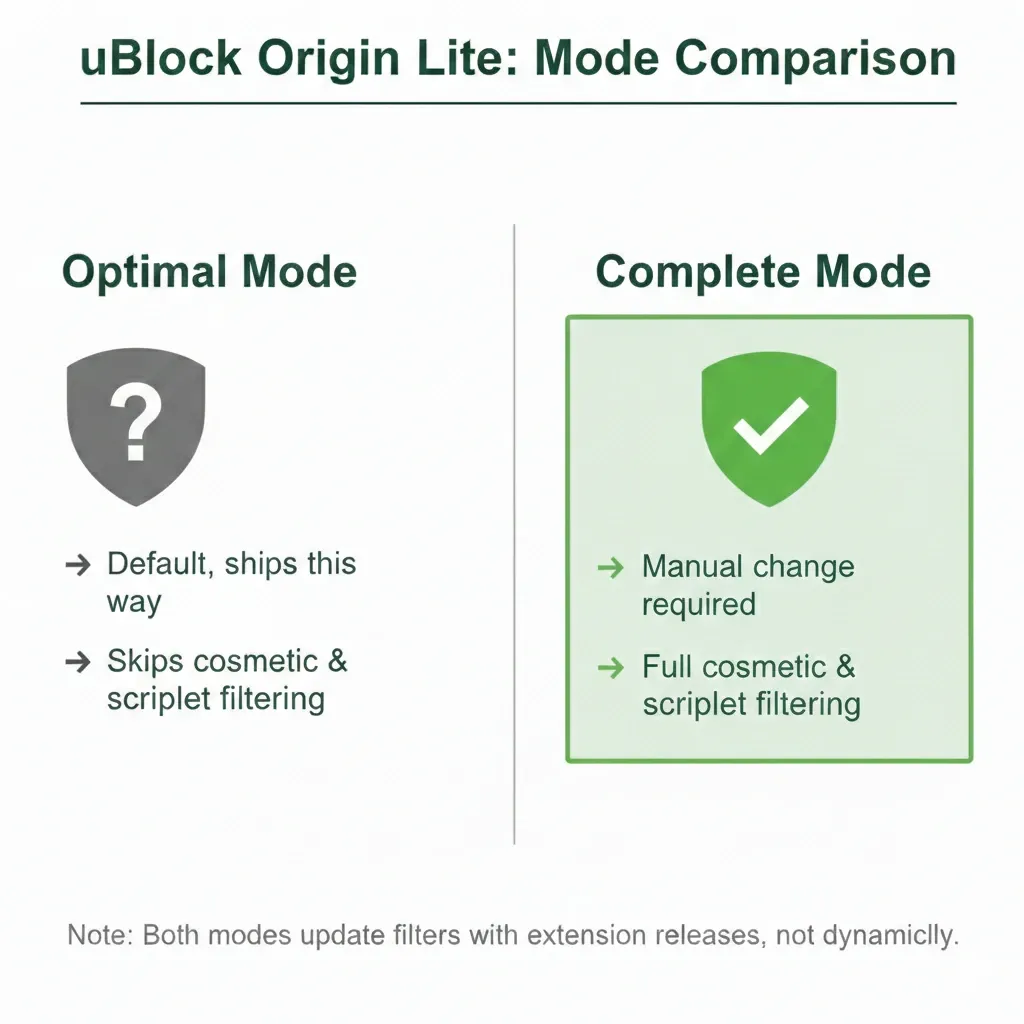
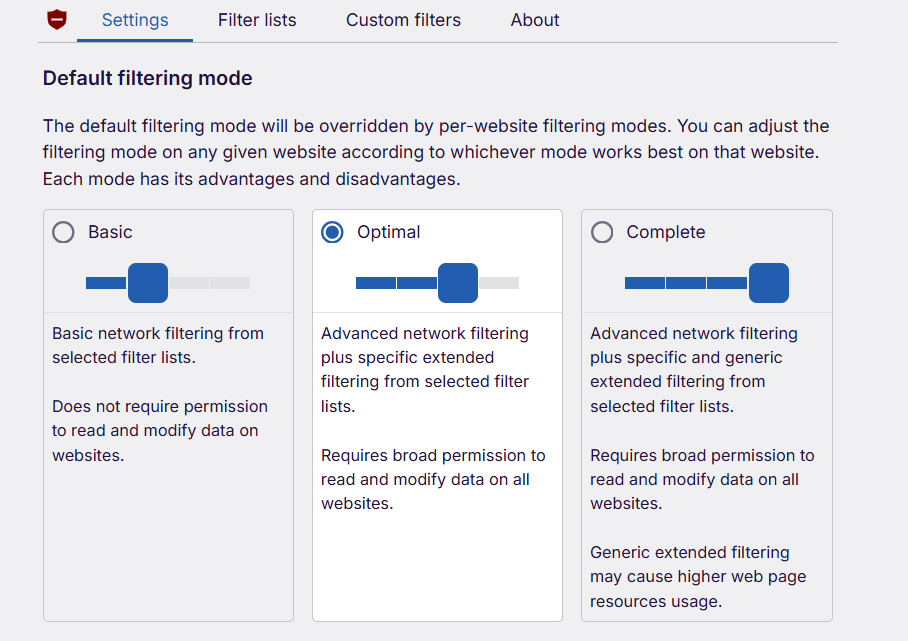
- The Default Mode Isn’t the Strongest: uBlock Origin Lite ships in “Optimal” mode, not “Complete.” Optimal blocks basic ads but skips stronger cosmetic and scriptlet filtering. Most users never change this setting, so performance feels weaker than expected.
- Slow Filter Updates: Unlike classic uBlock Origin (which can pull filter updates dynamically), uBlock Lite bundles filter updates with extension releases. When platforms change ad delivery, fixes may take days or weeks to reach users due to store review cycles.
Should You Keep uBOL?
- Mostly standard websites? uBOL in Complete mode may suffice.
- Regular YouTube, Twitch, or Spotify streaming? Switch.
- Minimal permissions matter most? Keep uBOL but pair with DNS-level blocking (covered below).
Best Alternatives to uBlock Origin Lite That Work
If uBlock Origin Lite isn’t cutting it anymore, here are the best alternatives that actually work in 2026.
Note: YouTube frequently updates its ad delivery systems. Even “High” reliability tools may experience short disruption periods before fixes are released.
| Feature | AdGuard MV3 | Blockify | Brave Shields | Firefox + uBO | DNS Blocker | uBOL (configured) |
|---|---|---|---|---|---|---|
| General web ads | ✅ Strong | ✅ Strong | ✅ Strong | ✅ Strong | ✅ Good | ⚠️ Decent |
| YouTube reliability | ✅ High | ✅ High | ✅ High | ✅ High | ❌ No | ⚠️ Inconsistent |
| Twitch reliability | ⚠️ Needs companion | ✅ High | ⚠️ Varies | ⚠️ Needs manual configuration | ❌ No | ❌ Weak |
| Update speed | Fast | Fast | Fast (native) | Fast (independent) | Fast (independent) | Slow (bundled) |
| Permissions needed | Broad | Moderate | None (built-in) | Broad (in Firefox) | Low | Moderate |
| CPU/battery impact | Moderate | Low-moderate | Low | High | Low | Low |
| Cost | Free / Paid (app) | Free | Free | Free | Usually free | Free |
AdGuard AdBlocker (MV3): Closest "Old uBlock Origin Feel"
If you're staying on a Chromium browser like Google Chrome or Microsoft Edge, AdGuard’s MV3 extension is the closest functional replacement for uBlock Origin Lite. It offers:
- Element picker
- Granular filter control
- Strong cosmetic filtering
- Cleaner interface for rule management
In practice, that means fewer “ad placeholders,” fewer broken layouts, and less waiting around when a streaming site updates its ad system.
It works across major browsers, but your best option depends on what you’re using:
- On Firefox: You can install full uBlock Origin instead, which is still more powerful than any Lite alternative. If you’re on Firefox, classic uBlock Origin is usually the better choice.
- On Safari: Browser restrictions limit advanced filtering. AdGuard still works well for general ad and tracker blocking, but you won’t get the same level of rule customization available elsewhere.
AdGuard still operates within modern browser limits, so it isn’t as powerful as classic uBlock Origin used to be everywhere, but for most users, it feels more consistent than uBlock Origin Lite.
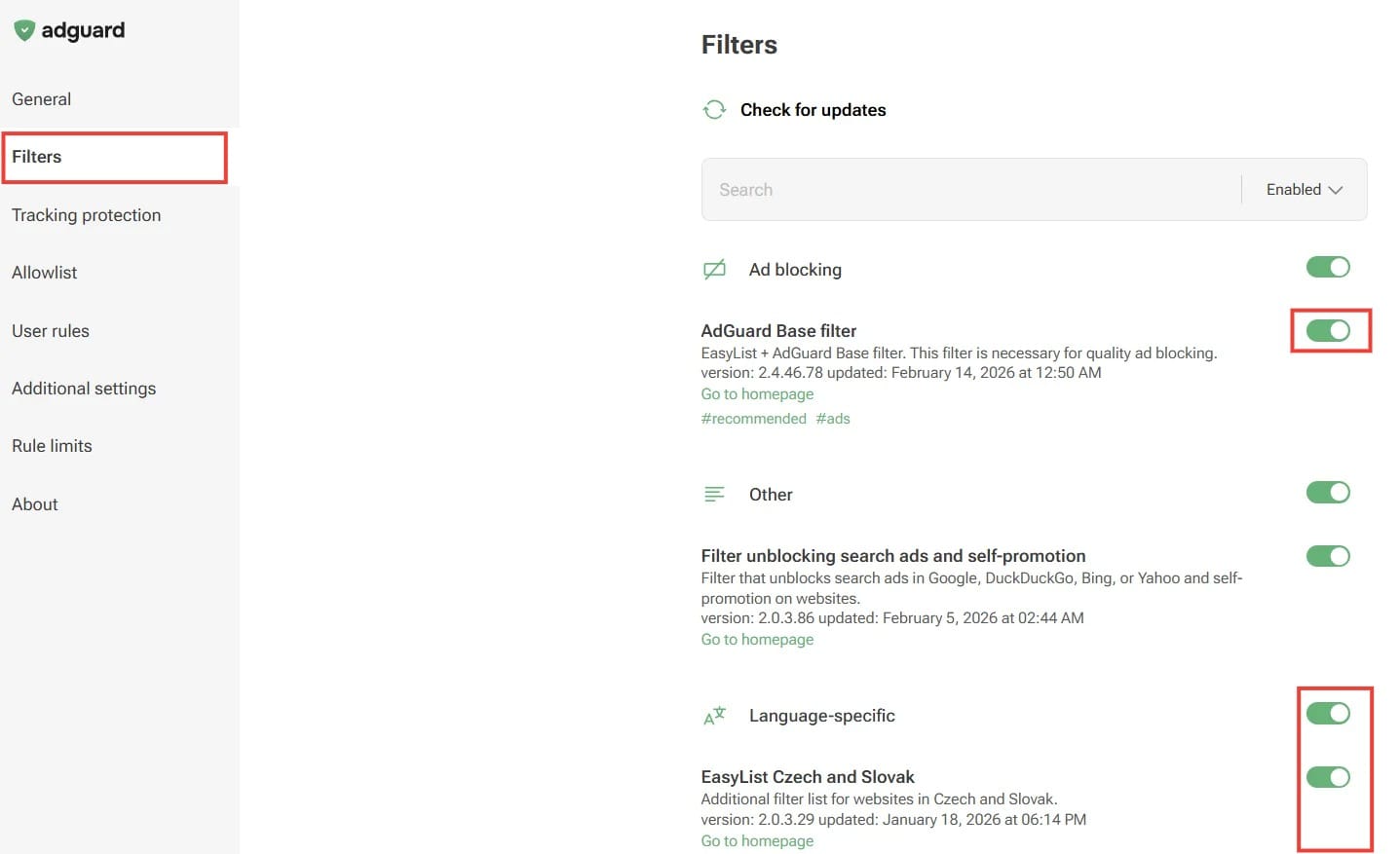
Setup: Install the extension → pin extension → Settings → Filters → enable "AdGuard Base," "AdGuard Tracking Protection," and "EasyList." If the battery suffers, disable non-essential filter lists. Requires broad site permissions.
Blockify (Balanced Ad Blocking with Extra Streaming Reliability)
Blockify is a strong option if streaming ads are a major frustration, but it isn’t limited to streaming.
It blocks:
- Ads on YouTube, Spotify, and other audio/video platforms
- General website ads and popups
Where it stands out is how it handles stubborn video and audio ads. It uses layered blocking, and when an ad can’t be fully removed, it can safely mute it instead. For users, that means fewer interruptions, even when platforms change how ads are delivered.
Setup: Install from blockify official webite or your browser's extension store → pin extension → test on a site and a streaming site.
Brave Browser (Shields): Chromium Without Extension Limits
Brave blocks ads at the network level before pages render. It is built into the browser, not constrained by MV3. Blocks third-party ads, trackers, cross-site cookies, phishing, and fingerprinting out of the box.
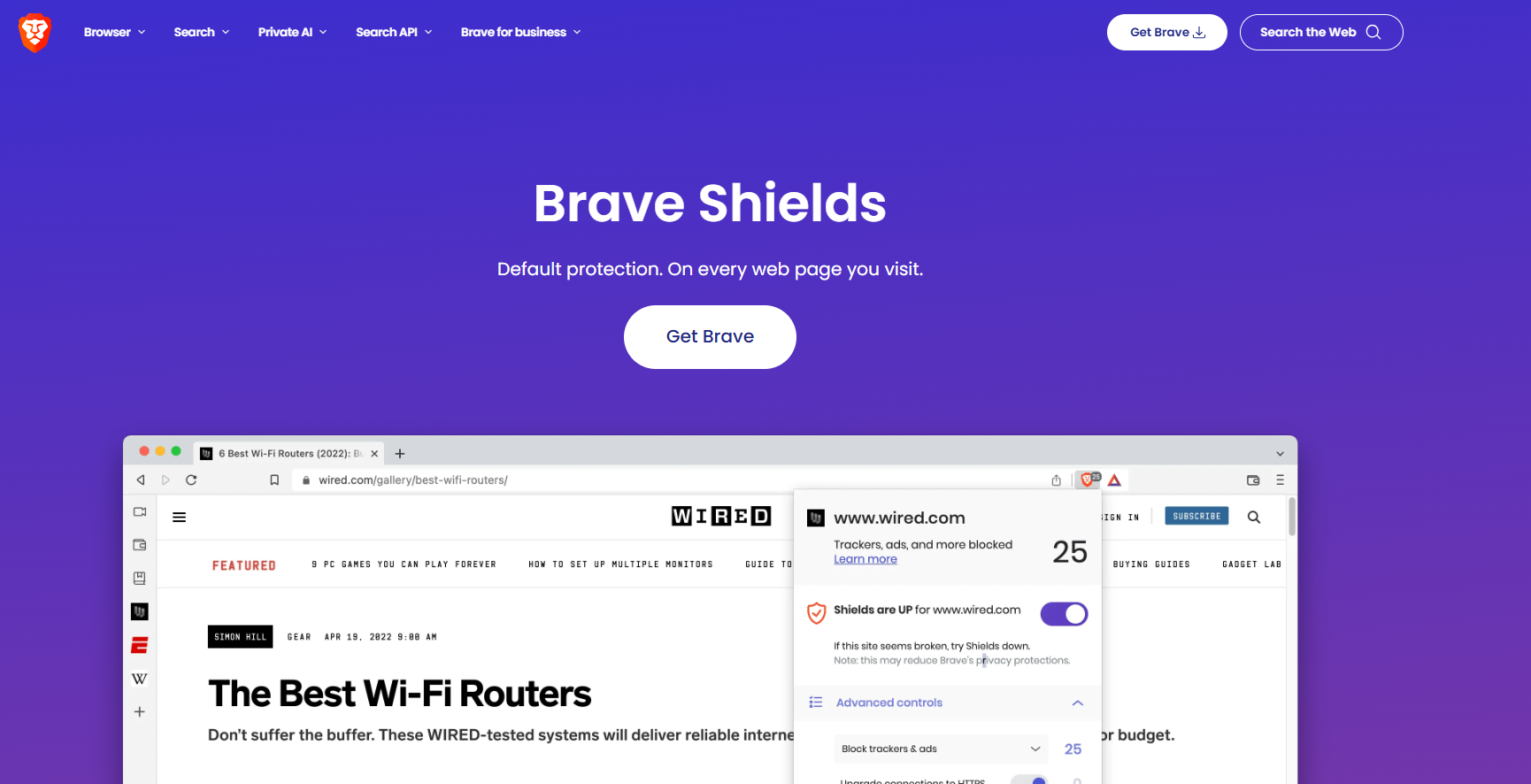
Setup: Download from brave.com/download → import Chrome data → configure Shields (lion icon in address bar). Standard mode suits most users; aggressive increases protections but may break some sites. Toggle per site as needed.
Caveat: Aggressive mode can break login forms and payment pages. On Twitch, SSAI limits effectiveness against video ads, though Brave removes banners, homepage promotions, and sidebar content.
Browser + DNS Blocker
Pairing a DNS-level blocker with your browser extension adds a lightweight base layer of protection without granting another extension full site access.
What a DNS layer can do:
- Block known ad-serving domains
- Stop many trackers and analytics requests
- Apply protection across all apps and browsers on your device
What it can’t do:
- Reliably block YouTube or Twitch video ads
- Distinguish between ads and content when both come from the same domain
Platforms like NextDNS and Control D make setup simple. Create a free account → enable “Ads & Trackers” and privacy-focused blocklists → follow their device configuration guide.
For a strong network-level blocking across your household, Pi-hole works, but cannot reliably block first-party video ads on YouTube or Twitch; those ads share domains with content. Best as a complementary DNS layer, not a standalone replacement.
Firefox + uBlock Origin
Mozilla has stated it has no plans to remove MV2 support. The original uBlock Origin runs at full power: dynamic filtering, real-time filter updates, advanced scriptlets, element picker.
Setup: Install Firefox → install uBlock Origin → enable "uBlock filters," "EasyList," "EasyPrivacy," "Peter Lowe's list," and "Online Malicious URL Blocklist." Import custom rules into Dashboard → My Filters.
Keep uBlock Origin Lite (Configured Properly)
uBlock Origin can still work, it's misconfigured by most users. Set key sites to "Complete" mode (uBlock Origin Lite settings → filtering mode) for cosmetic filtering and scriptlet injection. Works for standard websites without heavy streaming. Even in Complete mode, filter updates remain tied to extension releases.
AdGuard Desktop App (System-Wide)
The browser extension and desktop app are different products. The extension operates within MV3 constraints (free, browser-only). The desktop app filters traffic system-wide across all browsers and some applications. It is available for Windows and Mac, paid after trial. System-wide filtering means trusting one application with all your network traffic.
Looking for the Best uBlock Origin Lite Alternative for Streaming?
Streaming ads behave differently from standard website ads. Video platforms frequently rotate delivery methods or embed ads directly into media streams, which makes consistency harder.
When choosing a replacement for uBlock Origin Lite for streaming-heavy use, focus on:
- Update speed (how quickly fixes ship when ads slip through)
- Media-specific handling (built for audio/video ads, not just banners)
- Browser flexibility (some browsers allow stronger filtering engines)
What This Means in Practice
- For heavy streaming use, Blockify is designed specifically for audio and video ad scenarios, using layered blocking and fallback behavior when full removal isn’t possible.
- AdGuard offers strong cosmetic cleanup and typically recovers faster than uBlock Origin Lite when major platforms update.
- For maximum control, Mozilla Firefox with full uBlock Origin remains the most flexible setup.
- Built-in protection like Brave Shields removes many page-level ads and trackers without needing extensions.
- Twitch is the hardest platform to block consistently due to server-side ad insertion (SSAI). No extension can guarantee zero Twitch video ads at all times, so streaming-focused tools tend to perform more reliably there.
- Most technical: Tampermonkey + userscript from TwitchAdSolutions. This community approach attempts to fetch an ad-free stream. Warnings: quality may drop during ad segments, breaks when Twitch updates delivery, may violate ToS.
How to Switch from uBlock Origin Lite Without Losing Your Settings
Before uninstalling uBlock Origin Lite, document your allowlist, custom filter rules, and site-specific mode settings. Open uBlock Origin Lite settings → copy rules and allowlist entries to a text file. No one-click export exists.
By Destination
- AdGuard MV3: Paste rules into Settings → User Rules. Basic filter syntax works identically. Dynamic filtering rules need manual recreation.
- Brave: Bookmarks, passwords, and history import via. Extension settings won't transfer; rebuild Shields exceptions as needed.
- Firefox + uBO: Paste custom rules into Dashboard → My Filters. Re-add allowlisted sites in Dashboard → Whitelist. Resist enabling every filter list — more lists = more processing and site breakage.
Troubleshooting
Ads still showing: Disable all other ad blockers (conflicts are the #1 cause) → update filter lists → test in incognito → check filtering mode (uBlock Origin Lite Optimal = weaker than Complete).
YouTube issues (blank screen, anti-adblock warnings): Try Brave or Firefox + uBO. On Chrome extensions: test one blocker at a time, clear cache.
High CPU/battery: On AdGuard MV3, reduce filter lists to core 3–4. Brave Shields is lightweight by default. uBlock Origin Lite is already the lightest option.
FAQs
Which ad blocker is the best alternative to uBlock Origin Lite?
For Chrome users wanting familiar controls, AdGuard MV3. For audio or video content streaming on Spotify, YouTube, Twitch, Hulu,etc., go for Blockify. For maximum power, Firefox + uBlock Origin.
Is a DNS blocker enough to replace an ad blocker?
No. DNS blockers remove tracker and ad requests device-wide but cannot stop first-party ads on YouTube, Twitch, or platforms serving ads from content domains. Use DNS as a complement, not a replacement.
Is it safe to give an ad blocker full site access?
A trade-off: more permissions enable stronger blocking but let the extension see and modify all page content. Use official browser stores, verify the publisher, and prefer open-source tools. If uncomfortable, uBlock Origin Lite in Complete mode + DNS filtering is the lowest-trust option.