uBlock Origin, the once-undisputed king of ad blockers, no longer works the way it used to on Chrome.
The reason is simple: Chrome's switch to Manifest V3 killed the real-time, dynamic blocking power that made classic uBlock Origin so effective.
Millions of users are now hunting for the next best thing, something that actually works in 2026 without constant babysitting.
You can skip that search because we tested over 10 major ad blockers and alternatives across:
- Heavy streaming platforms (YouTube, Spotify Web Player, Twitch, Hulu)
- General websites
- Chrome (Manifest V3 environment)
- Firefox and other browsers (for true feature-parity comparison)
We looked at real-world ad-blocking success, setup time, resource usage, and many more! Here are the ones that actually deliver results right now.
Let’s get started!
TL;DR: What's the Best uBlock Origin Alternative in 2026?
- uBlock Origin Lite is the lightest open-source Chrome option, with clear trade-offs.
- Blockify is another strong option on major streaming platforms (Spotify audio ads, YouTube video ads, Twitch/Hulu interruptions) and supports blocking ads on all websites; ideal for minimal-setup streaming users.
- AdGuard MV3 adapts fastest when platforms change their anti-adblock tactics.
- For full uBlock Origin feature parity, Firefox or Zen Browser with the original uBlock Origin remains unmatched.
Top 3 Chrome Alternatives to uBlock Origin at a Glance
| Blockify | AdGuard MV3 | uBlock Origin Lite |
Best for | Streaming platforms along with all other websites | All-in-one ad protection | Lightweight open-source blocking |
Key strength | Smart detection + dual-layer blocking + safe muting fallback | Quick Fixes rapid-response filters | Efficient declarative blocking, minimal overhead |
Weak spot | Less granular per-site control than classic uBO | Can conflict with stacked blockers; corporate product | No dynamic filtering; limited element picker; slower updates |
Setup time | ~1 min | ~2 min | ~3 min |
Rating |
Note: YouTube, Spotify, and other websites update their ad delivery constantly. No tool is permanently bulletproof.
Pick Your uBlock Origin Alternative in 60 Seconds
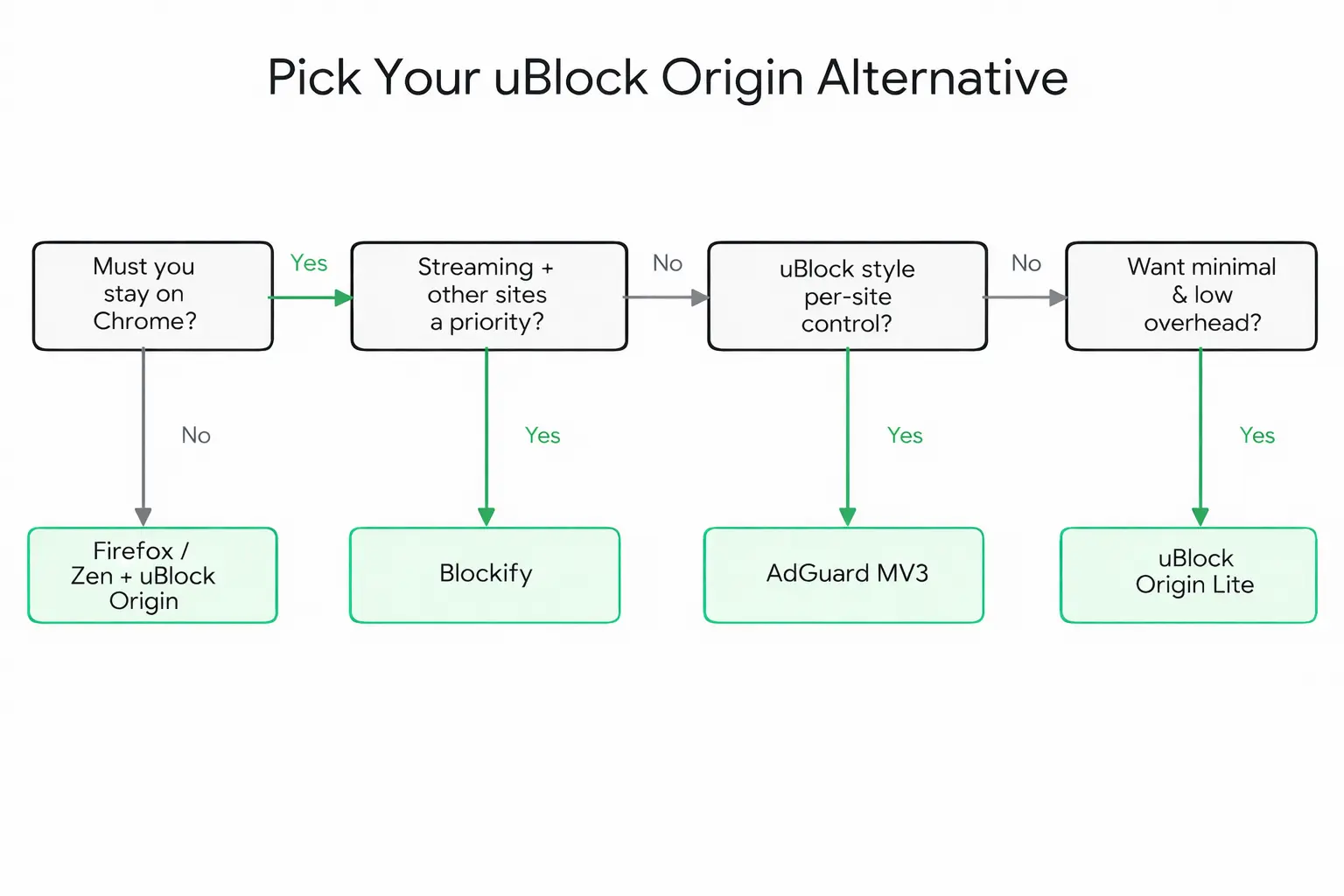
Pro tip: For network-wide ad blocking, you can add a DNS layer via NextDNS or Pi-hole on top of the options above.
Why uBlock Origin Stopped Working on Chrome
With the old system (Manifest V2), uBlock Origin could use Chrome’s webRequest API (the tool that lets extensions watch and change network requests as they happen in real time) to instantly intercept and modify every request.
This let it:
- Block ads the moment they tried to load
- Run clever scripts to bypass anti-adblock measures
- Add new filter rules very quickly (sometimes within hours) when YouTube changed how ads are delivered
MV3 replaces blocking webRequest with declarativeNetRequest, which is more constrained (quotas, fewer capabilities). Rules can still be updated dynamically, but not with the same flexibility as MV2 interception.
What broke:
- YouTube ads slipping through filters that used to catch them
- Filter updates delayed by stricter remote code restrictions
- Dynamic filtering and the network logger gone entirely
- Anti-adblock bypass scripts unable to execute as before
The MV2 deprecation timeline confirms this is permanent.
Key takeaway: The biggest losses aren't the number of filter rules, it's the speed of updates and the ability to react dynamically in real time that really matter. Any good alternative needs to deliver as much of that quick adaptability as possible.
Best uBlock Origin Alternatives by Scenario
Let’s go through the best alternatives you can rely on in 2026:
uBlock Origin Lite: Lightest Open-Source Option
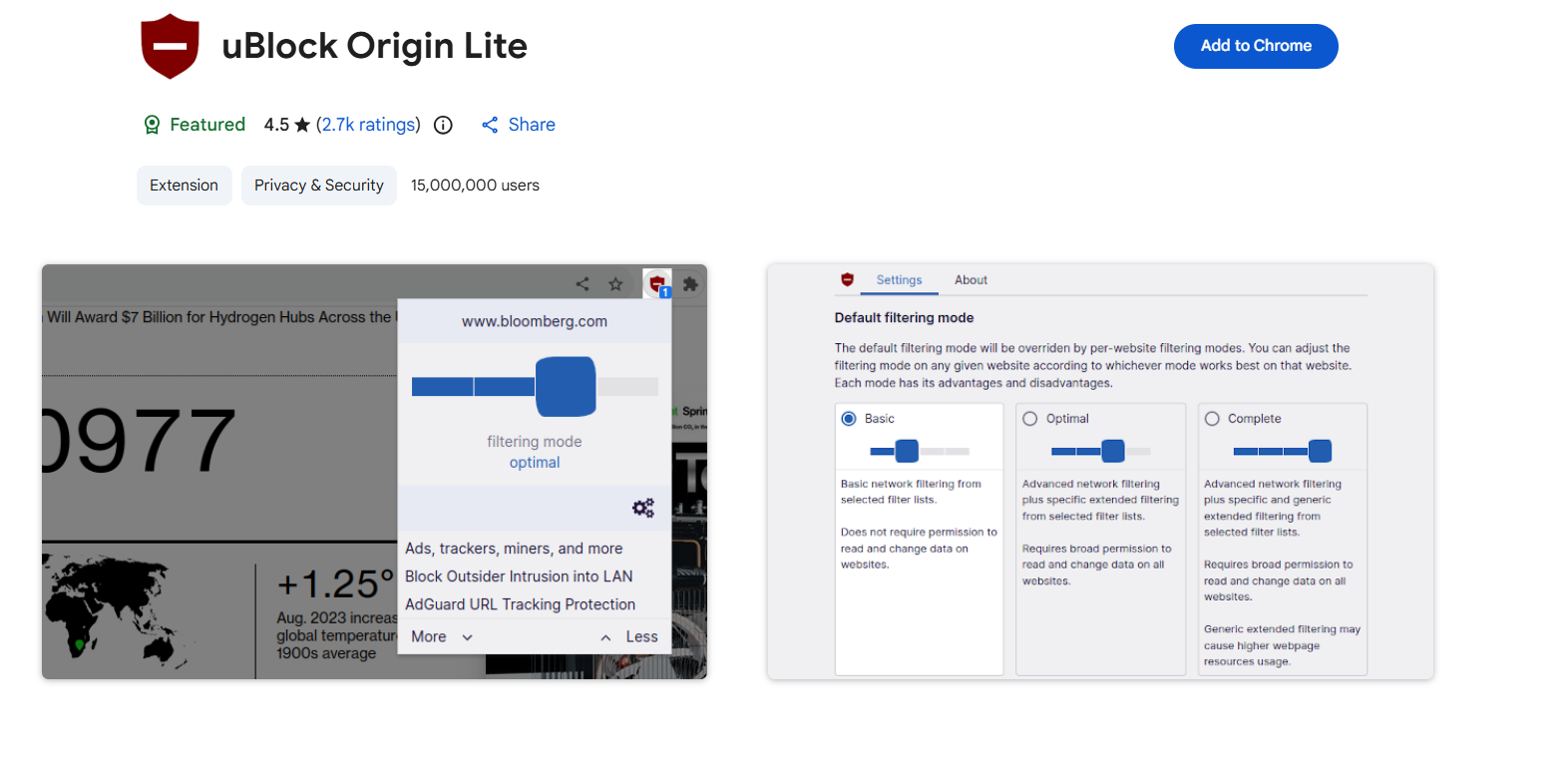
Raymond Hill built uBlock Origin Lite as the official MV3 adaptation. Efficient and transparent, but it explicitly drops dynamic filtering, the full element picker, and rapid-update mechanisms. You can find it on Chrome web store, Edge, Safari, etc.
Basic mode uses minimal permissions but weak cosmetic filtering (hiding/removing unwanted page elements). Complete mode enables stronger filtering but requires broad host permissions ("read and change data on all websites"). That trade-off matters.
Don't install "uBlock" without "Origin" in the name. Verify the author is Raymond Hill.
Blockify: Top Choice for YouTube, Spotify & All Other Websites
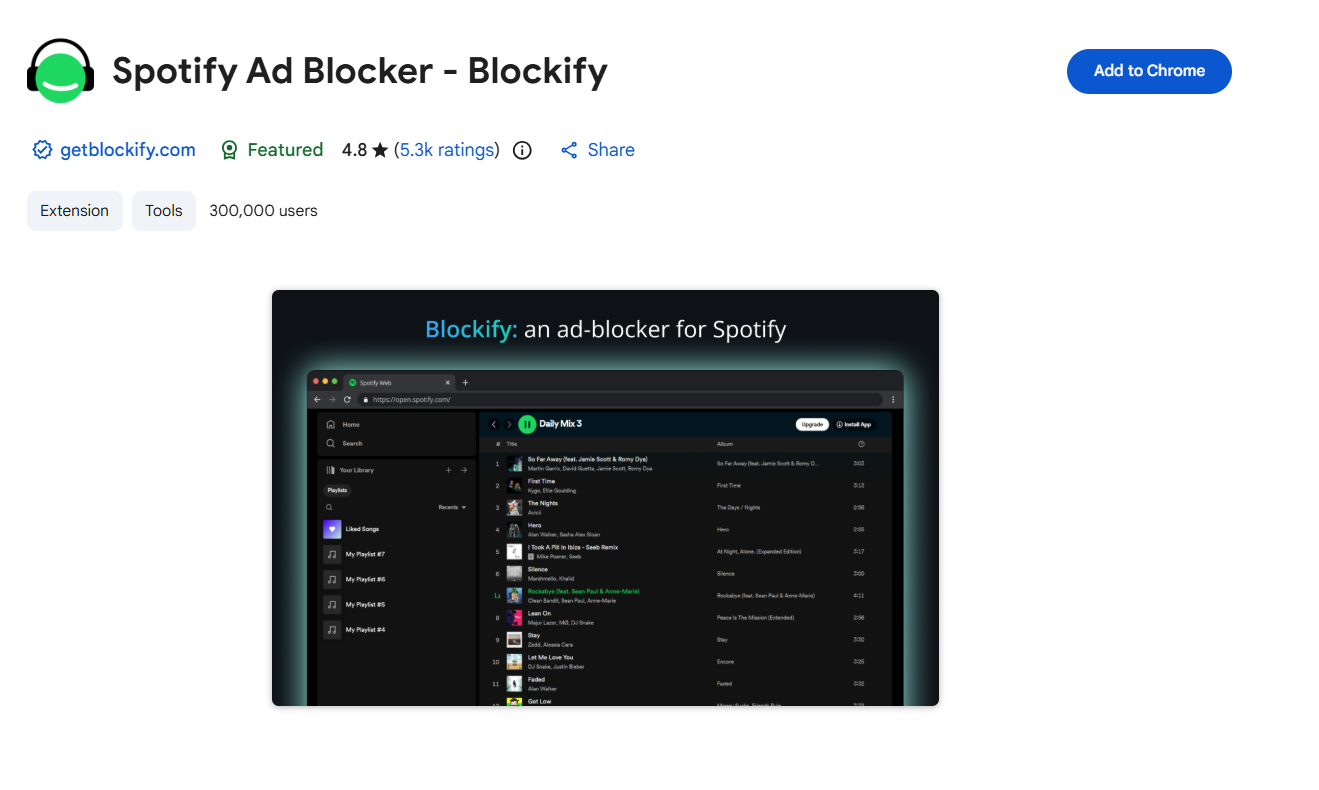
Traditional filter-list blockers weren't built for ads injected directly into audio and video streams. Blockify's smart detection identifies streaming ads before they load, and its dual-layer system with safe muting as fallback means you rarely hear or see an ad, even when platforms update delivery methods.
You can find Blockify on Chrome web store, Edge, and other web browsers.
Who it's for: Streaming-heavy and general users who want it to just work.
AdGuard MV3: Holistic Protection for a Changing Web
When YouTube rolls out new anti-adblock measures, AdGuard's Quick Fixes filter pushes patches faster than a full extension update cycle allows. Within MV3's constraints, it's the most responsive option for rapidly shifting ad tactics. It works well on all major web browsers.
Who it's for: Users who want strong blocking with rapid response times.
Also check out: AdGuard Alternatives in 2026
Other Alternative: Switch to a Browser with Built-in Ad Blocking
If you're tired of Manifest V3 compromises on Chrome and want the closest experience to classic uBlock Origin, switching browsers is often the most reliable and hassle-free path in 2026.
These options restore dynamic filtering, instant updates, element picking, and per-site control.
Firefox (or Zen Browser) with uBlock Origin
If you want everything back, such as dynamic filtering, element picker, per-site rules, instant updates, switching browsers is the cleanest path. Firefox still supports MV2.
Zen Browser runs on Firefox’s engine but provides a modern, refreshed interface for anyone who thinks standard Firefox looks outdated.
Migration takes roughly 15 minutes: export bookmarks, sync your password manager, install uBlock Origin from the Firefox Add-ons store.
Best for: Anyone who wants maximum control and no breakage.
Brave Shields: Chromium Feel Without MV3 Extension Pain
Brave's blocker runs at the engine level, not as an extension. It sidesteps MV3 constraints entirely.
Key strengths:
- Very strong out-of-the-box blocking (ads, trackers, cookie pop-ups, crypto-mining scripts).
- Pages load noticeably faster and use less data/battery.
- Familiar Chromium-based interface (same look/feel as Chrome).
- Built-in HTTPS upgrades, script blocking, and fingerprint resistance.
Best for: Users who want a Chrome-like experience with zero extension management and solid everyday blocking.
Feature-Parity Matrix: uBlock Origin vs. Every 2026 Alternative
This quick comparison below will help you decide which one works best for you:
Feature | Blockify | AdGuard MV3 | uBlock Lite | Brave | Firefox + uBlock |
Cosmetic filtering | Strong | Strong | Complete mode only | Native | Full |
Dynamic filtering | Yes | Partial | No | No | Full |
Update agility | Fast | Quick Fixes | Slow | Browser-tied | Fastest |
YouTube resilience | High | High | Moderate | Good | Best |
Spotify resilience | High | No | No | No | Moderate |
Anti-tracking | Yes | Yes | Basic | Built-in | Full |
Performance impact | Low | Medium | Very Low | Very Low | Low |
Open source | No | Partially | Yes | Yes | Yes |
Works on Chrome | Yes | Yes | Yes | No | No |
10-Minute Setup: Install and Configure Your Chrome Alternative
Done picking your extension? Now, let’s install it!
uBlock Origin Lite (Chrome)
- Install uBlock Origin Lite (verify author: Raymond Hill)
- Choose filtering mode:
- Basic: Minimal permissions, weaker cosmetic filtering
- Complete: Stronger filtering, requires broad host permissions
- Seeing empty white boxes where ads were? Switch to Complete mode
Blockify (Chrome)
- Install from the Chrome Web Store
- Pin to toolbar (puzzle icon → pin)
- Open YouTube, Spotify, or any other website; it activates automatically
- To exclude a specific site: click the icon → toggle off for that domain
No filter list configuration needed.
AdGuard MV3 (Chrome)
- Install from the Chrome Web Store
- Enable recommended filter lists (Base, Annoyances, Social Media)
- Confirm Quick Fixes is active (on by default)
- If YouTube ads persist: clear YouTube site data → reload
- Don't stack with other ad blockers. Conflicts make both worse.
Optional: DNS Blocking Layer
DNS blocking (NextDNS, Pi-hole) stops ad domains across your entire network. But it can't do cosmetic filtering. You might see empty rectangles and broken layouts where ads used to load. It is best paired with a browser extension, instead of using alone.
- NextDNS — cloud-based, 5-minute setup, free tier
- Pi-hole — self-hosted, needs a Raspberry Pi or server
Stacking rule: One browser extension + one DNS layer. That's your ceiling.
YouTube, Spotify, and Streaming Ads: 2026 Reality Check
No ad blocker permanently wins against YouTube or Spotify. These platforms update ad delivery weekly. Absolute promises are a red flag. Pick tools built for fast adaptation and keep a fallback ready.
When YouTube Blocking Breaks
Try this sequence:
- Update your extension to the latest version
- Disable other ad blockers (conflicts are the #1 cause)
- Clear YouTube site data (cookies + cache)
- Switch filtering modes if available
- Still broken → try Brave or Firefox + uBlock Origin for heavy YouTube use
Spotify Web Player
The web player's ad injection is dynamic and shifts frequently. Blockify's safe muting fallback means even when an ad slips through, you won't hear it. Expect occasional breakage — that's the reality of web player ad blocking in 2026.
Twitch and Hulu
Similar arms race. Blockify and AdGuard (via the “Extra” extension or DNS server) handle these due to faster update cycles. If one fails, try the other before assuming all blocking is broken.
Traps to Avoid
- Fake "uBlock" extensions: The Chrome Web Store has copycats. Always verify Raymond Hill as author and "uBlock Origin Lite" as the exact name.
- Stacking multiple ad-blocking extensions: Two extensions conflict, break pages, and weaken both. One extension + DNS is the right combination.
- Privacy Badger misconceptions: EFF removed the learning algorithm in 2020. Privacy Badger now relies on pre-trained/static blocklists rather than dynamically learning from your browsing. It’s effective for tracker blocking, but it is no longer a “smart” self-learning blocker.
- Outdated MV2 workarounds: Registry hacks and developer-mode tricks from old forum posts are unreliable in 2026 and not worth the maintenance.
FAQ
Is uBlock Origin Lite a good replacement for uBlock Origin?
Partially. It handles basic ad blocking efficiently but drops dynamic filtering, the full element picker, and rapid filter updates. However, complete mode improves cosmetic filtering at the cost of broader permissions.
Why doesn't uBlock Origin work on Chrome anymore?
Chrome's Manifest V3 replaced the webRequest API (real-time request interception) with declarativeNetRequest (static rules). This removed the dynamic capabilities uBlock Origin depended on.
What is the best free alternative to uBlock Origin for Chrome?
Blockify and uBlock Origin Lite are entirely free. AdGuard's Chrome extension is free with optional premium upgrades. For streaming-focused blocking, Blockify requires the least configuration.
Should I switch to Firefox or Brave instead?
For full uBO features: yes, Firefox or Zen Browser with uBlock Origin is the most complete option. For Chromium's interface without MV3 limitations: Brave's native blocker sidesteps extension restrictions entirely.
What alternatives still block YouTube ads effectively?
Blockify and AdGuard MV3 show the strongest resilience in 2026, though effectiveness fluctuates as platforms update. No tool guarantees permanent results.
Are there uBlock Origin alternatives with anti-tracking?
Yes. Blockify and AdGuard include tracker blocking. For network-wide protection including CNAME cloaking and first-party trackers, add a DNS layer like NextDNS. Brave has built-in tracker protection.