
Total Adblock is a highly effective, beginner-friendly ad blocker that successfully removes banners, pop-ups, and video ads on major browsers like Chrome and Edge. While initial performance is strong, it requires a $99 annual paid subscription after the heavily restricted free trial expires, making it less ideal for budget-conscious users seeking permanently free software.
Does this tool actually clear away digital clutter? In this definitive Total Adblock review, I evaluate whether the premium price tag justifies its performance. The quick answer: yes, it effectively scrubs mainstream web ads out of the box. However, steep $99 annual renewal fees, browser restrictions, and mobile app blindspots make it a tough sell for power users compared to free alternatives. This analysis breaks down its speed, privacy policies, and exact cancellation steps so you can decide if it fits your browsing habits.
Is Total Adblock Good?
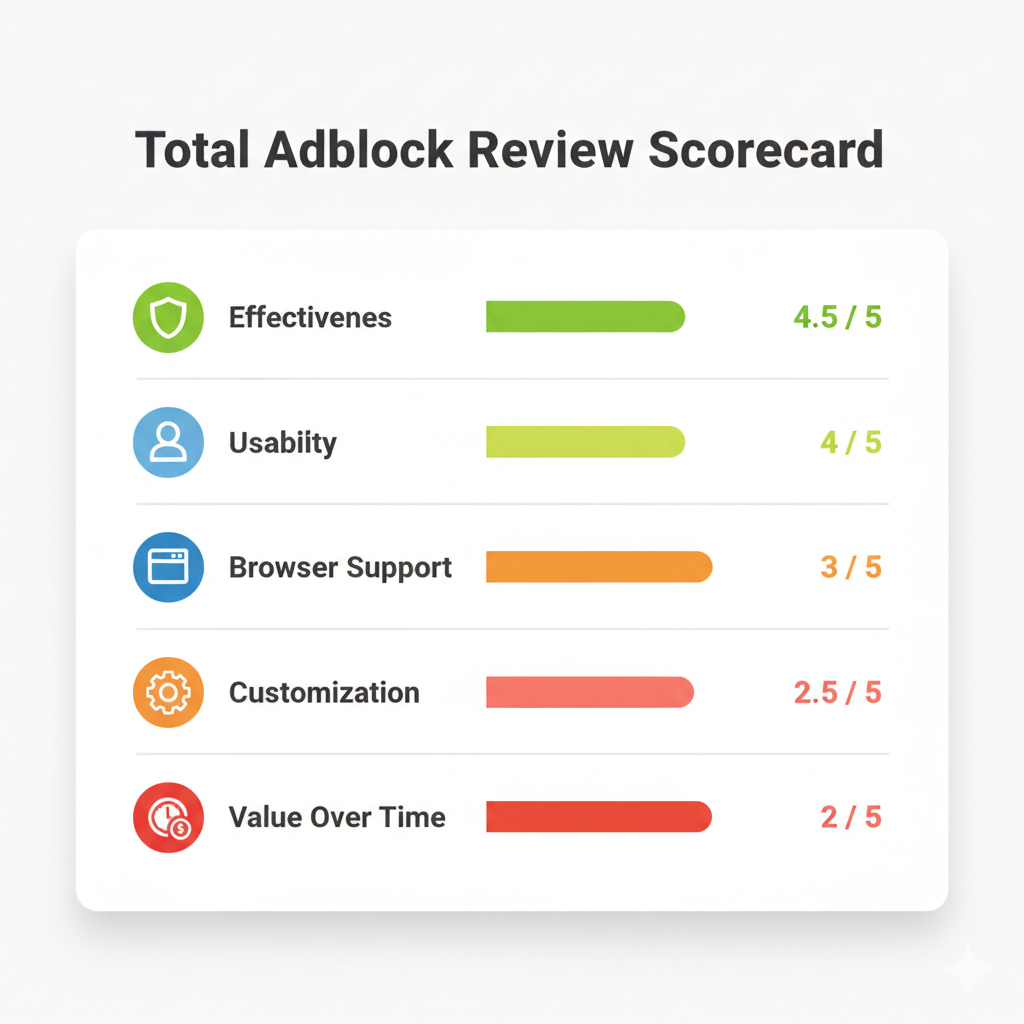
Key Takeaway: Total Adblock fits users prioritizing a frictionless setup over long-term cost savings. It scrubs basic banners and pre-roll ads effortlessly but struggles with app-native mobile ads.
To determine if this software is worth installing, you must separate the technical performance from the business model. During my Total Adblock ad blocker review testing, the extension reliably stripped display ads, pop-ups, and pre-roll video commercials from high-traffic websites. Judged strictly on its first week of use, the software delivers on its core promise.
The friction emerges after the trial phase. Evaluating its true value requires looking past the introductory $19 rate to the $99 annual renewal fee. Add a recent $2.5 million class-action settlement (Nelson v. System1, finalized on March 7, 2025) regarding auto-renewal disclosures, and the ecosystem surrounding the tool demands careful attention before entering your credit card details.
Total Adblock Pros and Cons
The primary tradeoff involves exchanging technical simplicity for high long-term costs and basic customization limits.
Pros
- Effortless, one-click installation and onboarding.
- Broad desktop compatibility (Chrome, Edge, Safari, iOS, Android).
- Reliable blocking for mainstream display ads and pop-ups.
- Built-in allowlist to support specific content creators.
- Straightforward, portal-based cancellation interface.
Cons
- Severe renewal cost shock (jumps from $19 to $99/year).
- Lacks granular, element-picking tools for advanced users.
- Inconsistent mobile blocking (in-app ads often bypass filters).
- Privacy policy permits sharing personal data for targeted advertising.
- High volume of consumer complaints regarding auto-renewals.
How I Conducted This Total Adblock Extension Review
Testing spanned multiple modern browsers, devices, and dynamic platforms to capture real-world performance instead of synthetic lab benchmarks.
Devices and Browsers
I tested the extension across:
- Chrome (Manifest V3 environment)
- Edge
- Safari (macOS)
- iOS Safari
Tested Environments
Evaluating ad blockers on static, text-heavy blogs fails to reflect modern internet usage. I pushed the software against:
- YouTube desktop feeds and Shorts.
- Twitch live streams.
- Ad-heavy global news publications.
- Social media timelines.
- Sites deploying aggressive newsletter overlays and soft paywalls.
Tracked Metrics
I measured visible ads blocked, leftover blank UI elements, page layout breakage, setup friction, and allowlist reliability.
Technical Note: Chrome’s Manifest V2 phase-out is complete (disabled in 2025). All Chrome-based testing reflects the current Manifest V3 framework restrictions.
Total Adblock Performance in Real Browsing
The extension clears mainstream web clutter instantly, but specialized platforms like Twitch and native mobile apps expose its technical ceiling.
Mainstream Site Effectiveness
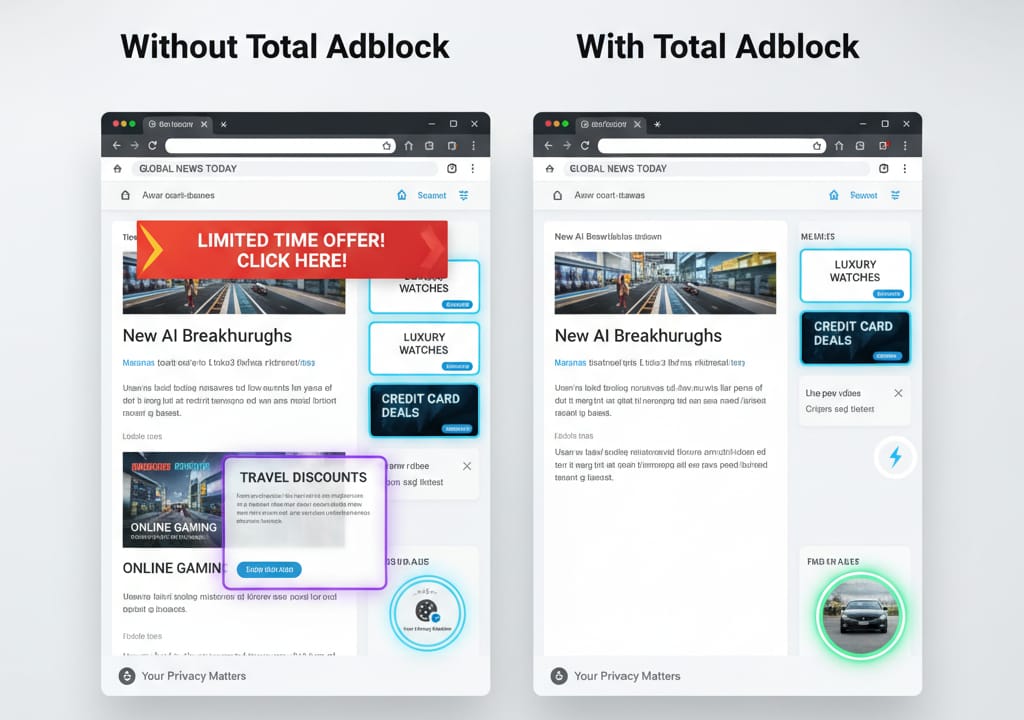
On standard ad-heavy news pages and social feeds, Total Adblock performance remains excellent. It strips injected display ads and basic pop-ups without lagging the browser. The YouTube desktop interface stayed clean, and pre-roll video ads were successfully blocked or skipped during testing.
Dynamic Platforms and Mobile Gaps
Performance degrades on complex, dynamic media players. YouTube Shorts and Twitch live streams occasionally let ad payloads slip through. Mobile expectations require adjustment: while iOS Safari blocking works efficiently via Apple's native content blocker API, app-delivered ads—such as those inside the native Facebook or YouTube mobile apps—remain entirely visible.
Speed Gains and Site Breakage
Disabling heavy media ads and trackers visibly accelerates page loads. The vendor claims a worldwide average of 57% faster page loads. Independent lab verification of the exact 57% speed increase claim is unavailable; treat this strictly as internal company marketing data. In my tests, breakage was rare, though aggressive cosmetic hiding occasionally clipped formatting on niche discussion forums.
Total Adblock Features and Usability
The software sacrifices deep technical customization to maintain an incredibly simple, beginner-friendly interface.
Core Capabilities
The Total Adblock features cover essential browsing protections:
- Network request blocking.
- Cosmetic hiding (collapsing empty spaces where ads previously loaded).
- Third-party tracker blocking.
- Malicious-site and phishing alerts.
- Acceptable Ads allowlist support.
Usability vs. Control
"Easy to use" often means fewer settings. The dashboard is minimalist, allowing you to toggle tracking and ad-blocking protections on or off. It lacks the deep, granular element-picking tools and custom rule creation features that power users expect from community-driven alternatives.
The Total Security Ecosystem
This ad blocker operates under the broader Total Security umbrella. Users frequently bundle it with TotalAV or Total VPN. Because these services share a unified login ecosystem, you must manage and cancel each add-on independently to prevent unexpected multi-product billing.
Free vs Premium: The Trial Reality
The free version acts as a highly restricted demo rather than a permanent, fully functional ad blocker.
Many aggregators label Total Adblock a top "free" tool. This is heavily misleading. The user journey follows a rigid path: install the extension, experience a brief unrestricted trial, hit a downgrade wall, and face persistent upgrade prompts.
Once downgraded, utility plummets. Archived pricing documentation indicates the free tier intentionally excludes ad blocking on the top 15,000 Alexa-ranked websites. If this restriction triggers during your session, the free version will fail to block ads on almost every major platform you visit daily, forcing a purchase decision.
Pricing, Auto-Renewal, and Total Cost
Calculating the steep year-two renewal cost fundamentally changes the value equation. Understand the rigid refund policies before entering payment details.
Current Official Pricing
The checkout funnel currently highlights an introductory price of $19. However, the official pricing matrix lists the standard annual renewal at $99 per year.
Note: Total Adblock labels its main subscription tier "Adblock Plus." Do not confuse this with the separate, independent open-source product from eyeo also named Adblock Plus.
Long-Term Ownership Cost
To assess true value, project the cost over multiple years:
- Year 1: $19
- Year 3: $217 ($19 + $99 + $99)
- Year 5: $415
Refund Rules
Canceling auto-renew does not automatically trigger a refund. Annual plans qualify for refunds within 30 days of purchase. Monthly plans carry a strict 14-day window. App store purchases (iOS/Android) bypass these direct policies and must be disputed through Apple or Google support.
Total Adblock Chrome Extension and Browser Compatibility
Your operating system and browser choice dictate the software's effectiveness just as much as its underlying code.
Desktop Support
Total Adblock officially supports Chrome, Edge, Safari, and Opera. Firefox users are excluded from the official support matrix.
The Total Adblock Chrome Extension and MV3
Google Chrome’s Manifest V2 deprecation is complete. Paid blockers frequently use this architectural shift to claim free tools are obsolete. That narrative is factually incorrect. Recent academic studies show no statistically significant reduction in ad-blocking effectiveness for Manifest V3 extensions compared to their V2 predecessors. The Total Adblock chrome extension continues to function seamlessly under the new MV3 rules, but so do entirely free competitors.
Mobile Browser Nuance
Apple’s developer ecosystem heavily restricts background filtering. Total Adblock operates strictly as a Safari content blocker on iOS. It cannot reach outside the browser to stop injected ads inside native apps like Spotify or mobile games. Android users face a fragmented install process, often requiring a direct APK download or specific Samsung-tailored Play Store variants.
Privacy, Trust, and the $2.5M Settlement
Ad blockers require permission to inspect every page you visit. Trusting the vendor's data practices is non-negotiable.
Data Permissions and Policies
To filter malicious requests and hide elements, ad blockers require permission to "read and change all your data on the websites you visit." Total Adblock’s privacy policy routes through its legal site, noting that personal information may be shared with advertising networks and social media platforms for targeted behavioral advertising. Privacy maximalists should scrutinize this clause.
Corporate Ownership and Settlement Context
System1 previously owned the Total Security brand portfolio before selling it to Just Develop It Ltd. in late 2023. Recently, the brand faced legal scrutiny in Nelson v. System1. A $2.5 million class-action settlement was finalized on March 7, 2025 regarding allegations of inadequate auto-renewal disclosures. The settlement involved no admission of legal guilt, but it strongly reinforces why consumers must actively monitor subscription terms.
Real User Reviews vs Editorial Ratings
Professional reviewers praise the initial ad-blocking technology; everyday users penalize the backend billing practices.
Search for a Total Adblock review, and you will notice a stark divide. Editorial tech publications frequently award it 4 or 5 stars based on synthetic lab tests and clean UI design. Conversely, consumer complaint boards skew heavily toward 1-star ratings.
On complaint platforms, negative patterns cluster around:
- Unexpected $99 auto-renewal charges.
- Friction during the cancellation process.
- Confusion regarding the intentionally restricted "free" tier.
- Misunderstanding mobile app limitations.
The reality exists between the two extremes: the filtering technology works well, but the aggressive monetization strategy frustrates a significant portion of the customer base.
Total Adblock vs AdGuard vs uBlock Origin vs Blockify
Match your ad blocker to your technical comfort level and primary browsing habits.
- Best for Simple Setup: Total Adblock. Delivers frictionless onboarding for mainstream browsers, provided you accept the $99 annual renewal.
- Best Truly Free Option: uBlock Origin Lite. Offers highly efficient, MV3-compliant filtering with minimal CPU overhead, entirely for free.
- Best for Deep Customization: AdGuard. Provides superior custom filtering, stealth mode privacy protections, and system-level application blocking.
- Best for Streaming Ads: Blockify. If dynamic, unskippable ads on video platforms are your main frustration, Blockify dominates. Operating with over 360K users, it utilizes specialized smart-ad detection and muting fallbacks explicitly engineered for Twitch, YouTube, Hulu, and the Spotify Web Player. It solves server-side injected ads that static filter lists routinely miss.
Who Should Use It, and Who Should Skip It
Budget constraints and required customization depth should drive your final decision.
Install Total Adblock If You:
- Prioritize rapid, one-click setup over long-term cost savings.
- Use mainstream browsers exclusively (Chrome, Edge, Safari).
- Prefer simplified toggle menus over complex script-blocking rules.
- Are comfortable tracking and managing premium software subscriptions.
Skip It If You:
- Require a comprehensive, permanently free ad blocker.
- Need granular cosmetic element pickers and custom rule lists.
- Use Firefox as your daily driver.
- Are highly sensitive to data-sharing privacy policies.
- Want to avoid all potential auto-renewal billing friction.
How to Cancel Total Adblock
Turning off auto-renewal stops future charges but does not automatically process a refund for your current cycle.
The fastest cancellation method bypasses phone support:
- Log into your Total Adblock Online Portal.
- Navigate to the My Subscriptions tab.
- Select Cancel Subscription.
- Complete the required email code or two-factor authentication step to finalize the request.
Important Note: If your receipt originated from Apple or Google Play, the vendor cannot process your cancellation. You must terminate the subscription directly inside your mobile device's native App Store settings.
Final Verdict
Total Adblock is a functionally capable extension hindered by an aggressive premium pricing model and complex backend billing.
This Total Adblock review confirms that the software works exactly as intended out of the box. It efficiently clears mainstream web clutter and blocks basic trackers without bogging down your device.
However, judging the product solely on its day-one performance ignores critical long-term factors. Once the initial trial expires, the steep $99 annual renewal fee and intentionally restricted free tier severely damage its value proposition.
Choose this tool if you demand absolute simplicity and do not mind paying a premium for it. Skip it if you expect permanent free value, require strict data privacy, or want advanced control over your browser filtering.
FAQ
Is Total Adblock good?
Yes, it reliably removes mainstream display ads, video pre-rolls, and trackers. However, its long-term value decreases due to steep renewal pricing, a restricted free tier, and limited advanced customization compared to open-source competitors.
Is Total Adblock safe and legitimate?
Yes, it is a legitimate cybersecurity tool owned by Just Develop It Ltd. after previously being part of System1. It actively blocks malicious payloads. However, users should review its privacy policy, which allows sharing certain personal data for targeted advertising.
Does the Total Adblock Chrome extension still work?
Yes. The extension is fully compatible with Google Chrome’s current Manifest V3 architecture, providing stable ad blocking without relying on deprecated MV2 frameworks.
Does it block ads on the iPhone YouTube app?
No. It functions strictly as an iOS Safari content blocker. It blocks ads inside the Safari browser but cannot filter ads natively baked into standalone mobile apps like YouTube, Facebook, or Spotify.
Is Total Adblock really free?
No. The free version operates as a heavily restricted demo. After a 7-day trial, the free tier intentionally excludes ad blocking on the top 15,000 Alexa-ranked websites, severely limiting its everyday usefulness.
How much does Total Adblock cost after renewal?
While the first-year introductory price is typically $19, the official standard renewal rate jumps to $99 per year.
How do I cancel Total Adblock and get a refund?
Log into your online billing portal, open My Subscriptions, and click Cancel to stop auto-renewal. To actually get your money back, you must submit a distinct refund request within 14 days (monthly plans) or 30 days (annual plans).