
Ads are evolving, but DNS blockers are hitting a wall. If you are searching for an AdGuard Home vs Pi-hole comparison, the direct answer is simple: AdGuard Home is better for an all-in-one setup with native encrypted DNS, while Pi-hole wins for modular, strict group-based control.
Loaded with identical blocklists, both stop the exact same amount of DNS-level ads. Neither can block modern YouTube or Twitch streaming ads alone. Your choice depends entirely on your preferred workflow, network architecture, and whether you are willing to run a second layer for your browser.
To deliver an objective AdGuard Home vs Pi-hole review, I benchmarked both tools in March 2026 under identical local Docker environments on a wired mini-PC.
I routed traffic through the same upstream DNS resolver, utilizing identical default blocklists. They filtered the exact same mix of IoT, mobile, and desktop devices. I tracked blocked queries, query latency, idle RAM, cold restart times, and the friction involved in writing a custom device-specific rule.
AdGuard Home vs Pi-hole: Quick Verdict
AdGuard Home wins on built-in convenience. Pi-hole wins on modular control. Neither wins against same-domain streaming ads.
Wondering if AdGuard Home vs Pi-hole is better for your specific network?
AdGuard Home
Choose AdGuard Home if you want to control and adjust blocking quickly per device.
What you can do with it:
- Block or allow ads on specific devices instantly
- Use encrypted DNS (DoH, DoT, DoQ) without extra tools
- Create and apply rules using simple Adblock-style syntax
- Monitor and manage all traffic from a single dashboard
Best suited for users who want fast control with minimal setup.
Pi-hole
Choose Pi-hole if you want to build structured rules and segment your network.
What you can do with it:
- Create device groups (e.g., kids, guests, IoT) with different filtering rules
- Apply advanced regex-based blocking for precise control
- Run a clean, minimal DNS sinkhole without additional built-in layers
- Integrate with tools like Unbound or cloudflared for a custom stack
Best suited for users who want granular control and a modular setup.
Layered setup
Choose a layered setup if you want to block ads that DNS-level tools cannot handle.
What you can do with it:
- Keep AdGuard Home or Pi-hole for network-wide DNS blocking
- Add a browser-level tool like Blockify
- Block YouTube, Twitch, and dynamically injected ads
- Cover both network-level and browser-level gaps
This is the only approach that reliably handles modern streaming and in-page ads.
Pi-hole v6 Update: What Changed
Pi-hole completely changed its baseline architecture.
In February 2025, Pi-hole released v6. They embedded a new web server and REST API directly inside the pihole-FTL binary. This removed the old lighttpd and PHP dependencies entirely, consolidated settings into a single toml file, and introduced native HTTPS for the admin interface.
This update makes Pi-hole simpler to run and maintain. You no longer need to manage multiple components like PHP or a separate web server, which reduces setup friction and potential breakpoints. The built-in HTTPS improves security out of the box, and the smaller, unified system makes updates faster and more reliable. In practical terms, it brings Pi-hole much closer to an “install and run” experience while still keeping its modular control advantages.
AdGuard Home vs Pi-hole: Ad Filtering Differences Explained
With the same blocklists, baseline DNS blocking is virtually identical. The real difference lies in how you manage rules and clients.
AdGuard Home Filtering (Adblock-Style Rules)
AdGuard Home uses an Adblock-style rule syntax. Its use of $client and $ctag modifiers makes per-client policy feel incredibly direct. If you are used to writing custom browser filters, this workflow feels instantly familiar and highly capable out of the box.
With AdGuard Home, you can quickly create rules for specific devices without learning a new system. For example, you can block a domain on your smart TV while allowing it on your phone, or apply stricter filtering to a child’s device in seconds. This makes day-to-day control faster and reduces the need for complex configuration or multiple steps.
Pi-hole Filtering (Group-Based Control)
Pi-hole dominates group management. Its regex control and clean allow/deny workflow offer absolute clarity. You assign devices to groups, then assign lists to those groups. It requires a few extra clicks on day one but scales beautifully for larger home networks managed by admins who hate feature sprawl.
With Pi-hole, you can organize your entire network into clearly defined segments. For example, you can create separate groups for family devices, guests, and IoT, each with its own filtering rules. Once set up, you do not need to manage devices individually, which saves time as your network grows and keeps your rules consistent across multiple devices.
Performance Comparison: AdGuard Home vs Pi-hole
The historical performance gap is gone. Deployment method and hardware matter far more than which software you install.
In daily use, resolver responsiveness is indistinguishable. Both deliver sub-millisecond local UI response times and recover instantly from false-positive whitelisting.
Because Pi-hole v6 eliminated its PHP overhead, the real-world RAM and CPU delta between the two Docker containers is now trivial. However, major version jumps carry risks. Some users experienced migration friction upgrading from Pi-hole v5 to v6. Always back up your configurations before triggering an update.
Setup & Security: Default Behavior Compared
The initial setup dictates the ongoing maintenance burden. This is the real fork in the road for network admins.
Encrypted DNS Support (DoH, DoT, DoQ)
AdGuard Home supports native upstream encryption. Paste a DoH, DoT, or DoQ URL into the dashboard, and it works immediately.
Pi-hole v6 provides native HTTPS for its local admin interface. It can be configured to use encrypted upstream DNS, but many setups still rely on external tools like Unbound or cloudflared for greater control and flexibility. This keeps the sinkhole modular while letting you build the exact DNS stack you prefer.
Security Risks & Maintenance Requirements
Self-hosted privacy tools require active maintenance. Neither platform is immune to security risks, especially when exposed to the public internet.
AdGuard Home: Like any actively developed software, it occasionally requires security updates. Critical vulnerabilities can arise and are typically patched quickly, so staying updated is essential.
Pi-hole: Past incidents affecting the broader Pi-hole ecosystem (such as third-party services or related infrastructure) highlight that risks are not always limited to the core software itself. Proper isolation, updates, and access control remain important.
Why DNS Ad Blocking Fails for Modern Ads
DNS blocking has a hard ceiling. Switching your DNS resolver will never fix modern ad delivery mechanisms.
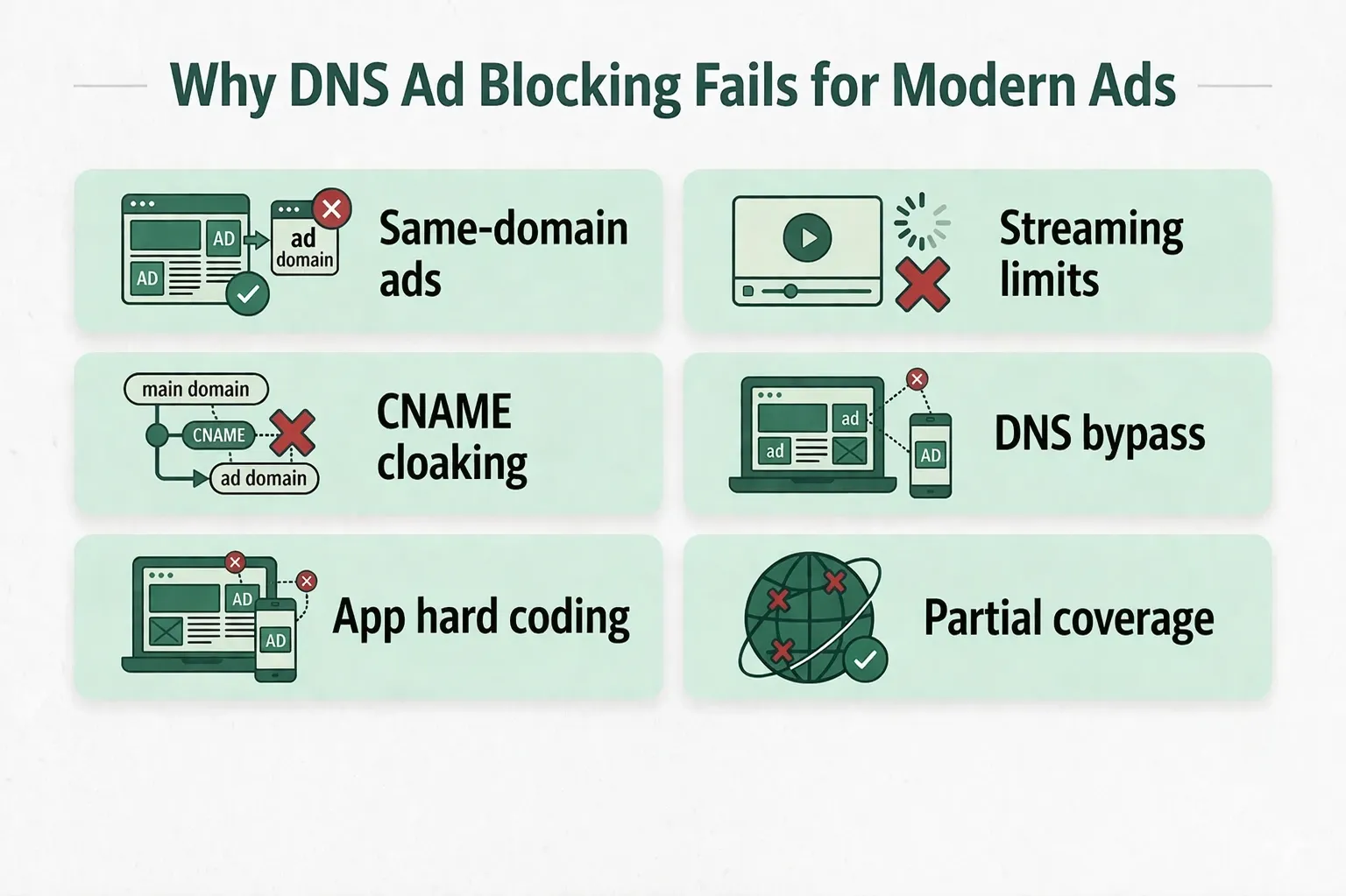
Same-Domain Ads Problem Explained
DNS cannot reliably block ads served from the exact same domain as the content you want to view. If your DNS sinkhole blocks the YouTube or Twitch ad server, it breaks the video stream entirely.
CNAME Cloaking & DNS Bypass Methods
Modern trackers evade basic lists using CNAME cloaking, mapping third-party trackers to first-party subdomains. Furthermore, smart TVs and mobile apps often hardcode their own DNS, bypassing your local server entirely.
Best Setup: DNS + Browser Ad Blocking
Total coverage requires defense in depth. You need your DNS layer for network-wide baseline blocking (IoT, smart TVs, malware domains), but you absolutely need a browser-level complement to intercept dynamically inserted web ads.
If your primary pain is modern web and streaming ads, Blockify is the ideal second layer. Built specifically for Chromium-based browsers, it utilizes smart ad detection and a dual-layer blocking system (with safe muting fallbacks) to intercept dynamic ads on platforms like Spotify, YouTube, and Twitch.
Used by over 360,000 people daily, Blockify functions as a set-and-forget browser layer covering the exact blind spots AdGuard Home and Pi-hole leave behind.
Should You Choose AdGuard Home or Pi-hole?
Switch to change your administrative workflow, not to block more ads.
Stay with AdGuard Home if you value built-in DoH/DoT and seamless per-client filtering. Switching to Pi-hole changes your philosophy, not your ad-blocking outcomes.
Stay with Pi-hole if v6 covers your needs and you prefer strict modularity. Only switch if you are tired of maintaining external encrypted DNS proxies.
Look at Technitium DNS if your network requires native high-availability clustering and multi-node sync (introduced natively in their v14 release). Neither Pi-hole nor AdGuard Home natively handles enterprise-grade clustering.
Look at Blockify if your main issue is YouTube, Twitch, or in-page ads. DNS tools will not solve these, so adding a browser-level layer is the only way to cover those gaps.
FAQs
Do I Need Pi-hole if I Already Use AdGuard Home?
No. Running both on the same home network is usually redundant because both mainly block ads at the DNS layer. Pick AdGuard Home for native encrypted DNS and easier client rules, or Pi-hole for tighter group-based control.
What Is Better: AdGuard Home vs Pi-hole?
AdGuard Home is better if you want a batteries-included setup with built-in encrypted DNS. Pi-hole is better if you want a modular stack, stricter group management, and cleaner network policy control.
Does Pi-hole Still Work In 2026?
Yes. Pi-hole still works well for DNS-level blocking, and the v6 update modernized the stack. It is still limited by the same DNS ceiling, so it cannot reliably stop same-domain streaming ads by itself.
Does Pi-hole Actually Block Ads?
Yes. Pi-hole blocks many DNS-resolvable ads, trackers, and telemetry domains. It does not reliably block same-domain or dynamically injected ads on platforms such as YouTube, Twitch, and Spotify.
Can AdGuard Home or Pi-hole Block YouTube and Twitch Ads On Their Own?
Not reliably. When ads come from the same domain as the content stream, DNS blockers cannot separate the ad request from the video request. You usually need a browser-level blocker as a second layer.
Is AdGuard Home Faster Than Pi-hole?
In most home networks, the performance difference is negligible. Hardware, upstream DNS choice, Docker settings, and list size affect latency more than the software brand.
What Does AdGuard Home vs Pi-hole Cost in 2026?
Both tools are free and open-source. The real cost is the hardware, electricity, backups, and maintenance time needed to keep a self-hosted DNS blocker running.